

brucekorb
Inspiring
January 3, 2026
Answered

Internal error ?:0 / indexing a NIL value while exporting a JPG

  • January 3, 2026
  • 2 replies
  • 197 views

If you don't get an automated report, then you ought to.


I restarted LRc and am about to try it again.

=== time passes ===

Nope. It fails again. Please provide a link so I can upload the .NEF, .XMP and ACR (?!) files, along with a snapshot of the export settings.

LRc-bug.png

It is possible that it is confused because there is only one file selected and nevertheless it is trying to export 2 files.
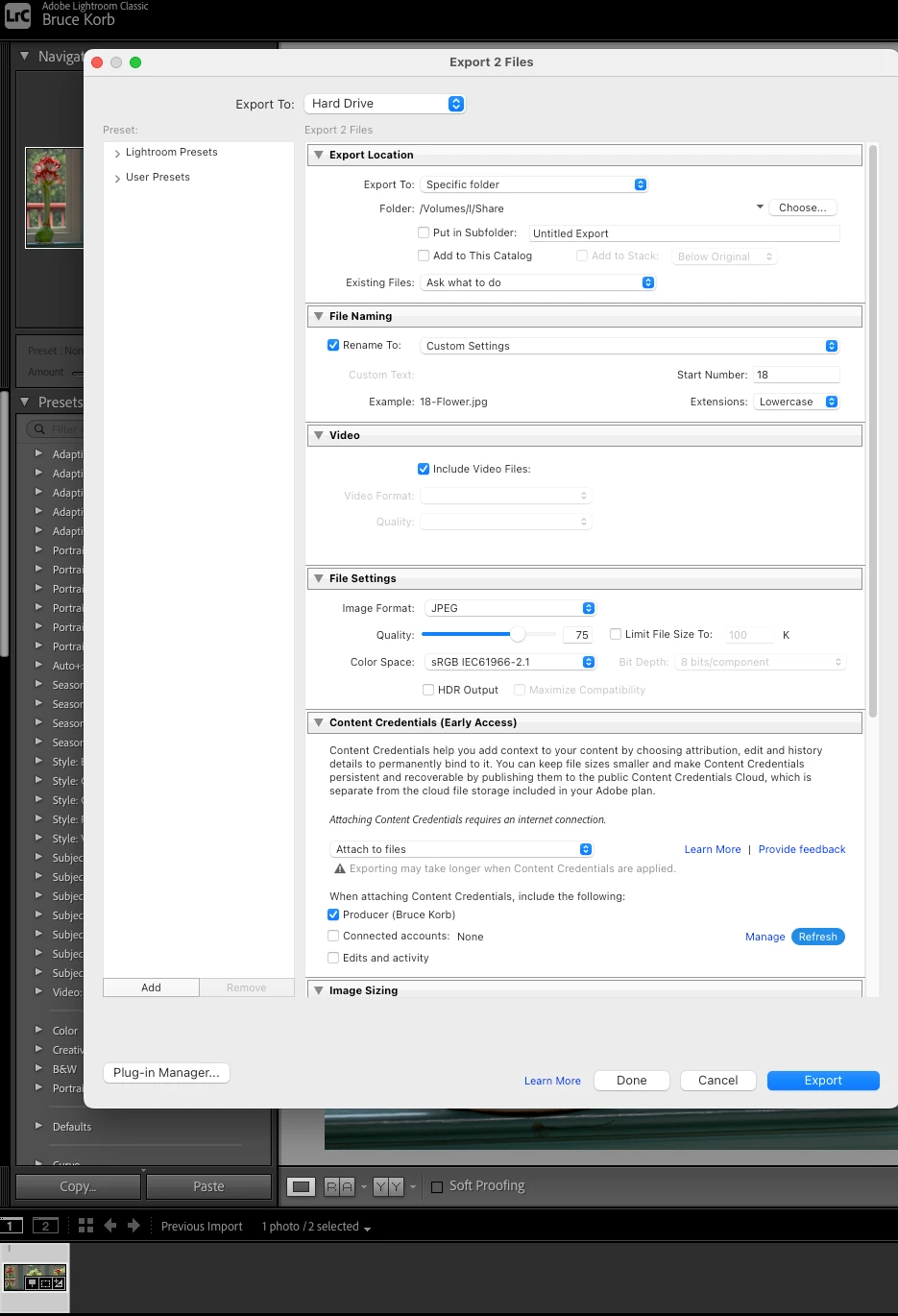
SS 2026-01-03 at 11.17.41.png


[moved from bugs to discussions according to the community rules - Mod.]

Correct answer brucekorb

What works is to get out of the "Previous Imports" window and into the "everything" window. The selected image remans the selected image and it's the only selected image. "Export" now only tries to export that one image and can do it successfully. I'll leave the "go back to Previous Imports window and try to export again" as an exercise for Adobe QA/devs.


P.S. THIS REMAINS A BUG YOU NEED TO FIX, even tho I've gotten around the problem.

2 replies

dj_paige
Legend
January 5, 2026

Please search the forum for "indexing a NIL value". This problem has been solved many times. I do not know what the solution is, but I do know the solution is in this forum.

brucekorb
brucekorbAuthor
Inspiring
January 18, 2026

I did that, but led to solutions to different problems. SO, that message has multiple causes.

SO, I repeat:

That message is an Adobe bug 100% of the time. It should automatically trigger a popup window saying, "I need to report this to Adobe. Will you grant me permission to do so?"


In this case, I have devised my own workaround and I expect that encountering this bug would be infrequent.

brucekorb
brucekorbAuthor
Inspiring
January 18, 2026

P.S.:


[moved from bugs to discussions according to the community rules - Mod.]


THIS IS A BUG, IT DOES NOT BELONG IN "DISCUSSIONS" !!!

brucekorb
brucekorbAuthorCorrect answer
Inspiring
January 3, 2026

What works is to get out of the "Previous Imports" window and into the "everything" window. The selected image remans the selected image and it's the only selected image. "Export" now only tries to export that one image and can do it successfully. I'll leave the "go back to Previous Imports window and try to export again" as an exercise for Adobe QA/devs.


P.S. THIS REMAINS A BUG YOU NEED TO FIX, even tho I've gotten around the problem.

Community Manager
January 5, 2026

Hi @brucekorb, thanks for reaching out!
Is this happening with just one photo, or are you seeing it across multiple images?
If it’s only affecting a specific image, try deleting it from the catalog and reimporting it, that often helps.
Thanks!
Alek

*(If you mention me with an @, like @Aleke, I’ll get a notification and can respond faster.)*
dj_paige
Legend
January 5, 2026
quoteIf it’s only affecting a specific image, try deleting it from the catalog and reimporting it

By @Aleke


This is very dangerous advice, I would advise never to do this, and I advise you not to give advice to re-import photos for any reason. Also, you could wind up with a VERY unhappy user who has performed a lot of edits on this very important photo, and by re-importing the photo is now unedited. Better solution is to fix the problem, as the solution is known and can be found by searching the forum, but even if the solution is not known, re-importing is very dangerous advice.