
Participant
December 2, 2024
Question

interner Fehler bim Erstellen eines Buches

  • December 2, 2024
  • 2 replies
  • 147 views

Beim Erstellen eines Buches erhalte ich neuerdings immer diese Fehlermeldung:


Interner Fehler: 

entity:doneConstructing(): Field "image" does not have a value.
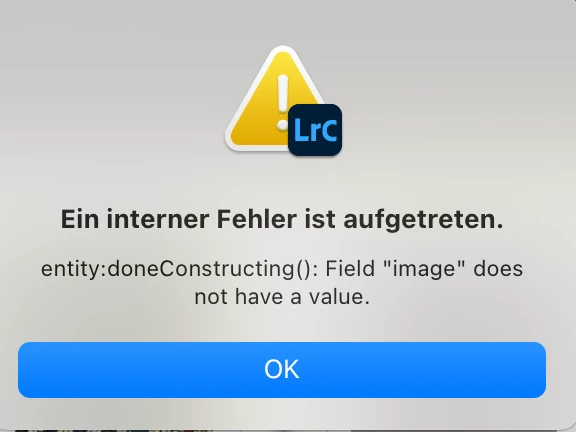


Kann mir hier jemand weiterhelfen?


Viele Grüße aus der Toskana


m.g.


[moved from bugs to discussions according to the community rules - Mod.]

This topic has been closed for replies.

2 replies

AxelMatt
Community Expert
Community Expert
December 9, 2024

Try resetting the preferences of Lightroom Classic:  How to reset Lightroom Classic preferences (adobe.com)

It's recommended to backup your preferences before you reset the preferences to the default settings: 

https://helpx.adobe.com/lightroom-classic/kb/preference-file-and-other-file-locations.html


Try to create a new book project with several images and try if the error occurs.


My System: Intel i7-8700K - 64GB RAM - NVidia Geforce RTX 3060 - Windows 11 Pro 25H2 -- LR-Classic 15 - Photoshop 27 - Nik Collection 8 - PureRAW 6 - Topaz Photo AI
AxelMatt
Community Expert
Community Expert
December 2, 2024

@m.gamer We can try to help, but you must give us more informations about your system. Otherwise all is a look into the crystal ball.

Which operating system (and exact version) do you use?

Which version of Lightroom do you use?


Please provide a copy of your 'System Info'. This can be get from the LrC Help > System Info menu item. There's a copy button in the System Info dialog. Press this button and paste the info into your next forum post.


What you're doing when the message appears?


My System: Intel i7-8700K - 64GB RAM - NVidia Geforce RTX 3060 - Windows 11 Pro 25H2 -- LR-Classic 15 - Photoshop 27 - Nik Collection 8 - PureRAW 6 - Topaz Photo AI
m.gamerAuthor
Participant
December 9, 2024

Hello AxelMatt, 
sorry for not providing the info - I should have known that. First the OS-info:


Chip: Apple M1 Max, 64GB

MacOS: Sequoia 15.1.1


 And here  the system information as from the "help"-menu:


-----


Lightroom Classic-Version: 14.0.1 [ 202410161356-30922cfc ]

Lizenz: Creative Cloud

Spracheinstellung: de-DE

Betriebssystem: Mac OS 15

Version: 15.1.1 [24B91]

Anwendungsarchitektur: arm64

Anzahl logischer Prozessoren: 10

Prozessorgeschwindigkeit: NA

SQLite-Version: 3.36.0

Stromquelle: Angeschlossen, 77%, Ladevorgang läuft

Integrierter Speicher: 65.536,0 MB

Dedizierter GPU-Speicher, der von Lightroom verwendet wird: 132,4MB / 49.152,0MB (0%)

Für Lightroom verfügbarer phys. Speicher: 65.536,0 MB

Von Lightroom verwendeter phys. Speicher: 2.320,3 MB (3,5%)

Von Lightroom verwendeter virtueller Speicher: 413.661,5 MB

Cache-Speichergröße: 218,7MB

Interne Camera Raw-Version: 17.0 [ 2043 ]

Maximale Anzahl Threads, die Camera Raw verwendet: 5

Camera Raw SIMD-Optimierung: SSE2

Virtueller Speicher in Camera Raw: 0MB / 32767MB (0%)

Physischer Speicher in Camera Raw: 2MB / 65536MB (0%)


Cache1: 

NT- RAM:0,0MB, VRAM:0,0MB, Combined:0,0MB


Cache2: 

m:218,7MB, n:0,0MB


U-main: 351,0MB


Standardvorschaugröße: 1440 Pixel

Monitore/Anzeigegeräte: 1) 3024x1964


Informationen zum Grafikprozessor: 

Metal: Apple M1 Max

Anfangsstatus: GPU zum Exportieren wird standardmäßig unterstützt

Benutzerpräferenz: Automatisch

HDR in Bibliothek aktivieren: AUS


Anwendungsordner: /Applications/Adobe Lightroom Classic

Bibliothekspfad: /Users/mg/Nathan/Lightroom Katalog/2023 Lightroom mg/2025 Mai/2023 lightroom mg-v13-3.lrcat

Einstellungen-Ordner: /Users/mg/Library/Application Support/Adobe/Lightroom


Installierte Zusatzmodule: 

1) AdobeStock

2) Excire Search

3) Flickr

4) Luminar 4

5) Luminar AI

6) Luminar Neo

7) Nik 6 HDR Efex

😎 Plug-in-Parameter

9) SmugMug


Config.lua-Flags: 

------


Greetings from Siena / Tuscany

Mike