

Is it normal for syncing to the cloud to take this long?
Hi all, as the title says it's taking an extremely long time for Lr Classic to sync to the cloud and I'm wondering if this is normal.
I cleared all synced photos recently as I was running out of cloud storage and had ~8000 images (mostly smart preview only) on there that I didn't need. After clearing it, I then selected 385 images that I wanted to add back to the cloud. I synced them via Lr Classic a first time, which didn't take long at all. This was just syncing the smart previews as it does when syncing to the cloud via Lr Classic.
I then tried to add the full quality images to the cloud by importing via the regular Lr program but unfortunately that took me over my storage limit, so I first cleared the deleted items on Lr to see if that woud help (it didn't). I then went back to Lr Classic, removed all the 385 images from All Synced Photographs, and started again to sync them as smart previews only.
I added the 385 images back to All Synced Photographs as before, however this second time trying to sync them has taken a really, really long time. I added them to All Synced Photographs on Sunday evening (2nd Nov) and it's now Tuesday morning (4th Nov) and there are still 46 images left to sync. It's not completely stuck as there aren't any errors when I go to sync settings, and it does go down (albeit extremely slowly!!!). It was stuck on 61 images left for hours yesterday and now has managed to get down to 46.
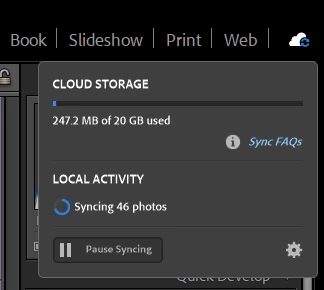
Is this normal? My internet speed is fast. Is it because I previously had the full-size images synced? Because I cleared All Synced Photographs twice in a relatively short time? Because I went over my cloud storage limit? Maybe because I permanently deleted all the deleted files from the cloud?
Any ideas (and solutions to speed it up!) are appreciated 🙂


 AdChoices