
Known Participant
April 28, 2013
Pregunta

Is it possible to edit a photo with this much light/dark range?

  • April 28, 2013
  • 5 respuestas
  • 22216 visualizaciones

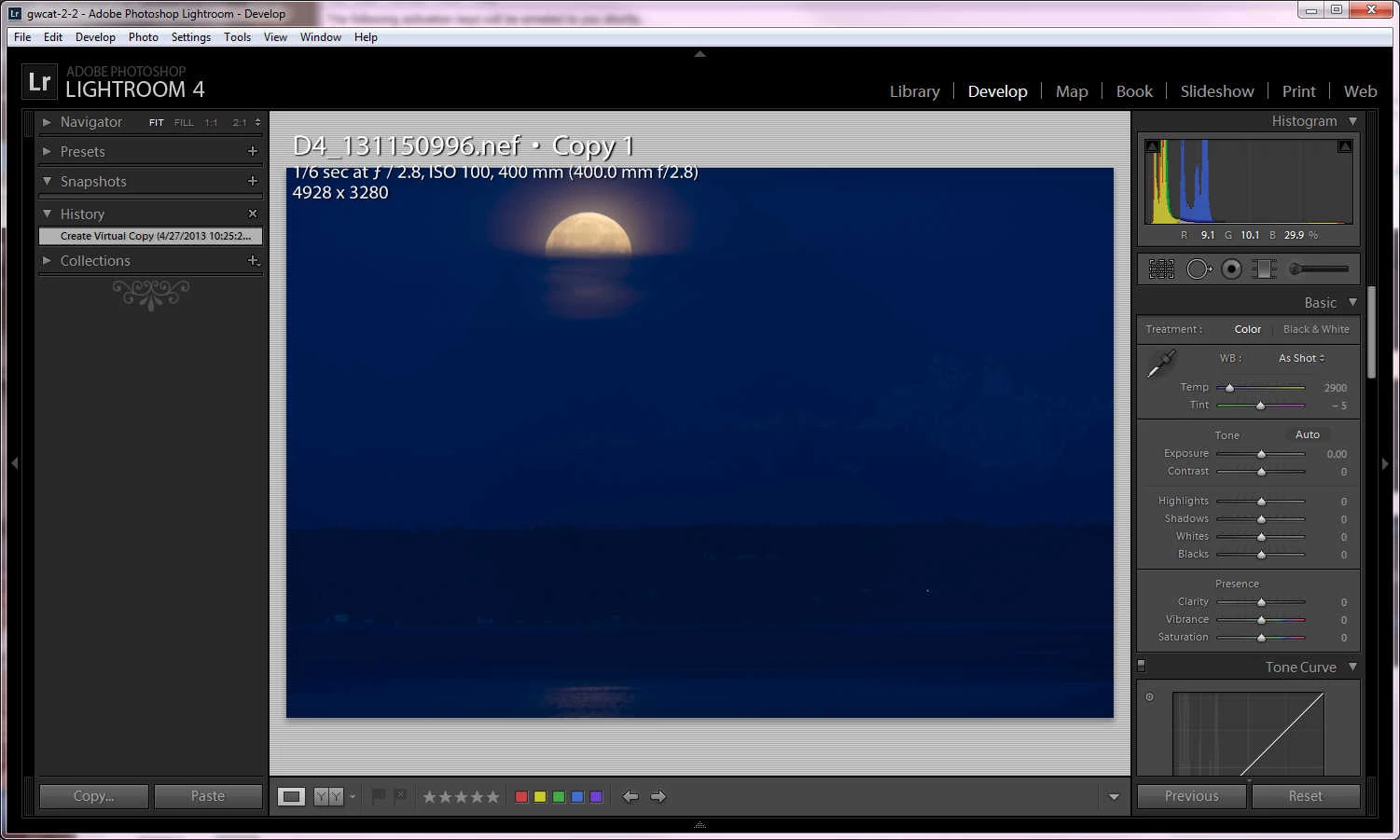
This is a "how to" question.  See attached photo of the moon setting at first light "as-shot".  The goal was to keep the moon from overexposing with the idea that the camera was capable of recording sufficient landscape information in the shadows.  I have this scene bracketed quite a ways  but the settings here seem to work best.
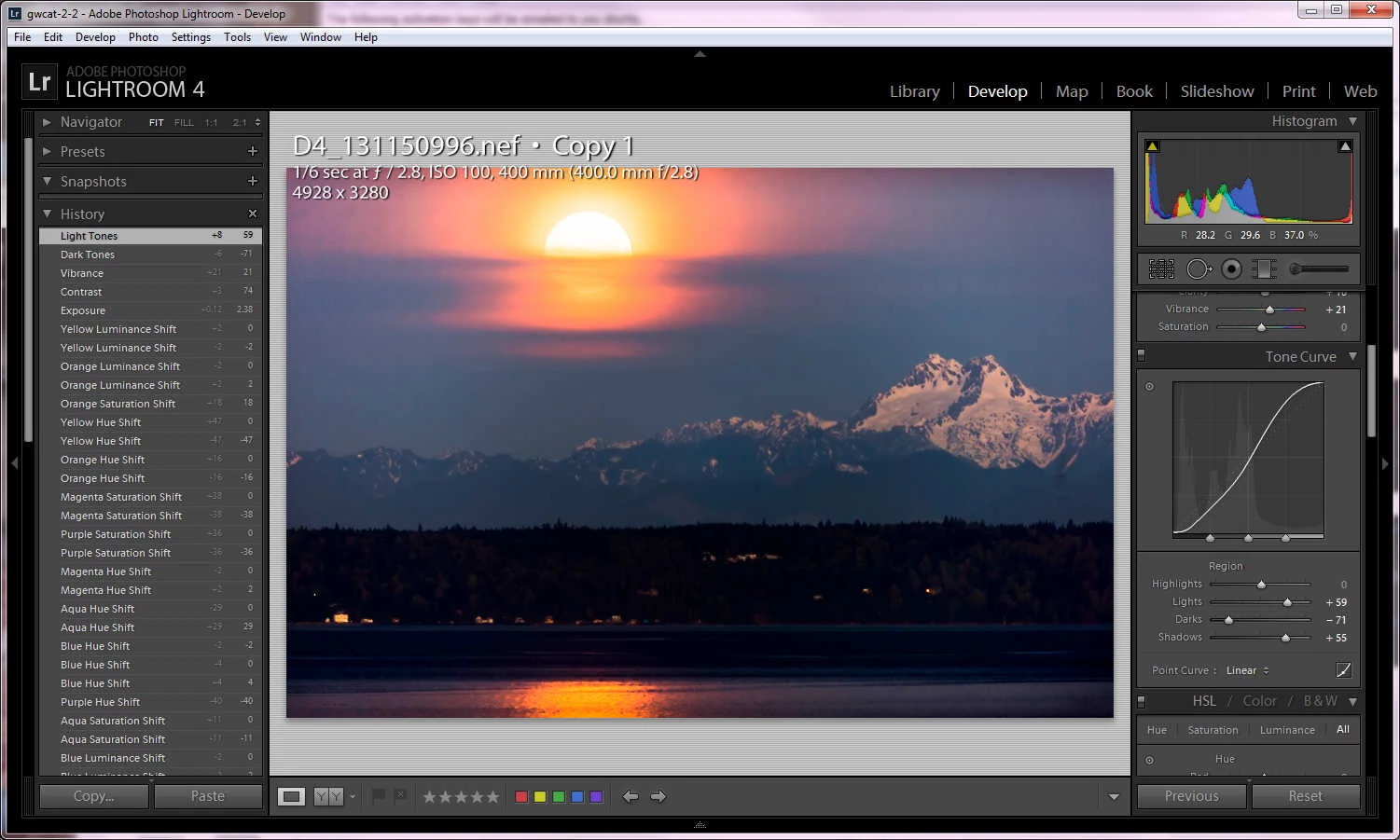
Here it is with the mountain brought out of the shadows and temperature adjusted.  The mountain has good depth, but what it takes to do this, messes up the moon (as you can see).
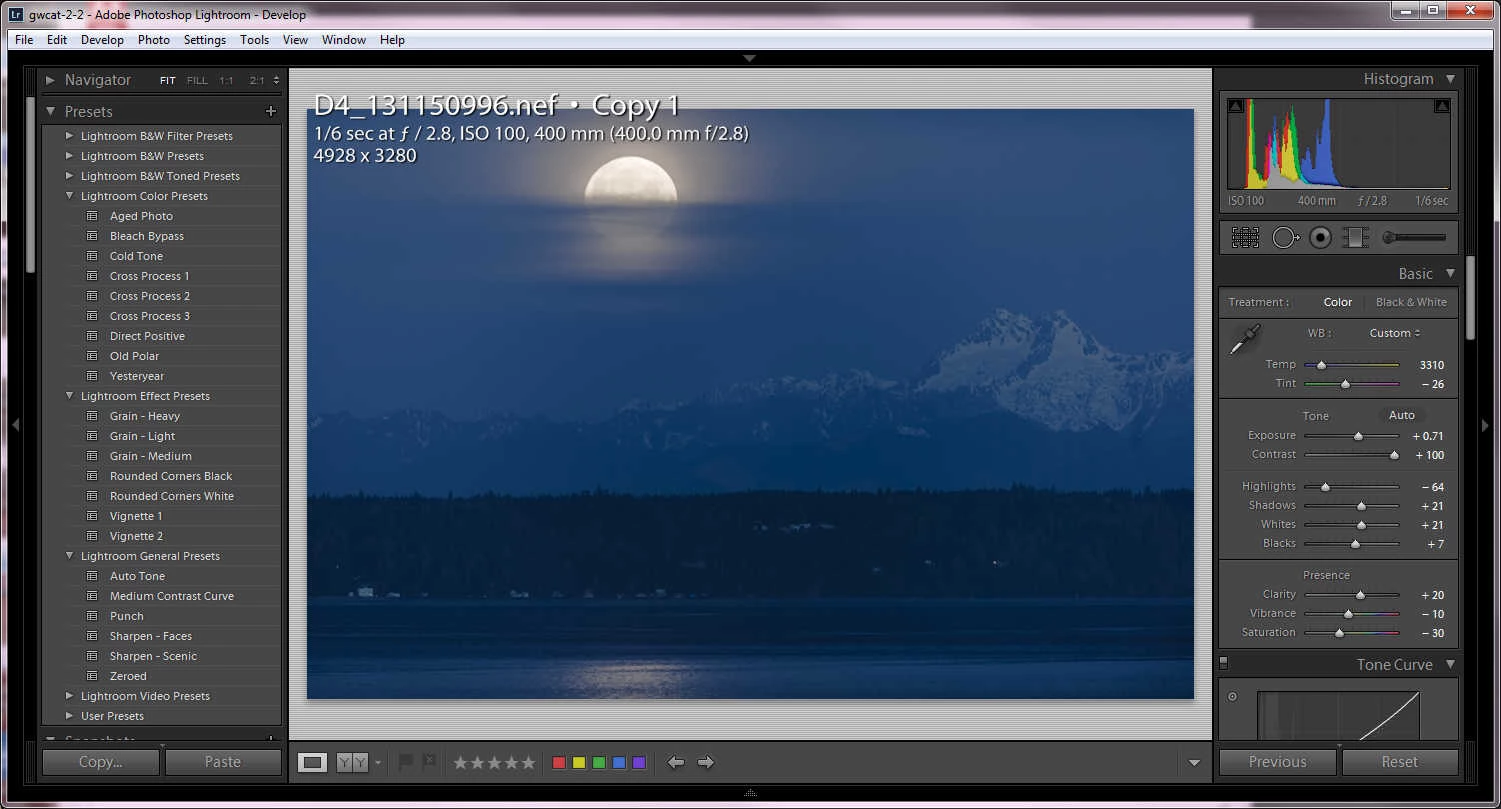
After messing around with the controls I noticed the bleach bypass preset will actually preserve most detail, but at the expense of most color. The orange reflection on the snow gives extraordinary depth to the mountain (especially for predawn). The instant I try to add more color, the moon turns bad.
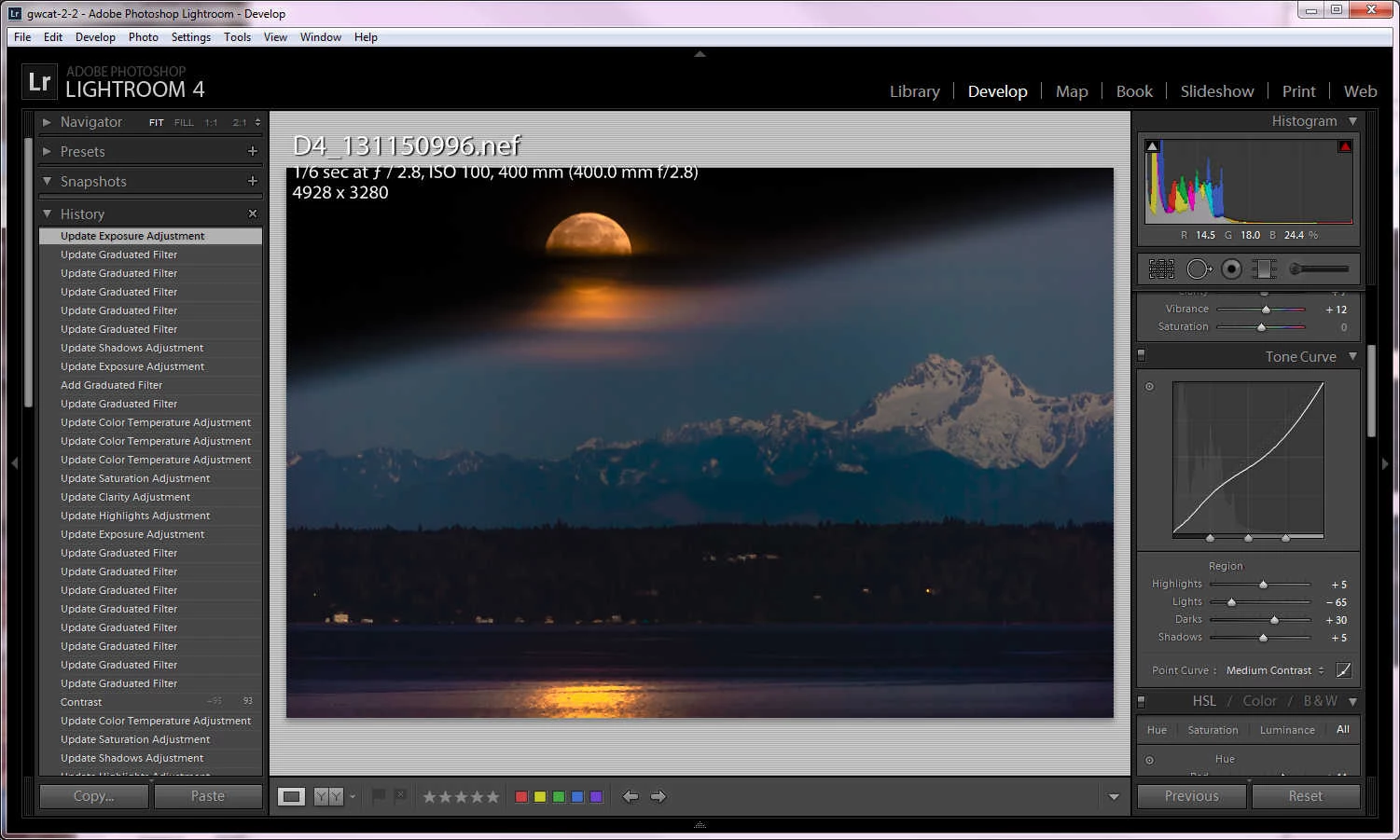
For illustrative purpose, this is the closest I can get both subjects on the same photo using LR,  graduated filters and some controls cranked.  I run out of control trying to recover the black around the moon, and lowering its saturation.  Obviously this is unacceptable except that it shows that since detail at both extremes got recorded to the same raw file, it should be theoretically possible to make it look like I want.  Or not?  That's the question.
What appears to destroy the moon the most is correcting the temperature to get the orange snow reflection.   Another way of looking at it: since my eyes had no  trouble seeing this scene live, and the camera was able to record this detail, there should be a way to render it.  I don't take a lot of landscapes so I don't know.  Any ideas? or am I out of luck?

Thank you in advance for any input.

Este tema ha sido cerrado para respuestas.

5 respuestas

areohbee
Legend
September 29, 2013

I used a lot of locals when editing this photo (see xmp file in post above), and with Lr5b, those locals were really wreaking havoc on Lr performance (spinning donut, blinking display, looooong delays...).

However, I just revisited it using Lr5.2 and such havoc is not happening - Lr is slowed down by the large number of locals, but not inordinately so like before.

UPDATE:

-----------

I spoke too soon. It seems that such a heavily edited photo makes for heavily overused ram. My system again soon became bogged down when working for a while with this photo. Ram over-use became prohibitive, slowing all apps/OS...

-----------

R

Known Participant
September 30, 2013

Rob:

My Lightroom speed solution was to move the OS and LR each onto their own sata-3 SSDs (LR program objects, cache, catalog and previews --everything except for the actual photo files). This solved the problem for me.  It now shows tons of disk thrashing, but to the SSD,  The spot removal used to slow down to a crawl after 20 or so edits, but now there is no limit to the edits I can pile on an image. I've even tried to intentionally slow it down with edits and was unable.  Where LR used to slow to a crawl, it now just slows a little but is still tolerable.   It would be even faster if it would use all the RAM before the slower SSDs.  The SSDs are fast compared to spinners, but still much slower than RAM.

According to my observations using task manager, Spy++,  performance monitor, etc, LR never uses close to the RAM I have available  (32gb), nor does it use the all the I-7 processors past ~50%.  It only uses 4-5  gb before it begins swapping.   It's slowness is in disk thrashing (page faults).  That suggests a compiler problem, or at least something  that should not be escaping the notice of the developer like it  obviously has been.  I also notice that LR does not have the same memory  settings as Photoshop, Premiere, etc.  I suspect there is a connection  there.

retiredff
Participating Frequently
August 24, 2013

I would just like to say I have found this thread, and the techniques discussed, very informative. My only concern would be for whatever noise was introduced while bringing up the darker areas.

Todd Shaner
Legend
August 24, 2013

PV2012's  shadow recovery capability may show visible noise in properly exposed images shot at even ISO 100. The solution is to increase your Noise Reduction and perhaps Sharpening settings to compensate. Lightroom does a good job with most DSLRs. Also keep in mind that noise you see at 1:1 view may not be visible in print or resized screen output, especially when shooting at very high ISO settings. The best way to determine this is to Export or Print an image at your target size and then examine it for visible noise. You'll develop (pun) a better correlation between noise in the onscreen 1:1 view and what you'll likely see in the final output image.

With noisy high ISO images LR's down-scaled view (<1:1) may be very inaccurate when using insufficient Luminance NR and/or over-sharpening. If that's the look you want then your only option for previewing in LR is to use 1:1 view. I suggest using sufficient Luminance NR and moderate sharpening, which will provide more accurate down-scaled views inside LR.

If interested there's more information here on LR's down-scaled view issues:

http://feedback.photoshop.com/photoshop_family/topics/afm8rbh6tnc31

NOTE: The above report is marked 'Not a problem' because there is a work-around." Adobe currently has no solution other than the suggestions provided.

Known Participant
August 25, 2013

There was slight noise in the dark areas of this shot as there always is, the difference here is that I needed to use those levels. But it was not anything that would be noticeable for most purposes.  The noise reduction tradeoff is most noticeable on the rock face.  I corrected it very slightly.

In general I found that setting sharp and noise correction at 2x works for avoiding over-correction.  I find it easier to find the acceptable tradeoff between noise reduction and detail this way.  I apply the effect so that it is just noticeable at 2x with an acceptable tradeoff.  This makes for a conservative setting at 1x, and mostly it keeps my eyes from playing tricks when using 1x.

I zoom to a place in the shot with good focus and a smooth background. Dog whiskers  work perfect for sharpening because they are cylindrical with sharp outlines. I set the Radius and Detail settings so the whiskers appear to have circular depth. Then I back down the Amount to where it is just noticeable at 2x.  That tends to make everything else look good.

Participating Frequently
May 1, 2013

I have no advice at all but I enjoy playing with other peoples pics. Though I might have tried a grad filter. Or if the shutter was open long enough with a narrow aperture, I'd waggle my fingers in front of the top half of the lens.

Edit: I used LR5b though without any of the new features. Ideally, I'd prefer to work this kind of thing through Photoshop. wher it might look better depending how much time I spent.

areohbee
Legend
April 29, 2013

The original:

Can everybody see the mountain in this one? - Note: its not anywhere near clipped in the blacks.

George in Seattle wrote:

Here it is with the mountain brought out of the shadows and temperature adjusted.  The mountain has good depth, but what it takes to do this, messes up the moon (as you can see).

It's really amazing you were able to get the mountain looking as nice as you did in this shot. Proof that, in Photoshop, or the right tool for the job, it would be salvageable, and then some...

George in Seattle wrote:

After messing around with the controls I noticed the bleach bypass preset will actually preserve most detail, but at the expense of most color. The orange reflection on the snow gives extraordinary depth to the mountain (especially for predawn). The instant I try to add more color, the moon turns bad.

Yes, this photo is a challenge both tonally and color-wise...

George in Seattle wrote:

For illustrative purpose, this is the closest I can get both subjects on the same photo using LR,  graduated filters and some controls cranked.  I run out of control trying to recover the black around the moon, and lowering its saturation.  Obviously this is unacceptable except that it shows that since detail at both extremes got recorded to the same raw file, it should be theoretically possible to make it look like I want.  Or not?  That's the question.

George, this is the result of something discovered by trshaner and others (not me, I was incredulous and had to be beaten over the head with a 2x4 before I would believe it).

* Locals are applied BEFORE globals (in the pipeline). Thus, if you darken to the point of clipping using locals, no amount of global correction will resurrect. Likewise at the other end of the histo...

So, to answser your question: yes, maybe, I think - you can normalize exposure of mountain and moon, but it will be very tricky, since you'll need to blend/match the inbetween, carefully, and in both color and tone, the former (color) being perhaps the greatest challenge. The secret will be to not underexpose anything when dropping exposure, locally, and not over-expose anything when raising exposure, locally. I may give another whack and post it, if successful (if unsuccessful, I'll probably just wander back into the shadows, with my tail between my legs, and keep quiet... (mostly joking).

George in Seattle wrote:

Thank you in advance for any input.

You're welcome, to the extent that I actually helped .

Rob

Todd Shaner
Legend
April 30, 2013

Rob Cole wrote:

George in Seattle wrote:

For illustrative purpose, this is the closest I can get both subjects on the same photo using LR,  graduated filters and some controls cranked.  I run out of control trying to recover the black around the moon, and lowering its saturation.  Obviously this is unacceptable except that it shows that since detail at both extremes got recorded to the same raw file, it should be theoretically possible to make it look like I want.  Or not?  That's the question.

George, this is the result of something discovered by trshaner and others (not me, I was incredulous and had to be beaten over the head with a 2x4 before I would believe it).

* Locals are applied BEFORE globals (in the pipeline). Thus, if you darken to the point of clipping using locals, no amount of global correction will resurrect. Likewise at the other end of the histo...

So, to answser your question: yes, maybe, I think - you can normalize exposure of mountain and moon, but it will be very tricky, since you'll need to blend/match the inbetween, carefully, and in both color and tone, the former (color) being perhaps the greatest challenge. The secret will be to not underexpose anything when dropping exposure, locally, and not over-expose anything when raising exposure, locally. I may give another whack and post it, if successful (if unsuccessful, I'll probably just wander back into the shadows, with my tail between my legs, and keep quiet... (mostly joking).

Rob

The fact that the sky went completely black using the Graduated filter confirms the raw image file is heavily underexposed. As Rob describes using the Locals in the wrong way can create problems. Locals take precedence over Globals and pixels that become clipped in one or more channels are not recoverable using the Global controls.

Known Participant
April 30, 2013

trshaner wrote:

The fact that the sky went completely black using the Graduated filter confirms the raw image file is heavily underexposed. As Rob describes using the Locals in the wrong way can create problems. Locals take precedence over Globals and pixels that become clipped in one or more channels are not recoverable using the Global controls.

Thanks. That is good to know about the locals. I need to write that down!  It explains some of what I've noticed about their behavior over the years. I knew there was a pattern and I learned sort of what to expect out of them without knowing why.  

I'm working on a few more attempts based in these comments and I have longer exposures to try them on which I'll post here.  I'm pretty sure I can get closer in LR.   I honestly was not expecting much from this shoot and was surprised to see that level of depth in the mountain.  The angle of the moonlight had to be the reason since I've shot these mountains many times in different sunlight with flatter results.  And since this is cloudy Seattle, I'm not ready to give up on the shot quite yet. 

areohbee
Legend
April 28, 2013

Other than the usual stuff (e.g. -highlights +shadows etc.), and of course locals (maybe with brush instead of gradient), it's hard to tell what's possible without having a crack at the raw - can you post it?

R

Known Participant
April 29, 2013

Thanks for the reply!  Check your messages. 

The lack of  separate black level and tone curve in the tool controls seem to be a problem.  Somehow there seems to be more range in the image than I have control over.  I cannot get it any closer than this ratty attempt:

areohbee
Legend
April 29, 2013

Hi George,

I messed with this just long enough to realize I don't have the skill to really do what you would probably like with this photo in Lightroom, i.e.

Vivid contrasty mountain, soft dim moon.

Not only is there a huge range between bright moon and dim mountain, but there is a nasty blue color cast to deal with. All-in-all, just not enough tone and color info to get anything really detailed out of the mountain, without it looking overprocessed.

To people reading along: the mountain is behind a heavy hazy foggy atmosphere (refer back to the original above) - cranked clarity all the way up to 100 and it still wasn't "clear" enough.

If this were my photo, I'd be tempted to do a black and white.

Truth betold, I do actually like the result I came up with, but it's subtle, and probably not what you had in mind:

George's Moon (you may need to context-click and choose "Open Link in New...")

Settings:

Temp 4500

Tint 10

Exposure 1.3

Contrast -50

Highlights -100

Shadows +100

Whites -100

Blacks +100

Clarity +100

Saturation -30

And some tweaking to the point curve(s).

A few subtle locals.

I'm sure I could have improved it further in Lightroom, with enough time and paint, but really I think it's more of a job for Photoshop or NX2, where as you know there are U-points and local tone curves...

Cheers,

Rob