Participant
May 15, 2025
Question

Is its safe to delete these files?

  • May 15, 2025
  • 3 replies
  • 914 views

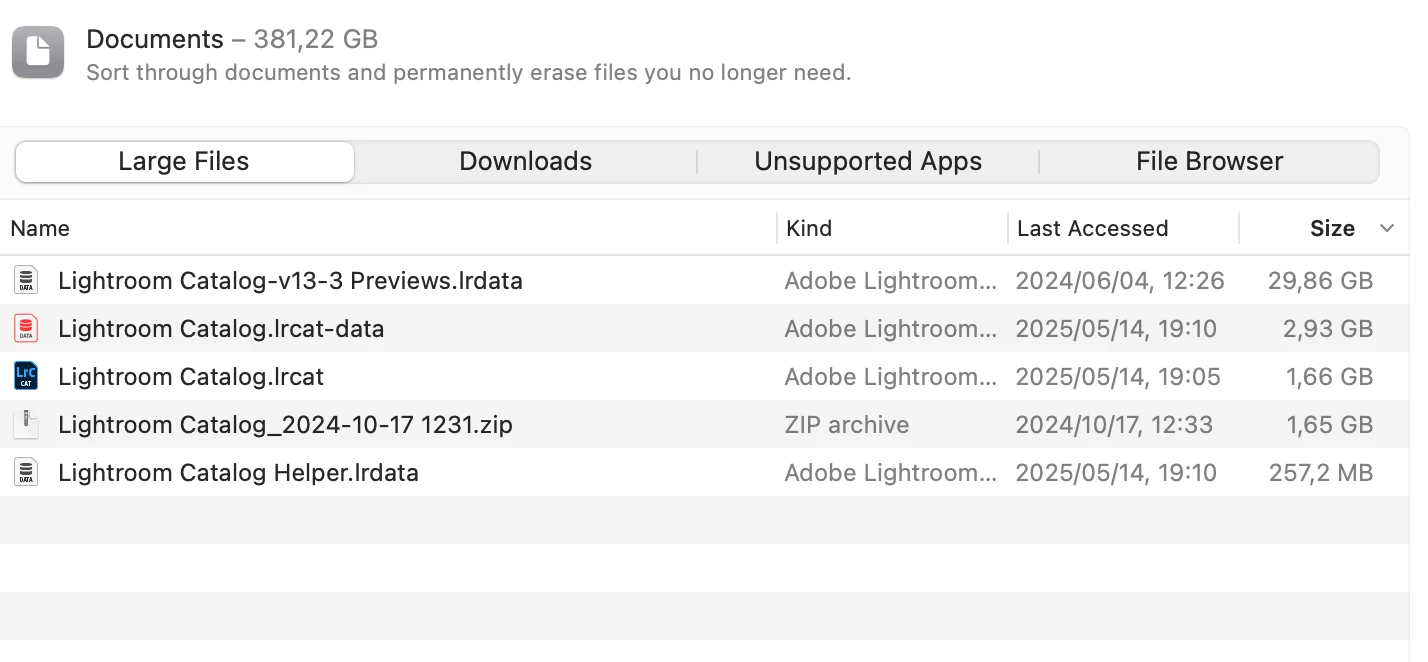
Is it safe to delete these files to make space?

3 replies

Conrad_C
Community Expert
Community Expert
May 16, 2025

The file ending in …Previews.lrdata is always safe to delete, because that is a cache of previews. Deleting it won’t alter any edits, and Lightroom Classic will rebuild previews automatically. Notice that the …Previews.lrdata is many times larger than any other file there, so deleting it does free up much more space than any other file in that folder. You can limit the size of the previews cache in Catalog Settings (not Preferences). The only inconvenience with deleting the …Previews.lrdata file is that images might display a little slower if their previews were in that cache because if the previews cache is deleted, then there may be a slight delay as each image’s preview is regenerated.


The file ending in .zip is a compressed backup of the file Lightroom Catalog.lrcat. My guess is the compressed backup was automatically made by Lightroom Classic at some point, such as during a catalog version upgrade. It is safe to delete if you are sure you don’t need that backup, such as if you already have other backups of that catalog. Because catalog backups are not actively in use, it’s also OK to move them to another volume like an external SSD.


The other files should not be deleted.

Participant
May 15, 2025

Thanks - where do I check for these?

nikunj.m
Legend
May 16, 2025

The default location of the catalog files is the Pictures folder of your Mac. You can go to Macintosh HD > Users > (Your Username) > Pictures.


Thanks,
Nikunj

nikunj.m
Legend
May 15, 2025

Hi, thanks for reaching out! The files shown in the screenshot are files related to your Lightroom Classic Catalog, and looking at the dates, it seems that this is the current catalog you're working on. The first file, however (Lightroom-Catalog-v13-3 Previews.lrdata) might be related to an older catalog. Can you check if you still have that catalog? 


Thanks,
Nikunj