Answered
is there a nice cursive font in lightroom 4? Using it for a water mark.
is there a nice cursive font in lightroom 4? Using it for a water mark.

is there a nice cursive font in lightroom 4? Using it for a water mark.
Lightroom will use the system fonts. So yes you can use a nice cursive font if you have one already installed in the Fonts Folder (System 32 on Windows) Click on image below to enlarge.
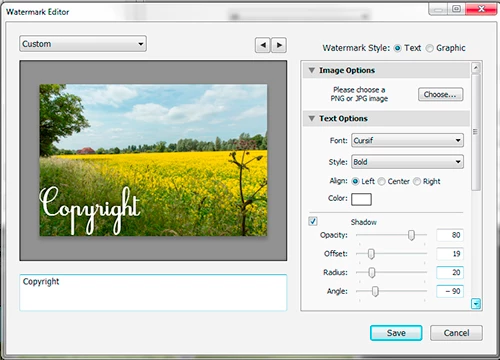
You start from the Library by clicking export, then check the option for Watermarking. If you click edit watermark from the dropdown list, you can create a new preset. In addition to using text, it’s possible to create a graphic in Photoshop or Photoshop elements using a PNG file with a transparent background. See YouTube video for further information.
If you don’t have that type of font already installed, you will find lots of free downloads on the web. Simply Google for cursive or cursif fonts.
http://tv.adobe.com/watch/learn-lightroom-4/exporting-watermarking-your-photos/
Already have an account? Login
Enter your E-mail address. We'll send you an e-mail with instructions to reset your password.
 AdChoices