
Participant
August 22, 2025
Answered

Is there a way to find images using metadata after renaming outside Lightroom?
  • August 22, 2025
  • 1 reply
  • 186 views

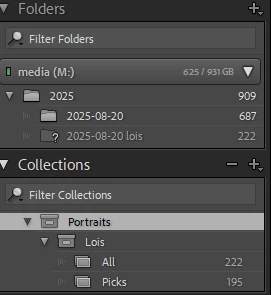
I messed up moving files around outside Lightroom to the point there is no longer any convention in the file names. My situation now is that I have a missing folder with 222 images. Those 222 images are present in the folder with 687 images. Is there a way to find them automatically by matching metadata such as time taken?

Correct answer Aleke

Hi @gleeful_whirl9525,

Just to make sure I’ve got it right, did you move those 222 images to a different folder and change their filenames as well?

If the filenames were changed, the Find Nearby Missing Photos method probably won’t work, unfortunately.

I’d recommend checking out this general guide for help with locating missing folders and photos:
https://adobe.ly/4mxPCO6


There’s an older thread where someone managed to locate missing files using metadata by creating a script. If you're up for experimenting it might be worth a try, though I haven’t tested it myself, and since it’s an older post it may not work anymore.

Let me know if you have any questions or run into any issues, happy to help however I can!

Thanks,
Alek

1 reply

Community Manager
August 22, 2025

Hi @gleeful_whirl9525, welcome to the community!

When you get a chance, can you try to go to Library > Find All Missing Photos, then click the missing photo icon. In the Locate Missing Photo dialog box, choose Find nearby missing photos.

Let me know if that does the trick!

Alek

*(If you mention me with an @, like @Aleke, I’ll get a notification and can respond faster.)*
Participant
August 22, 2025

Hi, unfortunately the "Find All Missing Photos" option did not seem to do anything. Neither does "Find nearby missing photos.". It just shows me a dialog where I have to manually select a file

AlekeCommunity ManagerCorrect answer
Community Manager
August 22, 2025

Hi @gleeful_whirl9525,

Just to make sure I’ve got it right, did you move those 222 images to a different folder and change their filenames as well?

If the filenames were changed, the Find Nearby Missing Photos method probably won’t work, unfortunately.

I’d recommend checking out this general guide for help with locating missing folders and photos:
https://adobe.ly/4mxPCO6


There’s an older thread where someone managed to locate missing files using metadata by creating a script. If you're up for experimenting it might be worth a try, though I haven’t tested it myself, and since it’s an older post it may not work anymore.

Let me know if you have any questions or run into any issues, happy to help however I can!

Thanks,
Alek

*(If you mention me with an @, like @Aleke, I’ll get a notification and can respond faster.)*