
Participant
July 2, 2024
Question

Is there a way to "nest" or somehow connect smart collections together?

  • July 2, 2024
  • 2 replies
  • 410 views

Hi Group!


I have a number of smart collections I've created to process my family pictures every month. The smart collections work great, but, my issue is the date range. Let's say I have 15 smart collections to do my processing. That means I need to update all 15 smart collections to set the date range for the month I want. This solution is OK, but, it would be much better if smart collections could be "nested" or "connected" somehow so that that the search criteria of different smart collections can be combined. That way I would be able to change the date range in just a single smart collection. It may look something like this:
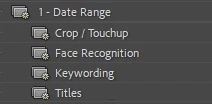
Does anyone know if I can do something similar to this or hack it in some way in Lightroom Classic? If not, maybe a plugin?


Thanks!

This topic has been closed for replies.

2 replies

Bob Somrak
Legend
July 2, 2024

@mremijan 


I agree it might be useful to NEST smart collections but you can do your particular example by using both the Smart Collections and Filter Bar together.  Go into Library/Grid and select all the Smart Collections you want and then go into the Filter Bar/Date section and select all the Dates you want.  

The following will select all the Red and Green colored Labels taken on 4/23/24 and 5/10/24.  Using this you only have to select new dates in the Filter Bar


4/


M4 Pro Mac Mini. 48GB
Conrad_C
Community Expert
Community Expert
July 2, 2024

And if there are specific date ranges you always want to go back to, you could save those as filter bar presets.

dj_paige
Legend
July 2, 2024

Smart collections can be "nested" inside a Collection Set, but not inside other smart collections.