
Known Participant
April 1, 2023
Question

Is this Really Lightroom Classic, showing a folder structure?

  • April 1, 2023
  • 4 replies
  • 646 views

I am trying to decide whether to jump from "legacy"  Lightroom 6 (circa 2017) to Lightroom classic 6.2 (Photography plan aka LrC).  I was on hold with Adobe Tech Support  for more than 2 hrs yesterday before I finally gave that up.  I have a list of questions for them if I ever did reach them. I still am uncertain on my path forward if going forward with a conversion to LrC and one of the big questions is whether there is access to my  folder hierarchy.  From what I could tell testing LrC during trial period it seems the answer is no ( FYI, Not going to import my current catalog unless I made the commitment to change).  But then I see this newly uploaded video for LrC and it shows 'collections" and a folder hierarchy, so know I am confused. Could I get some feedback on tbis video and the question in general about seeing  folders and accessing photos in the catalog in that manner?.  Thank you
 

https://www.youtube.com/watch?v=-RGuC_D48K4

This topic has been closed for replies.

4 replies

GoldingD
Legend
April 1, 2023

A little history about some Adobe marketing stupidity. Any confusion about Lr vs LrC is their fault.


  • Way back when we had Lightroom v6.
  • Adobe decided to go to the subscription model instead of lease model ( in truth we had a forever pay once lease, we never owned the copy) And for some time we had Lr and Lr CC, depending upon perpetual or subscription.
  • Adobe decided to separate the mobile portion from Lr, Lr CC, and create a separate product for the smartphone crowd. The called the new product Lightroom CC. Opps what about the previous Lightroom? Ah that they then called Lightroom Classic CC.
  • Several years later Lightroom Classic v8.2 rolls out and Adobe drops the CC part of the name. So we then had Lightroom Classic (no CC)
  • Very soon after Lr v4.3 came out and Adobe drops the CC part of that name as well.
  • So in 2019, the CC moniker went away.


A caution about Adobe subscription Plans


  • The Lightroom Plan only includes Lightroom. That is Lightroom Ecosystem Cloud based, a.k.a Lightroom Desktop, a.k.a Lightroom Cloudy
  • Their is no plan providing only Lightroom Classic
  • Typically Lightroom Classic is acquired via the Photography Plan.
  • 'The Photography Plan includes PS, Lr, LrC, Bridge and some other bits


A note about install order.


  • When installing from the Photography Plan, and when upgrading or updating, install (when available) PS first. Some users have problems in Edit in Photoshop from LrC if the install order is not PS first (bug?)


A note about LrC v12.2.1


  • Some are having issues with v12.2.1, both Windows and MAC, both starting and performance. If you have issues, see the bug section.


Known Participant
April 1, 2023

Thanks GoldingD  .

A followup on this excerpt from your post 

quote


A caution about Adobe subscription Plans


  • The Lightroom Plan only includes Lightroom. That is Lightroom Ecosystem Cloud based, a.k.a Lightroom Desktop, a.k.a Lightroom Cloudy
  • Their is no plan providing only Lightroom Classic
  • Typically Lightroom Classic is acquired via the Photography Plan.
  • 'The Photography Plan includes PS, Lr, LrC, Bridge and some other bits


A note about install order.


  • When installing from the Photography Plan, and when upgrading or updating, install (when available) PS first. Some users have problems in Edit in Photoshop from LrC if the install order is not PS first (bug?)


By @GoldingD


  • Sounds like I need to install Photshop First, but I have no intent on using it.  I have already installed LrC but exited before converting my catalog.  So I should uninstall LrC, install PS, then LrC again I take it.  Can I uninstall PS afterwards without impact to LrC?  I live on a laptop and space and space on internal drive is limiting.
  • Can you see my post just prior to yours re the catalog please.

Thank you

Bud


Legend
April 1, 2023

You don't have to install Photoshop at all.


You can upgrade your Lr 6 catalog to Lightroom Classic 12 later if you want, but why wait? Just upgrade the catalog and begin using your new Lightroom Classic.

GoldingD
Legend
April 1, 2023

Second up

see


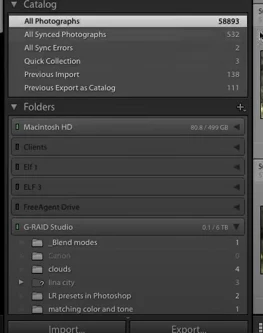
That second screenshot is from Lr, not LrC, hence some confusion about Folders Panel.


Known Participant
April 1, 2023

Thank you folks, ok, I see now that I had the wrong product as I started the trial.

I installed LrC a monent ago but I didn't import my current catalog from the legacy lightroom ver as I  am in  the middle of a majpr cleanup ( in other words...I blindly used a Scipt written by the Open AI chatbot and it did a massive delete of files...being recovered)

So the question is can I install the LrC without a catalog converison initially and then do it in the future when I'm ready.  I want to check out LrC while I have the trial but not with my current catalog unless (a) I can reimport that catalog all over again later and (2)  I can continue to use legacy LR after I already swiped its catalog for use in LrC.   I read the install notes for the catalog and not sure about either of these aspects.  Here's where I exited my initial use of the new LrC.


Conrad_C
Community Expert
Community Expert
April 1, 2023

Here are answers to those questions:


quote

So the question is can I install the LrC without a catalog converison initially and then do it in the future when I'm ready.  I want to check out LrC while I have the trial but not with my current catalog

By @Howard28977618ojo6


Yes, that’s easy. In Lightroom Classic 12, do not upgrade your old catalog at first. Instead, create a new catalog, but it is very important that you give it a very clear name like “LR 12 testing only”. When you no longer want to test, you can delete that catalog and its associated files.


Important: If you import any of your originals into this test catalog, avoid reorganizing the folders or doing any other actions that alter the organization or naming of original items or folders, because that would cause them to be out of sync with your Lightroom 6 catalog. Instead, during testing, it is strongly recommended that you create a folder on your computer that will contain only test images, then you can copy any originals you want into that test folder, and when you are done testing you can delete that whole folder of copies.


quote

I want to check out LrC while I have the trial but not with my current catalog unless (a) I can reimport that catalog all over again later

By @Howard28977618ojo6


Again…you do not need to import your Lightroom 6 catalog. Instead, open your Lightroom 6 catalog in Lightroom Classic 12 to upgrade the catalog format, which is what would have been done if you completed the dialog box in your screen shot of the Lightroom Classic Catalog Upgrade dialog box. Importing and upgrading catalogs are two different things.


quote

and (2)  I can continue to use legacy LR after I already swiped its catalog for use in LrC.

By @Howard28977618ojo6


Because Lightroom 6 was developed independently of and before the Lightroom Classic subscription, I think Lightroom 6 can exist along with Lightroom Classic 12. But others may know about any complications of doing that.


One more thing: If you subscribe to the Photography Plan that provides Lightroom Classic, Lightroom, Photoshop, Bridge, and cloud services, you can pick and choose which ones you actually want to install and use. You could decide to install only Lightroom Classic, or only Photoshop, or use Lightroom Classic without syncing it to cloud services. You do not have to use everything in the plan.

GoldingD
Legend
April 1, 2023

First up


I am trying to decide whether to jump from "legacy"  Lightroom 6 (circa 2017) to Lightroom classic 6.2 (Photography plan aka LrC)


The old perpetual Lr, the Legacy Lr, is Now Lightroom Classic LrC, and the current version is 12.2.1.  Their is also a product now called Lightroom Lr, a.k.a Lightroom Desktop, or Lightroom Ecosystem Clod Based, nicknamed Lr Cloudy, that is currently v6.2. LrC uses a database called a catalog on your hard drive, Lr Cloudy uses an Album on the cloud. LrC is what you are used to, Lr is a lesser product primarily meant for the mobile media crowd. As for Adobe Plans, the Lightroom Plan, only includes Lr. The Photography Plan includes PS, Lr, LrC, Bridge.


see:

https://www.adobe.com/products/photoshop-lightroom-classic/lightroom-cc-vs-lightroom-classic.html

and

https://www.lightroomqueen.com/lightroom-cc-vs-classic-features/


Known Participant
April 1, 2023

I just want to add this is the LrC interface on the left side that I see


Known Participant
April 1, 2023

I would like to amend  this thread, that's a old video but orginally I thought it was much newer.  Howver the  question about accessing folders is still of interest.  In another thread I had it did seem like it wasn't but maybe if I imported the catalog through the LR CC version..not sure

Known Participant
April 1, 2023

OP back again, I am looking at a truely recent youTube video re file management and it seems to be for LrC but the interface is so different from what I have.  I am interested in what LR product that is being used.  I'll post a screenshot of mine, one form the video and a link to the video.  Thanks for clarity that someone can bring 

heres mine 

heres from the video screehshot 

https://www.youtube.com/watch?v=lB2rzVj44Y0