


Participant
October 19, 2023
Question

Issues upgrading to v13

  • October 19, 2023
  • 5 replies
  • 293 views

Upgraded from LR Classic v 12 to 13.01. Windows 10 user on my desktop. What's odd it shows v11 v12 which was 2022 upgrade last year. This year it shows v11 v13.. Skipped going from v12 to v13. 
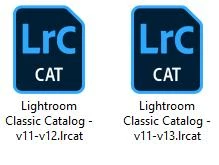
1. Takes over 1 1/2 minutes to open. Where before it took seconds. I have fast PC with Pentium 9, RAM 64GB. GPU 6 Core software updated. LR using 9-10MB of RAM memory. Very High

2. Doesn't bring over third party edits back into LR. 

3. Try to close LR out and it freezes. Have to go to task manager and click end task to close. 

4. Very Slow

Steps I've done. Per forum I saw answer from Adobe employee Rick Flohr. 

  • I closed LR.
  • Restart PC
  • Used Creative Cloud to uninstall 13.01
  • Restart PC
  • Installed v 13.0 w/o launching other programs
  • Restart PC 
  • Launch LR Classic
  • Wait 5 minutes. Actually waited longer. 

Still have same issues. Suggestions?

Best, Blair 

This topic has been closed for replies.

5 replies

GoldingD
Legend
October 19, 2023

And sorry about these individual replies, my bad. last one for now, Where do you store your catalog? What hard drive?

beball7Author
Participant
October 20, 2023

Thanks taking the time and replying. 

1. Graphics is Nvidia GeForce 1060 6GB - have on both my PC desktop and laptop. Interestingly the upgrade seems to work OK on laptop, it's slower Intel processor, less ram than PC. Only difference is Windows 11 I've been testing on laptop but Windows 10 PC. Might be some of the issues.

2. Catalog is on drive with Programs only, no data. Both for laptop and PC. Data stored on separate internal drive. 

3. As for catalog file names. In 2022 upgraded from v11 to v12. It kept that in name I didn't rename. I assumed this year my catalog was v12, it would show v12 v13. 

4. Also tested editing just now on laptop going to 3rd party app Topaz, it worked just fine. On PC I tried to go to Topaz & it just shows preparing for edit top left, several minutes goes by and never opens up in Topaz, just sits there in LR. 


Since I need to edit for my photography business I just unistalled v 13 and went back to 12.5 version. No problems going back to 12.5 version. Adobe needs to work out the issues. 

GoldingD
Legend
October 19, 2023
This year it shows v11 v13.. Skipped going from v12 to v13.

Your screen shots show a v12 and a v13 catalog. Booth with the old v11 as part of the file name. THis would have occurred at upgrade, In the catalog upgrade screen you can change the file name (rename) syntax.

GoldingD
Legend
October 19, 2023

What about your GPU driver, what is shown in LrC, /Help/System Info/ ?


For example:


Graphics Processor Info:

DirectX: NVIDIA GeForce RTX 3070 (31.0.15.3758)

Init State: GPU for Export supported by default

User Preference: GPU for Export enabled

GoldingD
Legend
October 19, 2023
Doesn't bring over third party edits back into LR. 

If by that you mean plugins for external editors like DxO NIK, then consider reinstalling the plugin, or the app in question (for NIK for example, just reinstall NIK) something may be getting fouled up. I had this for my LrC 13.0.1 and NIK, would edit in SilverEfex, a copy would be made, but SilverEfex never came up.


If by that you mean PS will not launch, typically that involves removing PS, then installing PS, add LrC into the mix on hard cases (if so, reinstall PPS before LrC)


If the external editor does open, you are able to edit, then close, but the image fails to show in LrC, double check you are not stacking, double check the sort order is not fouled up.

beball7Author
Participant
October 20, 2023

Thanks for replying. 

I've made the decision to roll back to LR Classic v12.5. No issues, no hasstle. Works fine, and I can get on with running my business. As I mentioned in an earlier reply I've been testing Windows 11 on my laptop with same graphics card as my PC. Also, the laptop doesn't have as powerful a processor, 1/2 as much RAM. Seems to work fine on version LR Classic 13.01. 

Adobe has some work to do, because some others I see are having problems as well. Thanks, all the best, Blair


GoldingD
Legend
October 19, 2023

"Steps I've done. Per forum I saw answer from Adobe employee Rick Flohr. "


Fairly sure that is for MACOS only. An Adobe server was fouled up and fouled up MACOS LrC v13.0.1 installs