
Inspiring
December 17, 2022
Question

Issues with files on NAS not or wrongly appearing in catalog

  • December 17, 2022
  • 2 replies
  • 373 views

I have some weird issues with files that I need help with.

I'm running Classic 12.1, MacOS Ventura. My catalog is on a local SSD, files on Synology NAS mounted with SMB.

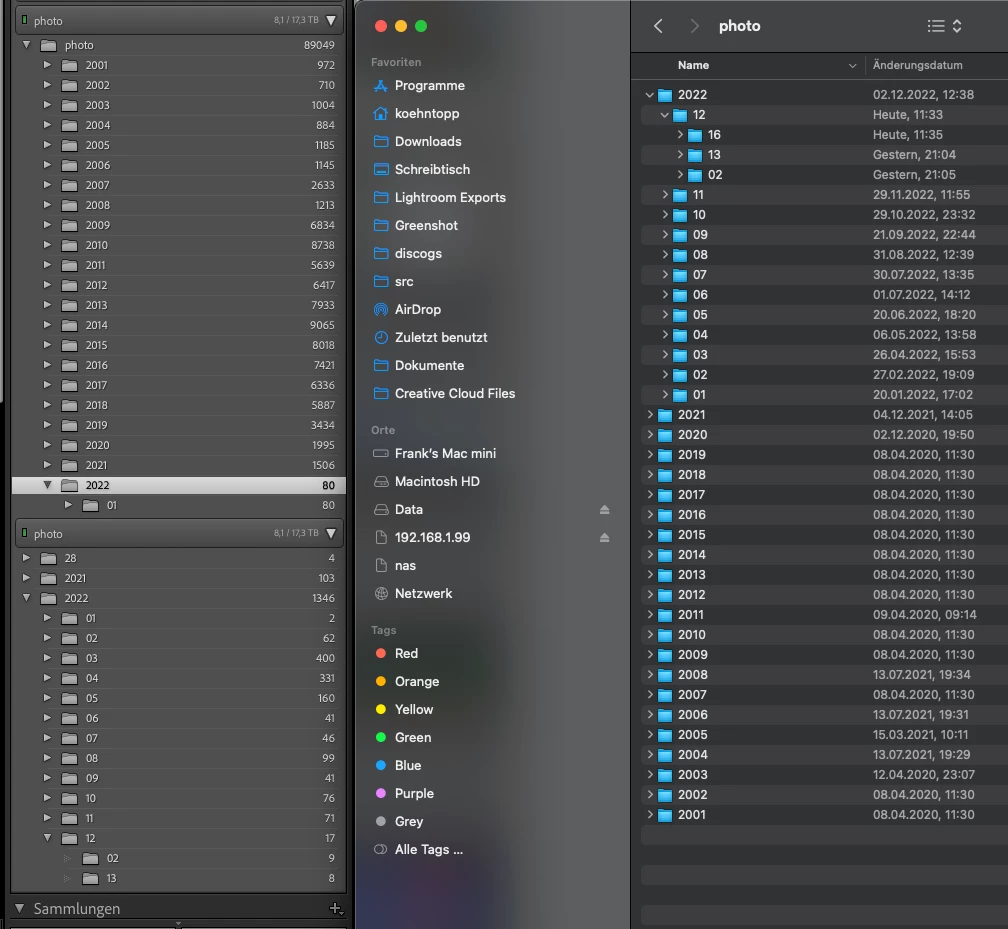
The three windows below show the same folder on the NAS. Even though I never changed configuration, the catalog has different ideas about the folders containing the files (left).

On the right you can see that there are files in 2022/12/16, which I imported from my camera yesterday. They will not appear in the catalog, no matter what I do. I even tried re-importing from the NAS folder, but I still can't work with them.


So, the two things I'd like to fix:

- all files on the left are actually in the same directory. Is there a way to remove the duplicate folder??

- how do I get my freshly imported files visible in the catalog???
 

This topic has been closed for replies.

2 replies

GoldingD
Legend
December 21, 2022

Did you resolve the duplicate folder issue in your LrC folders panel?

This is a serious issue  that needs to be resolved. Nothing but confusion can occur if that situation continues.


One way to resolve:

https://www.lightroomqueen.com/capitalization-catalog-error/

the above fix assume a capitalization error occured


koehntoppAuthor
Inspiring
December 21, 2022
quote

Did you resolve the duplicate folder issue in your LrC folders panel?

This is a serious issue  that needs to be resolved. Nothing but confusion can occur if that situation continues.


I did, thank you. In this case it wasn't capitalization, but maybe different ways of presenting the SMB folder name across years of NAS operating system updates (wild guess). Anyway, it's working now, and seems to have fixed the second issue, too.

dj_paige
Legend
December 17, 2022

https://helpx.adobe.com/lightroom-classic/kb/lightroom-displays-same-hard-drive-twice.html

or possibly this: https://community.adobe.com/t5/lightroom-classic-discussions/lightroom-cc-folder-panel-not-aligning-with-finder/m-p/10550014


Regarding your statement: "On the right you can see that there are files in 2022/12/16, which I imported from my camera yesterday. They will not appear in the catalog, no matter what I do. I even tried re-importing from the NAS folder, but I still can't work with them" You do show files in your operating system in a folder of that date, but you don't say what happens ... "I still can't work with them" explains nothing. Please explain what happens when you try to work with them. What happens. Show screen captures.

koehntoppAuthor
Inspiring
December 17, 2022

Thank you - though that was quite tedious, it did fix the issue.


#2 was about files I imported from my X-T5 to the NAS folder in Lightroom, they safely arrived in that folder on disk (right side of my screenshot), but the folder view in Lightroom does not even show these folders.


I shot a test picture and imported again, and it did work, albeit very slowly.


So - basic functionality seems to be there, for now, but this is a very fragile area and has been for a while.

My preferred solution would be cloud storage, but as long as there is no easy way to sync my NAS and the cloud this is not an option, unfortunately.

dj_paige
Legend
December 17, 2022

#2 was about files I imported from my X-T5 to the NAS folder in Lightroom, they safely arrived in that folder on disk (right side of my screenshot), but the folder view in Lightroom does not even show these folders.


Folder view does not have to mirror the operating system. Lightroom Classic is not a file browser. Depending how you import, you may wind up with the photos in the expected location in your operating system and a different location in LrC.


I shot a test picture and imported again, and it did work, albeit very slowly.


I don't know what was slow, or why importing a test picture has anything to do with the problems you mentioned.


So - basic functionality seems to be there, for now, but this is a very fragile area and has been for a while


This is too vague a statement for me to know what you mean, and how it related to anything else in this thread. Could you please be much more specific?