Heirloom Bob
Inspiring
November 27, 2016
Question

Jpg export and catalogs

  • November 27, 2016
  • 1 reply
  • 647 views

I put all my shots into a Folder into  Lightroom, in this case into a folder called Africa

This folder contains both a RAW and jpg image of each shot. (I have my camera set to do both)

Once I edit a RAW image, I export as jpg. The image shows my Export settings.
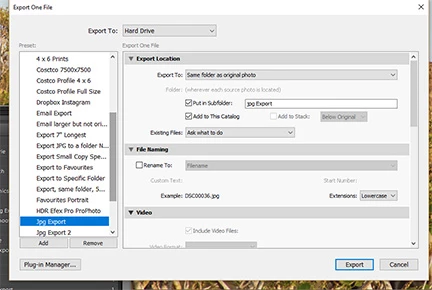
My issue is that the resulting jpg file shows both in my Africa album AND my Jpg Export subfolder. It seems to me it would be better if the edited jpg shows in the Jpg Export folder and not be showing in the Africa folder?

I realize that I could change the Export settings and deselect Add to this catalog but I do want to see the Jpg Export contents in Lightroom, just not in the Africa folder as well.

Bob

    This topic has been closed for replies.

    1 reply

    Just Shoot Me
    Legend
    November 27, 2016

    At the top you have select "Same Folder as Original Photo" and then into a Subfolder jpg Export. So they should be going into that subfolder.

    Is that not happening?

    Not sure what you mean by Africa Album (LR doesn't use the term Album).

    If you have the option set to show images in Subfolders all images in any subfolder below the folder that is selected in the Folders section will be displayed in the Grid View.

    Heirloom Bob
    Inspiring
    November 27, 2016

    Yes they show in the subfolder, in this case Jpg Export. The issue is they also appear in the Africa folder. I want the Africa folder to be only my original shots and the Jpg Export folder to be the edits.

    Just Shoot Me
    Legend
    November 27, 2016

    You said you import both the RAW and JPG that the camera captures. I think those are the JPGs that you are seeing in the main Africa folder.

    If you export a RAW image to a JPG file that has the same name as a preexisting JPG file but place it in a different folder than the original JPG file LR will not rename the file by adding a -2 to the end of the file name and nor will it pop up a warning that a file by the same name already exists (it is in a different folder).

    So I think that is why you are seeing 2 images with the same name in 2 different folders.

    Simple Delete all the original JPGs that you imported to the Africa folder.