lindam30207876
Participant
January 25, 2018
Answered

Keine Vorschau

  • January 25, 2018
  • 2 replies
  • 797 views

Hallo

Ich habe gestern das neue Windows 10 Installiert und auch das neue Adobe Abo Lightroom Classic.

Schritte

Lightroom geöffnet und meinen alten Katalog von Lightroom 5 oder so installiert.

So weit gut gegangen, alle Bilder wieder drauf.

Die Bilder zeigt es mir in der Bibliothek an und kann sie per Doppeklick auch in gross anschauen, sobald ich aber in den Entwickeln - Modus wechsle zeigt es mir fast immer kein Bild an.

Ganz selten, von 100 Bilder funktioniert es mit 1.

Ich gehe auf zuschneiden und erhalte wieder ein Bild das ich nun auch "normal" von den farben etc anpassen kann, ist aber umständlich.

Ist der Fehler wegen meinem alten Lightroomkatalog?

An was könnte dies liegen?

Auch wenn ich neue Bilder installiere geht es nicht
    This topic has been closed for replies.
    Correct answer Per Berntsen

    No preview

    I have installed the new Windows 10 yesterday and also the new Adobe Lightroom classic subscription.

    Steps

    Open Lightroom and my old catalog of Lightroom 5 or so.

    So far, all the images it again well gone,.

    The images it shows me in the library and you can double click in look great as soon as I change but developing - mode in which it displays almost always no picture.

    Very rarely, from 100 images, it works with 1.

    I'm going to cut and get an image which I now also "normal" can customize the colours etc, is back but cumbersome.

    Is the error due to my old Lightroomkatalog?

    What could this be?

    Also if I install new images it is not

    First of all, try to disable the GPU.

    Go to Edit > Preferences > Performance, and uncheck Use graphics processor.

    If that doesn't help, you probably have a defective monitor profile.

    Windows 10 is known to install defective profiles.

    Try setting the monitor profile to sRGB (Adobe RGB if you have a wide gamut monitor).

    If this fixes the problem, you should ideally calibrate your monitor with a hardware calibrator.

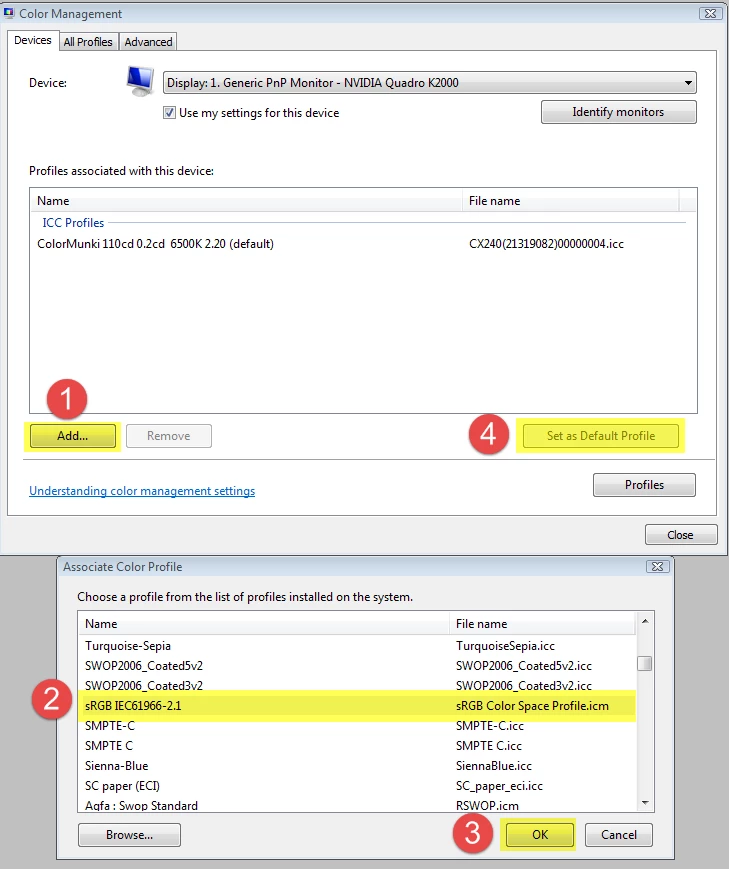
    Go to Control panel > Color management.

    Add the sRGB profile, then set it as Default profile. Make sure that Use my settings for this device is checked.

    2 replies

    alfroed
    Participant
    December 7, 2019

    Hi Per,

    I had the same problem with Lightroom yesterday -

    after uprgrading to win.10 wheter the preview in library nor the preview in developing mode worked.

    Instead of the pictures I only could see grey tiles.

    After changing the color management of win.10 to sRGB according to your tip the problem is solved.

    Thanks Alf

    Per Berntsen
    Community Expert
    Per BerntsenCommunity ExpertCorrect answer
    Community Expert
    January 25, 2018

    No preview

    I have installed the new Windows 10 yesterday and also the new Adobe Lightroom classic subscription.

    Steps

    Open Lightroom and my old catalog of Lightroom 5 or so.

    So far, all the images it again well gone,.

    The images it shows me in the library and you can double click in look great as soon as I change but developing - mode in which it displays almost always no picture.

    Very rarely, from 100 images, it works with 1.

    I'm going to cut and get an image which I now also "normal" can customize the colours etc, is back but cumbersome.

    Is the error due to my old Lightroomkatalog?

    What could this be?

    Also if I install new images it is not

    First of all, try to disable the GPU.

    Go to Edit > Preferences > Performance, and uncheck Use graphics processor.

    If that doesn't help, you probably have a defective monitor profile.

    Windows 10 is known to install defective profiles.

    Try setting the monitor profile to sRGB (Adobe RGB if you have a wide gamut monitor).

    If this fixes the problem, you should ideally calibrate your monitor with a hardware calibrator.

    Go to Control panel > Color management.

    Add the sRGB profile, then set it as Default profile. Make sure that Use my settings for this device is checked.