Participant
June 23, 2025
Answered

Keyword creation

Release 14.3.1  In attempting to create a new top level keyword. Results in creation of a sub keyword of an existing keyword. 

johnrellis
johnrellisCorrect answer
Legend
June 23, 2025

[This post contains formatting and embedded images that don't appear in email. View the post in your Web browser.]


"In attempting to create a new top level keyword. Results in creation of a sub keyword of an existing keyword."


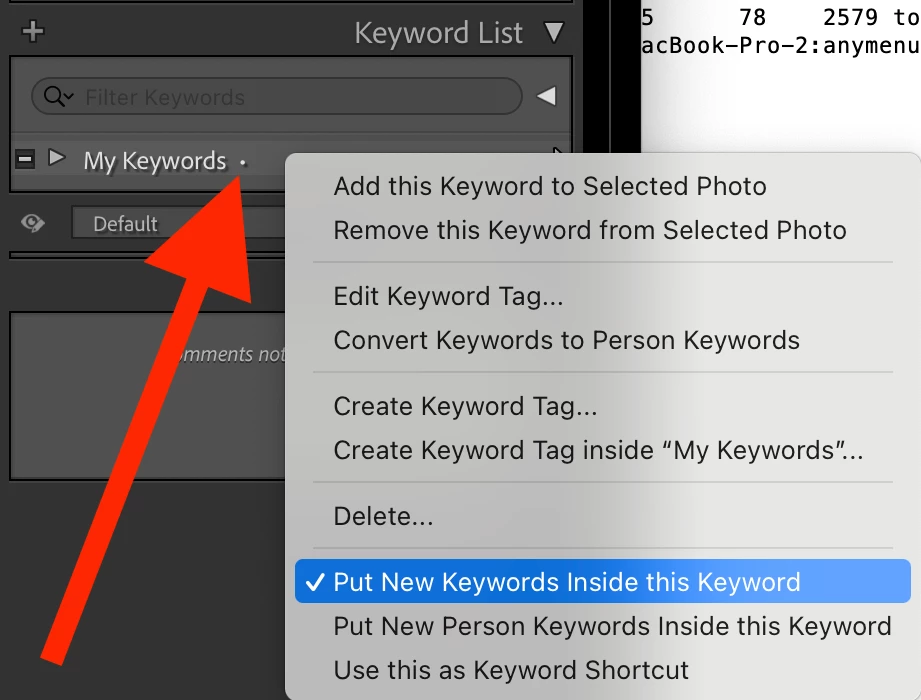
In the Keyword List, does that existing top-level keyword have a tiny little dot following it?  If so, right-click the keyword and deselect Put New Keywords Inside This Keyword:


5 replies

danielm49702136
Known Participant
October 22, 2026

If you need to reorganize your keyword tree, try KeywordsManager Plugin

Translate
johnrellis
johnrellisCorrect answer
Legend
June 23, 2025

[This post contains formatting and embedded images that don't appear in email. View the post in your Web browser.]


"In attempting to create a new top level keyword. Results in creation of a sub keyword of an existing keyword."


In the Keyword List, does that existing top-level keyword have a tiny little dot following it?  If so, right-click the keyword and deselect Put New Keywords Inside This Keyword:


Translate
dj_paige
Legend
June 23, 2025

If you just type the name of the keyword into the Keywording Panel box, you should have a new top level keyword. (Exception: if the keyword already exists, then the existing keyword is used)

Translate
Participant
July 21, 2025

The situation is this: An existing keyword 'church' with sub keywords of 'exterior' and 'interior'. Now I want a new keyword (top level)  'mission'. I click on '+' on the Keyword List bar and enter 'mission' into the form with no options checked. The result is a new sub keyword underr the keyword 'state and local parks' sub 'Minnesota'. It does not come in as a top level keyword and I don't know how to get it there.


Translate
johnrellis
Legend
July 21, 2025

"I click on '+' on the Keyword List bar and enter 'mission' into the form with no options checked."


Please re-read my reply above for how to solve your problem:

https://community.adobe.com/t5/lightroom-classic-discussions/keyword-creation/m-p/15385015#M407305


Translate