


Inspiring
August 8, 2022
Question

Keyword List Panel

I'm trying to understand some of the functionality of the Keyword List.


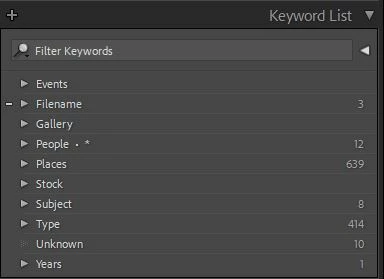
What do the numbers on the right mean?  They don't seem to have any correlation to what is inside the keyword set.  For example, inside of People there is no keyword named People and there are a lot more keywords in People than 12.


What does the . * mean on the People set?


When dragging an individual top level keyword into a set, sometimes it lets you do it and sometimes not.  I presume it is because that keyword is alread in the set.  Does it also check to see that the images linked to the top level keyword is also linked to the same keyword in the set.  If so, then I should just be able to delete the top level keyword, yes?


Thanks
 

This topic is closed to new replies. Start a new post to keep the conversation going.

7 replies

john beardsworth
Community Expert
Community Expert
August 9, 2022
quote

What does the . * mean on the People set?


By @cos49


It means that you've checked one of the right click commands: Put New Keywords Inside this Keyword, or Put New Person Keywords Inside this Keyword.

Translate
JohanElzenga
Community Expert
Community Expert
August 8, 2022

The numbers are the number of photos that have this keyword assigned to them.


If a keyword is at the top level and also inside a parent keyword, then Lightroom considers these as two different keywords. That means you should not delete a top level keyword just like that.


Translate
-- Johan W. Elzenga
cos49Author
Inspiring
August 8, 2022

That is what I would have thought as well. 

For example, Filename and People have over 2k photos each assigned to keywords in those sets.

Translate
JohanElzenga
Community Expert
Community Expert
August 8, 2022

@cos49 wrote:

That is what I would have thought as well. 

For example, Filename and People have over 2k photos each assigned to keywords in those sets.


The numbers only refer to images that have the keyword directly assigned to them, not images that do not have this keyword assigned, but have a subkeyword assigned.


Translate
-- Johan W. Elzenga