
Known Participant
July 12, 2019
Answered

Keyword List Suddenly Scrambled in LR 5.7

  • July 12, 2019
  • 3 replies
  • 1097 views

Hi. I have been helped so many times down through the years in this forum and I hope someone can assist me with this situation.

My Keyword List has become scrambled for reasons unknown to me. I have 82,927 photos catalogued in LR and all but 49 of them have keywords. Up until yesterday all my keywords where in 4 main categories, 1-Events, 1-Other, 1-Places and 1-People and they appeared in the order listed at the very top of my Keyword List. As of yesterday the list has become scrambled...
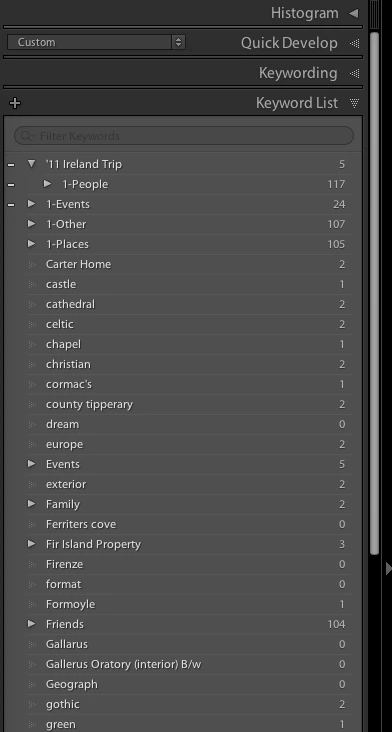
As you can see 1-People is now a subcategory of '11 Ireland Trip. Some subcategories which used to reside in 1-People are now scattered up and down the Keyword List as you can see with 'Family' & 'Friends' in the screenshot above. Another puzzling aspect of all of this is the numbers to the right of the keywords. '11 Ireland Trip at the top of the list has '5' to the right of it. Clicking the triangle to the right of the '5' brings up hundreds of photos none of which have anything to do with '11 Ireland Trip. In fact none of the numbers to the right of the keywords in the list shown above correspond to the number of photos included under that keyword. As an example clicking the triangle to the left of 'Events' in the list above reveals this:
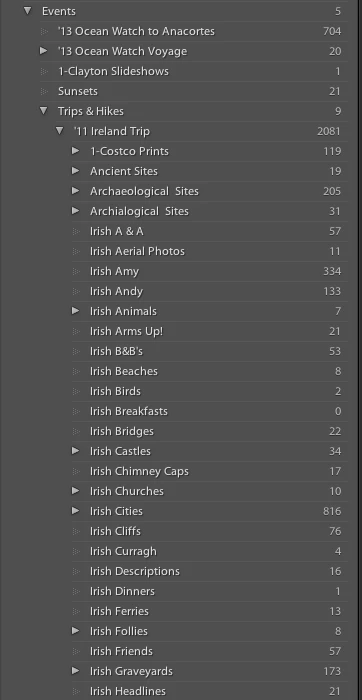
I am not sure what all is going on here. All the keywords appearing under 'Events' here used to reside within 1-Events at the very top of my Keyword List.

Does anyone know what might have taken place here and what I might do about correcting this other than going item by item to get everything in it's rightful place? The entire Keyword List seems to be fragmented for some reason.

My other question is how might I get the 1-People Keyword out from '11 Ireland Trip and back to the top of my Keyword List? Can I just drag it out? I'm hesitant to try because i don't want to somehow mix things up further.

Thank you in advance for any help with this.

-andy

    This topic has been closed for replies.
    Correct answer JohanElzenga

    I can’t explain exactly what went wrong, but it looks like you imported some images that have these keywords assigned to them but not the hierarchy. That can happen if you export an image and then import that exported image again.

    The number 5 behind the parent keyword ‘11 Ireland Trip’ means that there are five images that have this parent directly assigned to them. There are lots of other images that have a sub-keyword assigned, but not the parent itself. You will still find these if you click on the arrow behind the keyword, so that explains what you are seeing when you do that.

    3 replies

    johnrellis
    Legend
    July 12, 2019

    I can clear up one source of confusion: The number to the right of a parent keyword (e.g. "Events") is the number of photos that are directly assigned that keyword.  The number does not include the photos that have been assigned subkeywords (e.g. "Irish Army"). But when you click on the arrow to the right of a parent keyword ("Events"), LR shows all photos containing that keyword and all contained subkeywords (e.g. "Irish Army").

    Known Participant
    July 12, 2019

    johnrellis...thank you for this answer. I now get it.

    -andy

    JohanElzenga
    Community Expert
    JohanElzengaCommunity ExpertCorrect answer
    Community Expert
    July 12, 2019

    I can’t explain exactly what went wrong, but it looks like you imported some images that have these keywords assigned to them but not the hierarchy. That can happen if you export an image and then import that exported image again.

    The number 5 behind the parent keyword ‘11 Ireland Trip’ means that there are five images that have this parent directly assigned to them. There are lots of other images that have a sub-keyword assigned, but not the parent itself. You will still find these if you click on the arrow behind the keyword, so that explains what you are seeing when you do that.

    -- Johan W. Elzenga
    Known Participant
    July 12, 2019

    JohanElzenga...Good one! This makes sense to me. Recently I have tried to assign keywords to the photos I'm importing to save time but guess I never checked to see if they got the hierarchy applied. Good catch. I could not figure out what was going on.

    Also thanks for the explanation about the number to the right of a parent keyword. I get it now.

    Thank you very much for taking the time to explain this to me. I do love this forum.

    -andy

    Ian Lyons
    Community Expert
    Community Expert
    July 12, 2019
    Known Participant
    July 12, 2019

    Hi. If you are saying that my first posting from yesterday went through, I apologize. I did not think it had posted and I posted again today because of that and because I think I now have a clearer understanding of what is going on. I don't know why this change has occurred but I have a clearer sense of what has happened.

    What might I do about having my first post removed and leaving just my post from today?

    Thank you.

    -andy

    Ian Lyons
    Community Expert
    Community Expert
    July 12, 2019

    I've locked your earlier post and provided a link to this thread.