


Participant
November 4, 2022
Question

keywording issue

  • November 4, 2022
  • 1 reply
  • 149 views

I've noticed lately that when I'm exporting photos from my catalogue that the exported images are picking up some metadata from an old image (but not all the time, only now and then!).

I don't have any presets selected and the auto-write to XMP is checked in Metadata field in the Catalog Settings.

But for some reason, it's still exporting keywords that I entered for a particular set of images ages ago, even though they aren't displayed in the Keywords Tag field!
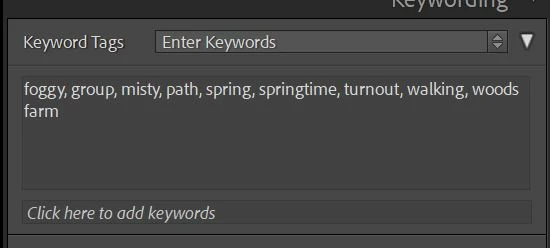
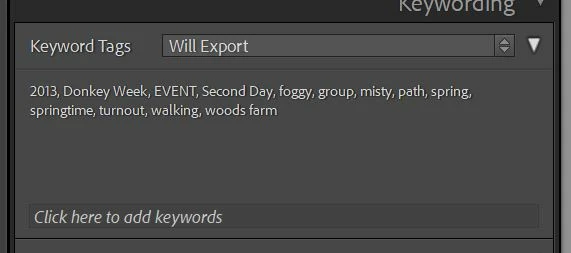
If I change the dropdown arrow here to 'Will Export' it does show these erroneous keywords, but there's no way of removing them that I can find. 
Any help would be appreciated! Thanks.

(First pic shows the keywords I've entered for this particular pic that I want to be saved down. Second pic shows the actual keywords that are being saved. Running up-to-date Lightroom Classic on Windows)


This topic has been closed for replies.

1 reply

Community Expert
November 4, 2022

"Will export" may show keywords which don't appear in the "Enter keywords" list, when:

  • the 'extra' keyword is an additional  synonym of one of those - for example, "misty" may add "foggy" also
  • the 'extra' keyword is a parent keyword, for example "2013"


Removing a synonym would AFAIK require deleting that synonym from the properties of the keyword concerned.


A parent keyword (unless also directly applied) may be suppressed from exporting by either: removing the child keyword from its nesting within this parent; or changing the properties on the parent keyword to dont-export; or changing the properties on the child keyword to don't-export-containing-keywords.


OTOH "Will export" display may fail to show even a directly applied keyword, if that particular keyword's properties are set to dont-export.