


Jon_Kreski
Known Participant
January 4, 2026
Answered

Keywords Misclassified

  • January 4, 2026
  • 4 replies
  • 155 views

I have a keyword of Animals and for some reason in the drop down list of keywords some other keywords have become sub-items of the Animals keyword.  I would like to move the out from under Animals so they are at a higher level and be their own keywords.  How can I do this and what do you think may have caused this.  I use commas to seperate my keywords when I specify multiple keywords in the input box.  Thanks!  I am on Windows 11 computer.
Correct answer bhousto90

In your keyword list check  "Animals" in your keyword list.

It will most likely have a small dot beside it that indicates that new keywords should be added inside as child keywords.

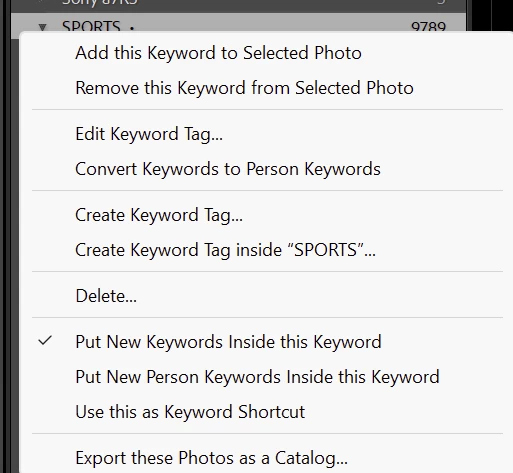
Right click on "Animals" keyword and uncheck the "Put New Keywords inside this Keyword" option:

872766i70461E4DD079622D.png


4 replies

bhousto90Correct answer
Legend
January 4, 2026

In your keyword list check  "Animals" in your keyword list.

It will most likely have a small dot beside it that indicates that new keywords should be added inside as child keywords.

Right click on "Animals" keyword and uncheck the "Put New Keywords inside this Keyword" option:

872766i70461E4DD079622D.png


johnrellis
Legend
January 4, 2026

@Jon_Kreski: "what do you think may have caused this."


In the Keyword List, right-click Animals -- is there a check next to Put New Keywords Inside This Keyword? If so, click it to remove the check.

dj_paige
Legend
January 4, 2026

What caused this? User error. We have all at one or more times in our life accidentally clicked the mouse where we didn't intend to click it, and performed some action we didn't intend to perform, and since it was an accident you may not even realize you did something.

JohanElzenga
Community Expert
Community Expert
January 4, 2026

Simply drag it out of its parent in the keyword list.


-- Johan W. Elzenga