
Inspiring
August 4, 2025
Question

Keywords on photos but missing from the list

  • August 4, 2025
  • 1 reply
  • 761 views

I recently organized my keywords to make things easier to find. However, I now have a situation where dozens of keywords still exist on files, but they do not show up in the Keyword List.  

If you see the image below, I have multiple keywords on a photo, but none of them show up in the list.
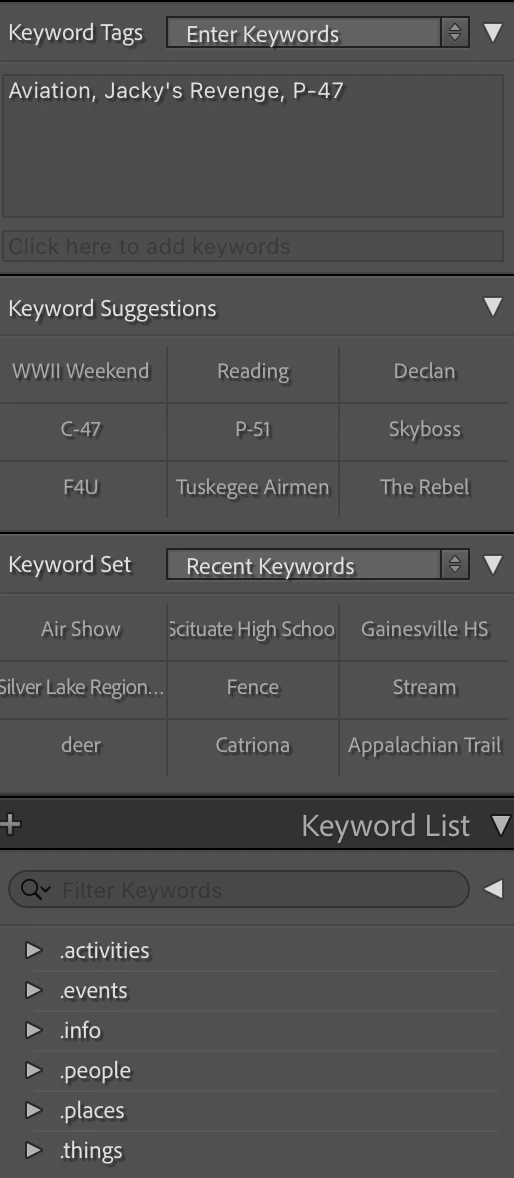
In addition, I can delete one of the keywords from the text box ("Aviation" for example), and then try and type it back in. As I type "Avi", "Aviation" will display for me to choose. That tells me the keyword is in there somewhere, but it still is not showing up in the Keyword List. I also have multiple smart collections based on keywords, and they still work.


I deleted the helper.lrdata file multiple times, and I tried resetting all my preferences. I also tried exporting as a catalog. That didn't work either. Still missing most of my keywords.


How can I get my keywords to show up in the list?

1 reply

Inspiring
August 4, 2025

An update:

I tried doing Metadata -> Export Keyword List. It got about halfway through and stopped. I waited several minutes before canceling. The CSV contained what was in my keyword list panel, but my guess is there is something wrong with the internal keyword list, and it froze the export.


Any way to rebuild the keyword list from all the photos?


One more thing, I checked my before and after backups. Sure enough, the keywords are missing in the after, and they are there in the before.


I'm thinking there is a bug in purge unused keywords since that is the last thing I ran after I completed the re-org. Feels like it removed dozens (maybe hundreds) of keywords even though there are photos that have the keyword.


I've been using this catalog for many years (at least 10, probably more, but I don't know exactly), and I have 40-50k photos.

JohanElzenga
Community Expert
Community Expert
August 4, 2025

The keywords shown in your screenshot are 'parent' keywords. The solid triangle shows that they contain sub keywords. That is where the keywords shown on your images are hiding. Click on a triangle to expand it and show the keyword hierarchy.


-- Johan W. Elzenga
Inspiring
August 4, 2025

To be clear, I know they are parent keywords. However, you need to note that there are no check boxes or '-' next to any of those parent keywords as there should be to indicate that a keyword down in the hierarchy is selected.


Also, if I search for Aviation in the keyword list, it will not be found. Expanding all keywords in the hierarchy, and Aviation (along with an untold number of others) are not in the list. There are there on the photos, but they are not in the keyword list.


Finally, if I try and export the keywords, the export process will never complete.


As I said above, I've been using Lightroom for over 10 years. I use keywords all the time.