
Participant
August 11, 2022
Answered

Korrekturpinsel in Lightroom Classic nicht vollständig angezeigt

  • August 11, 2022
  • 1 reply
  • 830 views

Hallo,

meine Korrektur-Tools im Entwickeln-Modus bei Lightroom Classic werden nicht in der Form dargestellt, wie sie bei allen Tutorials zu sehen sind. 

Bei mir sieht die Leiste so aus: 
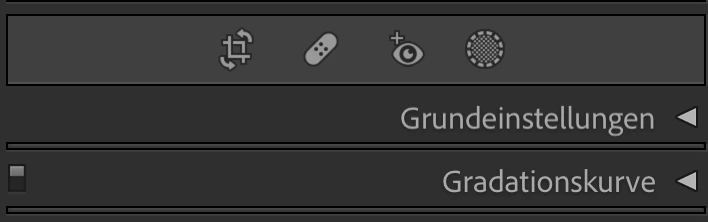
In den Tutorials sehe ich aber stets diese Leiste:
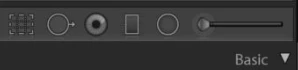
Wie bekomme ich es hin, dass ich diese erweiterte Leiste sehen kann?

Hier noch ein paar Hintergrundinformationen:

  • Lightroom Version 11.4.1
  • macOS Monterrey Version 12.5

Vielen Dank für einen Tipp.


This topic has been closed for replies.
Correct answer dj_paige

Your Lightroom Classic 11.4.1 has a new set of icons and new organization for the same tools that used to be there (as shown in your second screen capture), plus new tools and new capabilities. See https://helpx.adobe.com/lightroom-classic/help/whats-new/2022.html. There are probably dozens of YouTube videos explaining how the new Masking tools work.


1 reply

dj_paige
dj_paigeCorrect answer
Legend
August 11, 2022

Your Lightroom Classic 11.4.1 has a new set of icons and new organization for the same tools that used to be there (as shown in your second screen capture), plus new tools and new capabilities. See https://helpx.adobe.com/lightroom-classic/help/whats-new/2022.html. There are probably dozens of YouTube videos explaining how the new Masking tools work.


F.J.HAuthor
Participant
August 12, 2022

Thanks @dj_paige for the quick reply.