
Lelion86
Participant
June 6, 2026
Question

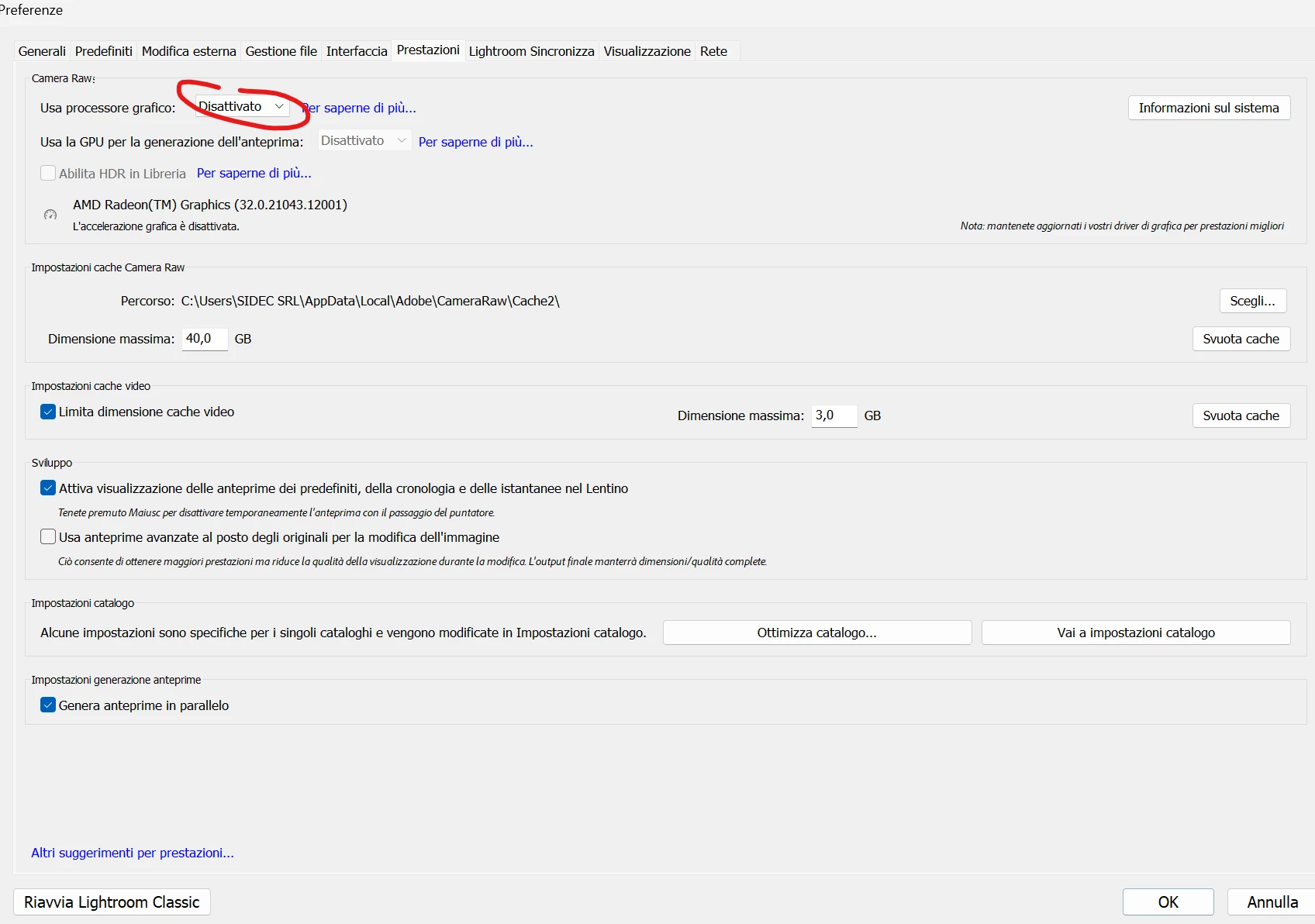
la funzione denoise è diventata molto lenta. Prima era pochi secondi, ora molti minuti. Inoltre,se mantengo attivo il GPU in modalità AUTOMATICO, lavorare le foto in sviluppo è lentissimo e scattoso. Prima non era così. Ho una AMD RADEON.
  • June 6, 2026
  • 3 replies
  • 38 views


    3 replies

    johnrellis
    Legend
    June 12, 2026

    Dedicated GPU memory used by Lightroom: 743.0MB / 485.7MB (152%)

    DirectX: AMD Radeon(TM) Graphics (32.0.21043.12001)

    Installed memory: 31912.1 MB


    Your GPU meets LR’s system requirements. The GPU is integrated with the CPU (on the same chip).  The system requirements specify at least 16 GB of shared memory -- your computer has 32 GB. So the problem isn’t caused by this.


    GPUDeviceEnabled: false


    This line has confused many people. It means only that the part of LR that processes video isn’t using the GPU:

    https://community.adobe.com/questions-675/rtx-5070-stuck-on-limited-graphics-acceleration-in-lrc-15-2-gpudeviceenabled-false-image-processing-greyed-out-1553783?postid=7520211#post7520211


    It says nothing about whether LR is using the GPU for image processing.

    Community Expert
    June 12, 2026

    Do you have checked if there a newer version of the AND driver is available?

    What AND graphic hardware do you have installed?


    My System: Intel i7-8700K - 64GB RAM - NVidia Geforce RTX 3060 - Windows 11 Pro 25H2 -- LR-Classic 15 - Photoshop 27 - Nik Collection 9 - PureRAW 6 - Topaz Photo AI
    Community Expert
    June 6, 2026

    Check if you’ve installed the latest version of the graphic device driver. If no, install the recent version and check.

    Please provide a copy of your 'System Info'. This can be get from the Lightroom menu item Help > System Info. There's a copy button in the System Info dialog. Press this button and paste the info into a text file and attach it to your next forum post.

    My System: Intel i7-8700K - 64GB RAM - NVidia Geforce RTX 3060 - Windows 11 Pro 25H2 -- LR-Classic 15 - Photoshop 27 - Nik Collection 9 - PureRAW 6 - Topaz Photo AI
    Lelion86
    Lelion86Author
    Participant
    June 12, 2026

    Versione di Lightroom Classic: 15.3.1 [ 202605261338-e36f8566 ]
    Licenza: Creative Cloud
    Impostazioni lingua: it
    Sistema operativo: Windows 11 - Business Edition
    Versione: 11.0.26200
    Architettura dell'applicazione: x64
    Architettura del sistema: x64
    Conteggio processore logico: 16
    Velocità processore: 4,5GHz
    Versione SqLite: 3.36.0
    Versione Adobe GSDK: 1.4.0.213

    Utilizzo CPU: 1,0%
    Fonte di alimentazione: Collegato
    Memoria integrata: 31912,1 MB
    Memoria GPU dedicata usata da Lightroom: 11,1MB / 485,7MB (2%)
    Memoria reale disponibile in Lightroom: 31912,1 MB
    Memoria fisica usata Lightroom: 3671,8 MB (11,5%)
    Memoria virtuale usata Lightroom: 3913,5 MB
    Conteggio oggetti GDI: 844
    Conteggio oggetti UTENTE: 3327
    Conteggio maniglie elaborate: 2273
    Dimensione cache memoria: 1621,6MB
    Versione Camera Raw interna: 18.3 [ 2530 ]
    Numero di thread massimo utilizzato da Camera Raw: 5
    Ottimizzazione SIMD Camera Raw: SSE2,AVX,AVX2
    Memoria virtuale di Camera Raw: 1478MB / 15956MB (9%)
    Memoria reale di Camera Raw: 1587MB / 31912MB (4%)

    Cache1: 
    NT- RAM:0,0MB, VRAM:0,0MB, Combined:0,0MB

    Cache2: 
    m:1621,6MB, n:0,0MB

    U-main: 95,0MB

    Impostazione DPI del sistema: 144 DPI (modalità DPI elevata)
    Composizione desktop attivata: Sì
    Lato maggiore Anteprime standard: 1680 pixel
    Monitor: 1) 3840x2160
    Tipi di input: Multitouch: No, Tocco integrato: No, Penna integrata: No, Tocco esterno: No, Penna esterna: No, Tastiera: No

    Informazioni processore grafico: 
    DirectX: AMD Radeon(TM) Graphics (32.0.21043.12001)
    Stato iniziale: GPU per la visualizzazione supportata per impostazione predefinita con elaborazione dell'immagine ed esportazione supportata nella modalità personalizzata
    Preferenze utente: Disattivato
    Abilita HDR in Libreria: DISATTIVA
    GPU per la generazione dell'anteprima:Disattivato (S4_0)

    Cartella applicazione: C:\Program Files\Adobe\Adobe Lightroom Classic
    Percorso libreria: C:\Users\SIDEC SRL\Desktop\Lightroom Catalog- Nuovo A3 - nuovo\Lightroom Catalog- Nuovo A3.lrcat
    Cartella impostazioni: C:\Users\SIDEC SRL\AppData\Roaming\Adobe\Lightroom

    Plug-in installati: 
    1) AdobeStock
    2) Flickr

    Indicatori Config.lua: 

    Adattatore n. 1: Fornitore : 1002
        Dispositivo : 164e
        Sottosistema : 88771043
        Revisione : c3
        Memoria video : 485
    Adattatore n. 2: Fornitore : 1414
        Dispositivo : 8c
        Sottosistema : 0
        Revisione : 0
        Memoria video : 0
    Adattatore n. 3: Fornitore : 1414
        Dispositivo : 8c
        Sottosistema : 0
        Revisione : 0
        Memoria video : 0
    AudioDeviceIOBlockSize: 1024
    AudioDeviceName: System Default - Realtek Digital Output (Realtek(R) Audio)
    AudioDeviceNumberOfChannels: 2
    AudioDeviceSampleRate: 48000
    Build: LR5x34
    Direct2DEnabled: true
    Direct2DPresent: true
    GPUDeviceEnabled: false
    OGLEnabled: false


    This are the info with the GPU disabled. I copy/paste to you also the info when I enable the GPU:


    Versione di Lightroom Classic: 15.3.1 [ 202605261338-e36f8566 ]
    Licenza: Creative Cloud
    Impostazioni lingua: it
    Sistema operativo: Windows 11 - Business Edition
    Versione: 11.0.26200
    Architettura dell'applicazione: x64
    Architettura del sistema: x64
    Conteggio processore logico: 16
    Velocità processore: 4,5GHz
    Versione SqLite: 3.36.0
    Versione Adobe GSDK: 1.4.0.213

    Utilizzo CPU: 0,0%
    Fonte di alimentazione: Collegato
    Memoria integrata: 31912,1 MB
    Memoria GPU dedicata usata da Lightroom: 743,0MB / 485,7MB (152%)
    Memoria reale disponibile in Lightroom: 31912,1 MB
    Memoria fisica usata Lightroom: 4161,2 MB (13,0%)
    Memoria virtuale usata Lightroom: 4553,1 MB
    Conteggio oggetti GDI: 864
    Conteggio oggetti UTENTE: 3347
    Conteggio maniglie elaborate: 2304
    Dimensione cache memoria: 1711,0MB
    Versione Camera Raw interna: 18.3 [ 2530 ]
    Numero di thread massimo utilizzato da Camera Raw: 5
    Ottimizzazione SIMD Camera Raw: SSE2,AVX,AVX2
    Memoria virtuale di Camera Raw: 1503MB / 15956MB (9%)
    Memoria reale di Camera Raw: 1611MB / 31912MB (5%)

    Cache1: 
    NT- RAM:0,0MB, VRAM:0,0MB, Combined:0,0MB

    Cache2: 
    m:1711,0MB, n:0,0MB

    U-main: 149,0MB

    Impostazione DPI del sistema: 144 DPI (modalità DPI elevata)
    Composizione desktop attivata: Sì
    Lato maggiore Anteprime standard: 1680 pixel
    Monitor: 1) 3840x2160
    Tipi di input: Multitouch: No, Tocco integrato: No, Penna integrata: No, Tocco esterno: No, Penna esterna: No, Tastiera: No

    Informazioni processore grafico: 
    DirectX: AMD Radeon(TM) Graphics (32.0.21043.12001)
    Stato iniziale: GPU per la visualizzazione supportata per impostazione predefinita con elaborazione dell'immagine ed esportazione supportata nella modalità personalizzata
    Preferenze utente: Automatico 
    Abilita HDR in Libreria: DISATTIVA
    GPU per la generazione dell'anteprima:Disattivato (S4_0)

    Cartella applicazione: C:\Program Files\Adobe\Adobe Lightroom Classic
    Percorso libreria: C:\Users\SIDEC SRL\Desktop\Lightroom Catalog- Nuovo A3 - nuovo\Lightroom Catalog- Nuovo A3.lrcat
    Cartella impostazioni: C:\Users\SIDEC SRL\AppData\Roaming\Adobe\Lightroom

    Plug-in installati: 
    1) AdobeStock
    2) Flickr

    Indicatori Config.lua: 

    Adattatore n. 1: Fornitore : 1002
        Dispositivo : 164e
        Sottosistema : 88771043
        Revisione : c3
        Memoria video : 485
    Adattatore n. 2: Fornitore : 1414
        Dispositivo : 8c
        Sottosistema : 0
        Revisione : 0
        Memoria video : 0
    Adattatore n. 3: Fornitore : 1414
        Dispositivo : 8c
        Sottosistema : 0
        Revisione : 0
        Memoria video : 0
    AudioDeviceIOBlockSize: 1024
    AudioDeviceName: System Default - Realtek Digital Output (Realtek(R) Audio)
    AudioDeviceNumberOfChannels: 2
    AudioDeviceSampleRate: 48000
    Build: LR5x34
    Direct2DEnabled: true
    Direct2DPresent: true
    GPUDeviceEnabled: false
    OGLEnabled: false


    I believe the problem is here:


    Preferences: Automatic, but GPUDeviceEnabled: false
    DirectX: AMD Radeon(TM) Graphics (32.0.21043.12001)
    Video memory: 485 MB
    GPU memory used by Lightroom: 877.5 MB / 485.7 MB (180%)


    The detected dedicated VRAM is only 485 MB, which is extremely low, and Lightroom is going beyond that amount. This could explain the stuttering, slowness, and strange fallback behavior.

    For me, this seems to be the core of the problem. It is not simply a case of a “weak GPU”; it is more likely that the GPU, the AMD driver, or Lightroom is not able to activate hardware acceleration correctly. On top of that, Lightroom is detecting very low dedicated VRAM and reporting GPU memory usage at 180%.

    I should also mention that until about a month ago everything was working correctly and smoothly, including AI Denoise. Now I have a large number of photos to edit for a professional job, and this issue is causing me serious problems.
