BrooklynMcTavish
Participant
September 20, 2017
Answered

Layout guides in the Print Module

  • September 20, 2017
  • 1 reply
  • 308 views

Is there a way to add guides to the print module? It is hard to see the crosshairs when laying out a photo spread.Is there a way to add guides to the print module? It is hard to see the crosshairs when laying out a photo spread.

Cheers
    This topic has been closed for replies.
    Correct answer Rob_Cullen

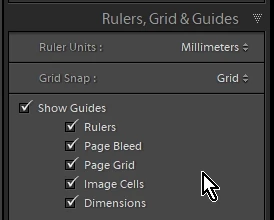
    Both "Picture Package"  and "Custom Package" layout styles have options to use grids (inch, mm, etc) and 'Snap To'.

    All in the panel- [Rulers, Grid & Guides]

    Are these options not sufficient for your designs?

    1 reply

    Nancy OShea
    Community Expert
    Community Expert
    September 20, 2017

    You've posted in the Lounge -- a non-support forum.

    Which application are you using?  A moderator can move this question to the proper forum for you.

    Nancy O'Shea— Product User & Community Expert
    BrooklynMcTavish
    Participant
    September 20, 2017

    Hello Nancy,

    I am using Lightroom. I use Lightroom for printing on a large format printer. I am unable to judge the space between images when I design a large panel print.

    Cheers,

    Patrick

    Rob_Cullen
    Community Expert
    Rob_CullenCommunity ExpertCorrect answer
    Community Expert
    September 20, 2017

    Both "Picture Package"  and "Custom Package" layout styles have options to use grids (inch, mm, etc) and 'Snap To'.

    All in the panel- [Rulers, Grid & Guides]

    Are these options not sufficient for your designs?

    Regards. My System: Windows-11, Lightroom-Classic 15.3, Photoshop 27.5, ACR 18.3, Lightroom 9.3, Lr-iOS 10.4.0, Bridge 16.0.3 .