

kentmcpherson
Inspiring
June 24, 2018
Question

Lens Correction Preset not working

  • June 24, 2018
  • 3 replies
  • 3361 views

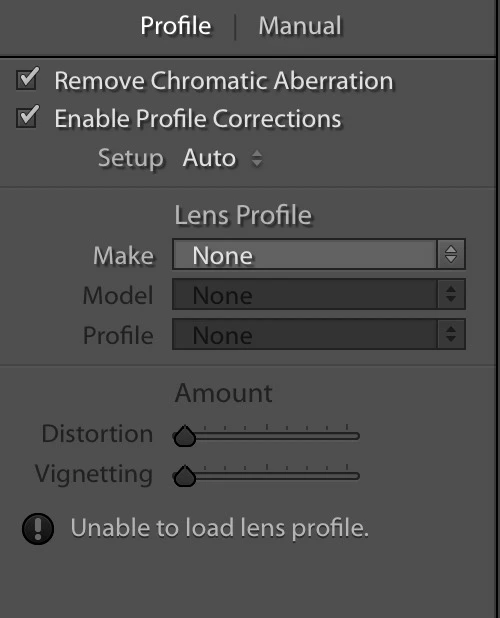
I just upgraded to Lightroom Classic CC 7.4.  I have a preset called "Lens Correction" that previously worked but now does not.  It used to have the check boxes for

  • Remove Chromatic Aberration
  • Enable Profile Corrections

both checked.  And it always picked the correct lens.  Now the check boxes are checked but the lens is None.  How do I fix this?
    This topic has been closed for replies.

    3 replies

    johnrellis
    Legend
    June 24, 2018

    I just upgraded to Lightroom Classic CC 7.4.  I have a preset called "Lens Correction" that previously worked but now does not.  It used to have the check boxes for

    • Remove Chromatic Aberration
    • Enable Profile Corrections

    both checked. 

    Try creating a new preset with the same settings. There have been many bugs with the new preset format introduced in 7.3, and perhaps you're tripping over another one.

    johnrellis
    Legend
    June 24, 2018

    Also, are you applying the preset automatically during Import or manually after the photo is imported. Another person reports that the a preset with lens correction doesn't work during import but does afterward: preset lens correction weaves

    kentmcpherson
    Inspiring
    June 25, 2018

    I am applying during import.  I deleted my old preset and created a new one.  It still does not work.  Hopefully this gets fixed because having to do this manually for every photo after importing will be a big pain. 

    cmgap
    Community Expert
    Community Expert
    June 24, 2018

    What happens if you change the setup from Auto to Default or Manual?

    Inspiring
    June 24, 2018

    Before moving from the Library module, did you click on the 'embedded preview' button (bottom right of loop view) before taking it into the Develop module. I sometimes experience the same issue and suspect that when going into Develop, somehow the lens profile doesn't 'travel' with it. Maybe worth a try. However, on those occasions, I just go into the lens profile dropdown and click onto my camera make and it sets he correct profile.

    Todd Shaner
    Legend
    June 24, 2018

    Most lens profiles only work with raw files. You probably have a JPEG file selected. What model lens are you using?

    kentmcpherson
    Inspiring
    June 24, 2018

    No, this is not a jpg. I shoot raw files. I use all Canon lenses except for my one Sigma lens. This all worked fine under 7.2.