

Lens Profile Fail on install to new machine
Hi everyone! I recently bought a new PC as my old one was struggling with Lightroom Classic, especially doing brush corrections. I installed my Creative Cloud Apps on this new one, and I've noticed when moving my photos directories onto the new machine, Lightroom doesn't recognize my Canon RF 15-35mm f2.8 L camera lens. It recognizes it as an EF 15mm 2.8 lens, and distorts the photos quite wildly if I choose the EF choice. If I don't set the lens correction, the photo looks ok. Here's where it gets really weird. I did a few corrections on the photo, exported it to a folder as a .PSD doc, opened it in Photoshop, and when looking at the EXIF data in Photoshop, it had no problem recognizing and reporting which lens was used (the RF 15-35). I see no profiles for RF lens in Lightroom on the new machine. On my old one, it showed all of them. Is there a place where I can manually add lenses?? The pulldown box shows only EF lenses, and only one Canon camera choice, the 5D. Thanks in advance! See attached photo.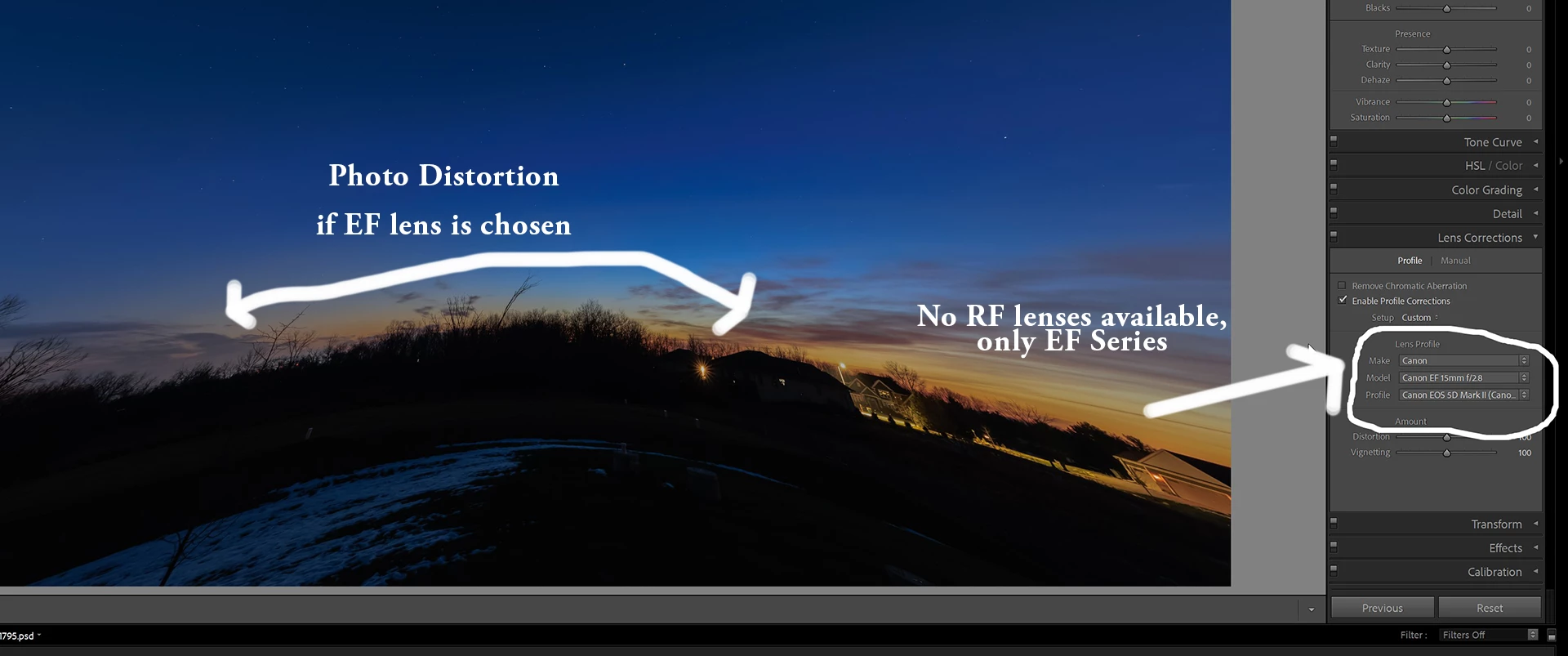


 AdChoices