Participant
September 20, 2018
Answered

Lens profile mapping don't work

  • September 20, 2018
  • 1 reply
  • 404 views

I have several lenses which I (may) change during my trip. When importing images into Lr, it doesn't recognize the attached lens, I need to tell manufacturer first and after that it recognizes the model and profile of the lens.

I am using (mostly) Nikon D750, Nikkor 24-70/2.8 and Tamron 70-200/2.8 G2.

Lr 6.14

Camera raw 10.1

Win10/64bit
This topic has been closed for replies.
Correct answer JohanElzenga

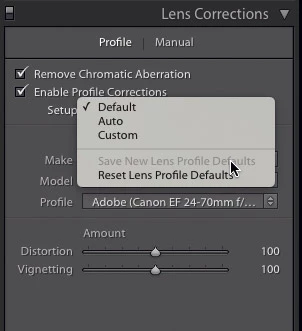
After you have done that, click on the pop-up menu behind 'Setup' and select 'Save New Lens Profile Defaults'. The menu is dimmed in my screenshot because my lens defaults are up-to-date. From now on Lightroom should recognise the lens automatically.

1 reply

JohanElzenga
Community Expert
JohanElzengaCommunity ExpertCorrect answer
Community Expert
September 20, 2018

After you have done that, click on the pop-up menu behind 'Setup' and select 'Save New Lens Profile Defaults'. The menu is dimmed in my screenshot because my lens defaults are up-to-date. From now on Lightroom should recognise the lens automatically.

-- Johan W. Elzenga
GardinAuthor
Participant
September 25, 2018

Thanks - this works.