
Answered
Library moved: 'The selected folder is already in Lightroom'
Hi There,
I have a new Images drive and copied the entire Lightroom Library folder (images, catalogues, backups etc) to the new drive and opened the catalogue. I then imported some images (to the library on the new drive).
But on the left, I now see confusing feedback (see attached).
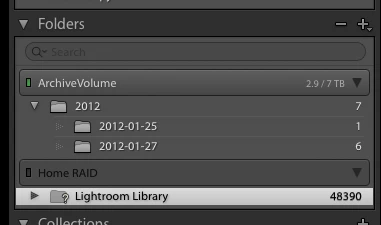
The new images show on the new drive (ArchiveVolume) but the original library displays a question mark (Home RAID). If I right click and choose 'Find missing image' I see the warning;
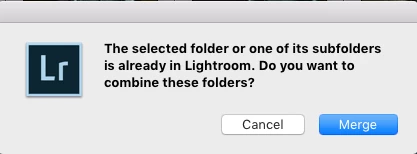
'The selected folder or one of its subfolders is already in Lightroom. Do you want to combine these folders?'
QUESTIONS:
1.
Can I just remove the question mark library?
2.
How do I get the old images to show in the new library under ArchiveVolume (only the new 7 images show)?
Cheers
Ben
 AdChoices