
Pellegutt
Participant
December 2, 2023
Answered

Lighroom 6.0 shuts down after opening (small panic)

  • December 2, 2023
  • 2 replies
  • 356 views

Hi  anyone.
My W10 LR6.0 has worked fine for several years. I have 61000 fotos in the catalog.
Today I added a new w10-katalog (left pane) and a small panic arose because:
1. LR shut down immediately.
2 LR then starts ok and all seems fine ....but...
3. After only 10-20 second it  just quits whitout any error-messages.
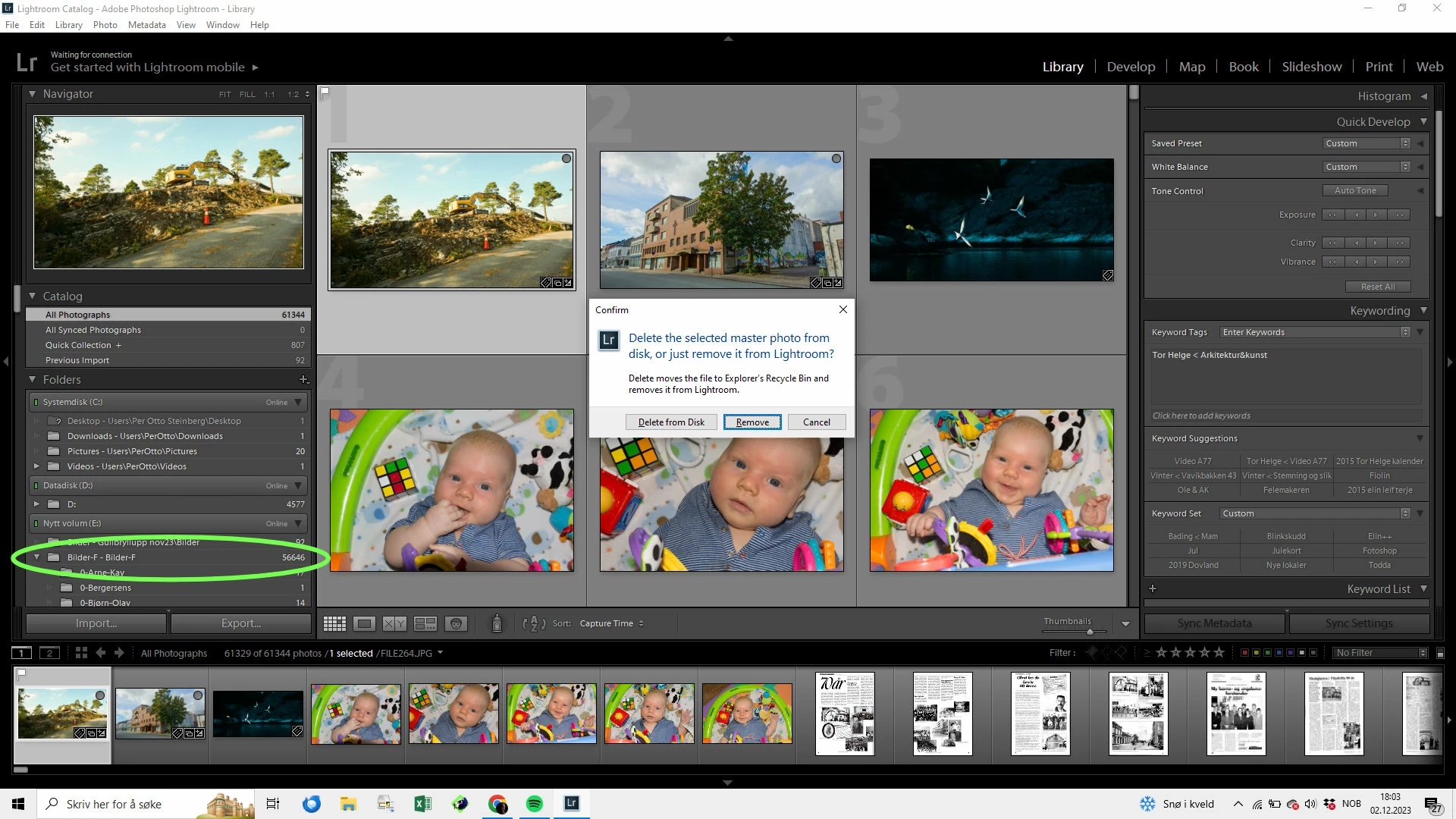
It looks that i have added my main W10-catalog (with 61000 pics) twice because:
"Bilder-F - Bilder-F" apperes twice on left pane as the added picture shows.
(The reason I can show this screenshot is: If I press DELETE just after startup I get the normal message "Delete or remove" and LR stays open. As soon as I press any option LR shuts down without any message.)  
I really hope it willbe possible to resolve this e.g. use the previous LR-catalog orsomething ????

This topic has been closed for replies.
Correct answer Pellegutt

Thanks for the answere.  
(Added W10-catalog: I presssed the +sign/add folder and choosed  a windows-folder when LR stopped.)
Happily LR no starts ok by doble-click on an old .lrcat-file.
So your comment " restoring a previous catalog version from backups " is obvious correct.
Now: How to find my last ok lrcat?  Catalog settings says; d:\lightroom\backups\023-01-26 1043.
There I find 14 subfolders named 0 to F and a zip.folder. This file gives the "Not Writeable"-error.
This is most likely the corrupted one.  How can I find the scond newest which most certain is ok?

2 replies

Rob_Cullen
Community Expert
Community Expert
December 2, 2023

I am not sure what you mean by- "I added a new w10-katalog", and I don't see "Bilder-F - Bilder-F" twice in the folders panel of your screen-shot.

"Bilder-F - Bilder-F" is the full name of one folder on E:drive.

Your screen-clip indicates you are trying to Delete one selected photo.

It is possible Catalog corruption in the catalog that 'shuts down' and restoring a previous catalog version from backups is often the only answer.


"not writable" would suggest that there are folder Permissions preventing the write.

A backup catalog in a ZIP file needs to be unzipped and preferably moved to the folder where your working catalog normally is located (first rename the corrupt catalog so as not to overwrite ). A [Double-click] on the catalog.LRCAT file will 'Open' it in Lr. (I cannot remember if Lr6 catalog backups were zipped!)

RESTORE A CATALOG FROM BACKUP


Regards. My System: Windows-11, Lightroom-Classic 15.3, Photoshop 27.5, ACR 18.3, Lightroom 9.3, Lr-iOS 10.4.0, Bridge 16.0.3 .
Pellegutt
PelleguttAuthorCorrect answer
Participant
December 2, 2023

Thanks for the answere.  
(Added W10-catalog: I presssed the +sign/add folder and choosed  a windows-folder when LR stopped.)
Happily LR no starts ok by doble-click on an old .lrcat-file.
So your comment " restoring a previous catalog version from backups " is obvious correct.
Now: How to find my last ok lrcat?  Catalog settings says; d:\lightroom\backups\023-01-26 1043.
There I find 14 subfolders named 0 to F and a zip.folder. This file gives the "Not Writeable"-error.
This is most likely the corrupted one.  How can I find the scond newest which most certain is ok?

Pellegutt
PelleguttAuthor
Participant
December 2, 2023

Working  on it......

Pellegutt
PelleguttAuthor
Participant
December 2, 2023

Updated info:
I just doublecliced on an old .lrcat  it is starts ok - and don't shuts down.  Reely  Releiving
But an unzip'ed .lrcat gives message: "Can't be opened because it is not writable". 
How to use a unzipped one?