
Participating Frequently
June 28, 2025
Answered

Light Room Classic getting "stuck" on importing photos.

  • June 28, 2025
  • 4 replies
  • 985 views

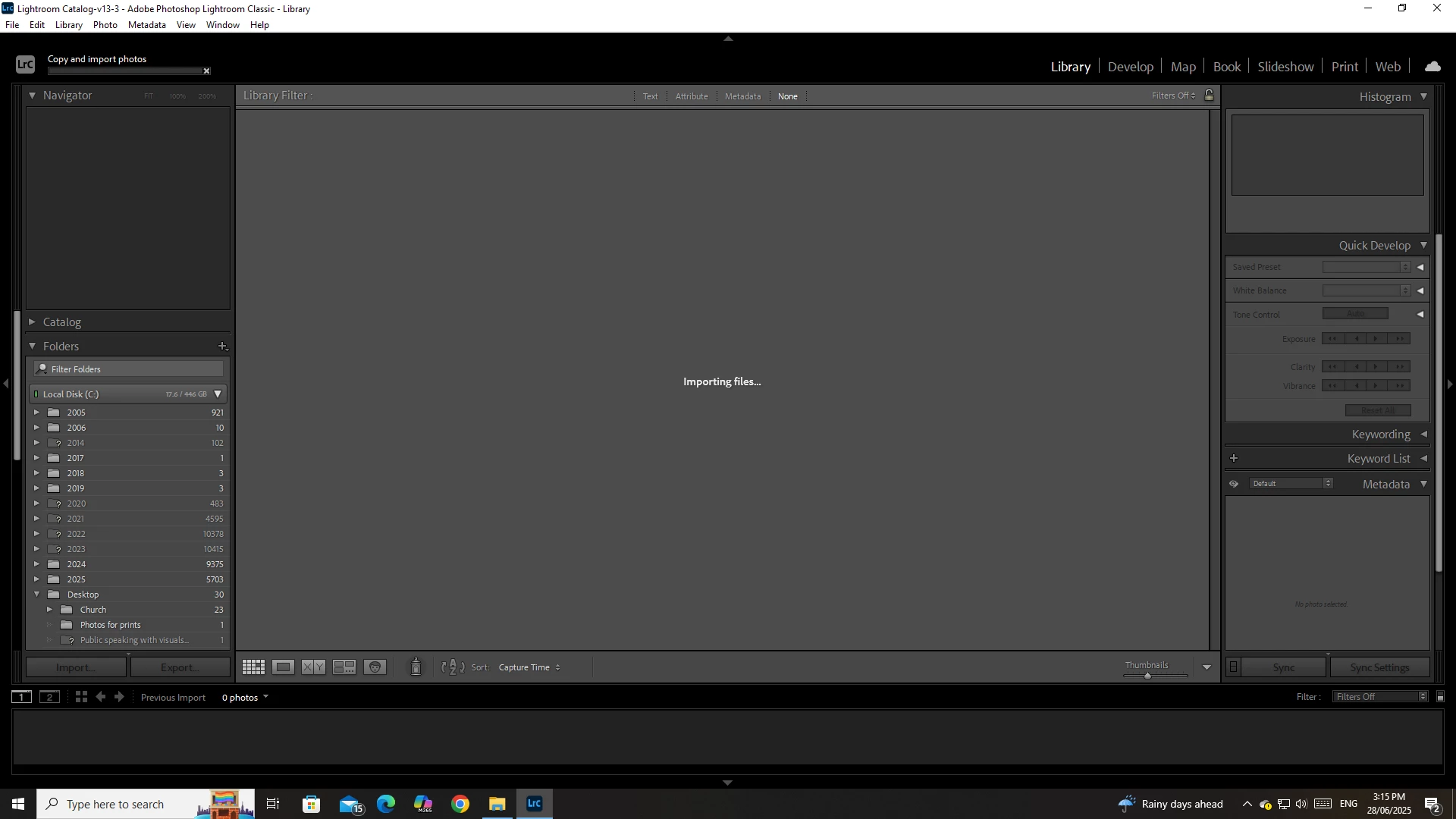
Lightroom has worked fine for me for years until last week. Now I cannot import photos. I am working on a Desktop Windows 10. I plug the camera in like usual. I select the photos that I need to import (ensuring they all have the tick). and I click Import. And the bar opens up but no progress happens. I left it all night and nothing came in. I can manually cancel the import, and when I do it says "No photos or videos were found to import."

I have tried the following: 

- Restarting the computer

- copying the images to a hard drive and importing from there (same problem happens this way too).


below is a screen shot of where it gets "stuck."
 

{Moved from Lightroom Cloud to Lightroom Classic Forum by Moderator} 

Correct answer andrewl23271864

Thanks for your suggestion but unfortunately it didn't work.  I chose a few images without a movie, dragged the to LrC and it hangs on "importing files at current location".  Nothing happens.


Just for follow up, I spoke to a senior Adobe tech who had me import one image from my group first and then import all the rest.  For some reason, that works.  He says it is not a problem with LrC but it seems strange.

4 replies

GoldingD
Legend
June 28, 2025

Two Observations:


  1. I see that you have selected Devices as opposed to Files in the Import source. LrC can be a bit obstinate when you select Devices. Sometime way back, Adobe recommended not doing that. In your case, the source shows up in both Devices and Files, so you could select Files. Try that.
  2. I see in the Folders panel that many Folders are missing. The LrC Catalog is a database and as such may not like clutter or misinformation. Try to keep your Folder structure clean. Try repairing the missing folders issue and see if that helps.
Participating Frequently
July 1, 2025

Hi GoldingD. I was a skeptic about your idea regarding the catalog database. But I decided to re-link some of the missing folders and then run an import again and it seems to be working now! Thank you so much for your suggestions. 

andrewl23271864
andrewl23271864Correct answer
Participant
November 18, 2025

Thanks for your suggestion but unfortunately it didn't work.  I chose a few images without a movie, dragged the to LrC and it hangs on "importing files at current location".  Nothing happens.


Just for follow up, I spoke to a senior Adobe tech who had me import one image from my group first and then import all the rest.  For some reason, that works.  He says it is not a problem with LrC but it seems strange.

dj_paige
Legend
June 28, 2025

Is there one or more videos in the files you are trying to import ?

Participating Frequently
July 1, 2025

No videos. Just a hand ful of photos. Not even 1gig worth. There is 17 free gig of space on the C Drive. 

dj_paige
Legend
June 28, 2025

Please show us a similar screen capture of the Import dialog box just before it gets stuck.

Participating Frequently
June 28, 2025

Ian Lyons
Community Expert
Community Expert
June 28, 2025

Have you tried resetting the LrC Preference file? If not, then follow the procedure set out in Method 1 at https://helpx.adobe.com/lightroom-classic/help/reset-preferences.html

Participating Frequently
June 28, 2025

Thank You Ian. I have just followed the instructions and reset my preference file but the problem still persists.