
Inspiring
January 20, 2026
Answered

Lightroom 15.0.1 Catalog Photo Count

  • January 20, 2026
  • 13 replies
  • 198 views

I import CR3 files in daily directories into my catalog.


I process the CR3 files then export them converting them to JPG


I then import the JPG files to put back into the daily directory they came from and to keyword them.


The counters on all the directories are set to zero after this import.


I have to exit and restart Lightroom to get the counters reset to their actual number of files in each folder.


If I delete the CR3's as no longer necessary the counter goes negative by the number of photos removed.
Correct answer johnrellis

[This post contains formatting and embedded images that don't appear in email. View the post in your Web browser.]


"I process the CR3 files then export them converting them to JPG. I then import the JPG files to put back into the daily directory they came from"


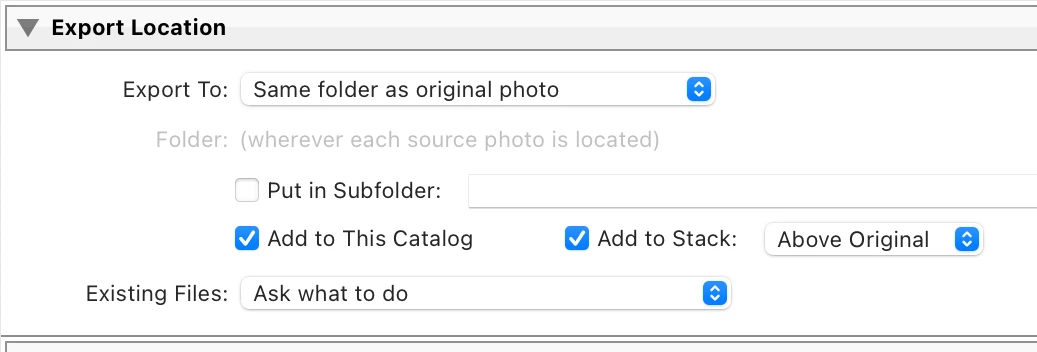
You can do this in one step by telling Export to export to the same folder as the originals and to add the exported files back to the catalog:

875708i495BFFC9B398215B.png


13 replies

Inspiring
August 3, 2026

Thanks I will follow the link you have provided. Thd numbers will go negative if I carry on working rather than restarting.


I am using an HP Omen Laptop with C: and D: drives.

My catalog is split across the D: drive and an external G: drive. A 5TB USB drive. I don't always have the G: drive plugged in.

All my “work” is done on the D: drive

I have a rolling 12 monthly Jan to Dec folders. All raw files go into daily folders within the month.

The G: drive holds all the Annual folders.

Once I have processed all the raw files, I convert them to jpg then keyword them.

Running around 6 months behind I move the processed jpg daily folders across to the correct year and month folder on the G: drive.

This serves 2 purposes. We live full time freedom camping in a motorhome. Power is either from alternator or solar. Not running G: drive all the time makes a tiny contribution to concerving electricity.

I am 78. My database of photos is preserved in jpg. This means any family members in the future have complete access to all my photos without needing something that understands raw. They are preserved in a totally universal format, together with the keywords.

Rob_Cullen
Community Expert
Community Expert
August 3, 2026

catalog is split across the D: drive and an external G: drive”- 

Not exactly! Your CATALOG file (the .LRCAT file)  resides only on one drive. Your photo files can be “split” and stored on any drive, however a drive must be plugged in and connected for the Catalog to access the photos.

All my “work” is done on the D: drive”-

Not exactly! All your work is done in the Catalog. All your editing is stored in the catalog. When you export those JPGs the editing is applied to the JPGs exported.

If a drive is not plugged in you will see ‘Missing’ photo exclamation marks on the grid view borders of photos in the library. Even if you create and use Smart Previews you can do edits, but any operating system based functions (eg. moving files) must have the drive with the files connected.

Maybe not using the G:drive plugged in is contributing to the “0” problem.

Here is an advanced hint- For your family photos (a noble enterprise) you should investigate the use of Publish Services, so when set up, any photo you add to a collection (your best shots) within Publish Services can be automatically exported as JPG to a specified folder- No manual exporting required! And the photos exported by Publish Services can be easily updated if you re-edit the original raw file.

 (I’m 78 also 😏)

Regards. My System: Windows-11, Lightroom-Classic 15.4.1, Photoshop 27.8, ACR 18.4, Lightroom 9.4, Lr-iOS 10.4.0, Bridge 16.0.3 .
Inspiring
August 3, 2026

You are correct with the explanation which is exactly the way I understand it also. Once photos are shifted to the G Drive they are almost never worked on by Lightroom again. So the error only ever occurs with the G Drive plugged in. The catalog includes all my Mum and Dad's photo albums scanned in, all our family colour slides from us growing up scanned in,  then all my own family photos from my married life then on into the digital age.

Thanks for the two avenues you have pointed me at.

Inspiring
July 31, 2026

This issue has persisted to drive me nuts over the 6 months that have elapsed. I have enclosed a workflow illustration to show it happening.


I really appreciate the export to original location tip - it really helps my workflow. 

Rob_Cullen
Community Expert
Community Expert
August 1, 2026

Why have you not adopted the Export approach provided by ​@johnrellis  ?

Your process need to simplified as in my Export dialog- ONE step - Then maybe the count might show correctly.


Regards. My System: Windows-11, Lightroom-Classic 15.4.1, Photoshop 27.8, ACR 18.4, Lightroom 9.4, Lr-iOS 10.4.0, Bridge 16.0.3 .
Inspiring
August 1, 2026

My System: Windows-11, Lightroom-Classic 15.4.1, OneOn Photo Raw Max 2026.5


OK - I’ll try the step that I was not doing, As some of my conversions from RAW to JPG can be 400+ photos at a time, I am trying to keep the RAW and JPG from appearing concurrently in the same folder. I can see from what you are saying that I can see how to modify my process and see if that overcomes the problem. I can see in the suggested approach that the photos never leave the catalog, where as I remove the catalog entries then recreate them with the import.


johnrellis
Legend
January 21, 2026

I'm not able to reproduce that misbehavior, but I may not be doing the same exact steps.


Try deleting the Helper.lrdata folder:

a) Do Catalog Settings > General > Show to open Finder / File Explorer on the current catalog folder.
b) Exit LR.
c) In that folder, delete the folder "<catalog> Helper.lrdata".
d) Restart LR, and it will rebuild the folder.

The Helper.lrdata folder caches information about metadata, keywords, folders, collections, and other things to speed the performance of LR and it can sometimes get corrupted. In recent versions, LR has used it more heavily to improve the speed of displaying metadata, and there have been a fair number of bugs with it.


* * *


If that doesn't help, attach a full-resolution screen recording (not a phone video) showing the precise steps you're taking. (Make the LR window as small as possible to reduce the size of the video.)

https://www.descript.com/blog/article/how-to-screen-record-on-windows

johnrellis
johnrellisCorrect answer
Legend
January 21, 2026

[This post contains formatting and embedded images that don't appear in email. View the post in your Web browser.]


"I process the CR3 files then export them converting them to JPG. I then import the JPG files to put back into the daily directory they came from"


You can do this in one step by telling Export to export to the same folder as the originals and to add the exported files back to the catalog:

875708i495BFFC9B398215B.png


Inspiring
January 21, 2026

Thanks - I will investigate further.

My reason for doing it the way I describe is that I convert to JPG, then
move the CR3 to a predelete folder within Lightroom so that any JPG that
end up with the dreaded circle error are still on hand to repeat the
export/import from the predelete folder.

Because I have all my photos sorted by file name order, ending up with
scores of JPG amd CR3 alternating in the folder makes removing the CR3 a
bit tedious, but I guess its easy enough to resort by type.


--

Cheers

David

[Removed personal information] (NZ)

Skype david.francis.nz