
Inspiring
July 3, 2026
Answered

Lightroom 15.4 Metadata Fields

  • July 3, 2026
  • 2 replies
  • 49 views

When updating metadata fields for a multiple selection in the grid view, only the current photo field updates.

It used to update the metadata field for all selected photos.

I use this lost feature to update metadata fields such as sub location, caption etc for a couple of hundred photos at a time.

I am now having to enter the data per photo which becomes a huge task.
    Correct answer Per Berntsen

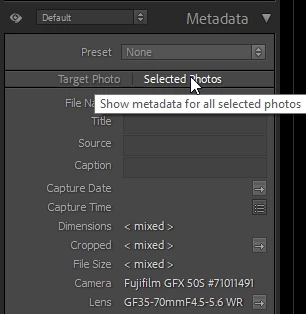
    Sounds like you have Target Photo selected at the top of the Metadata panel, in which case metadata will only be applied to the most selected photo.
    Click on Selected Photos, and metadata wll be applied to all selected photos.


    2 replies

    Inspiring
    July 3, 2026

    Thanks Per. You got it in one! Missed this - something happened about 2 weeks ago. All my options reset, even my own variation to the order of the right hand panels in Develop, my screen banner, all the grid and loupe view display options etc etc. I have had to work through and repersonalise everything.


    This is now no longer an issue.

    Per Berntsen
    Community Expert
    Per BerntsenCommunity ExpertCorrect answer
    Community Expert
    July 3, 2026

    Sounds like you have Target Photo selected at the top of the Metadata panel, in which case metadata will only be applied to the most selected photo.
    Click on Selected Photos, and metadata wll be applied to all selected photos.