


DibbyDoo
Participating Frequently
June 26, 2016
Answered

Lightroom 2015.6 Prints Dark And Wrong Colours

  • June 26, 2016
  • 19 replies
  • 33248 views

Hi i have been using Lightroom 6.5.1 for all my prints and prints fantastic i have the epson ET-2550 printer. i decided to do the update to the latest version 2 days ago to lightroom 2015.6 and now all my prints turn out dark and the wrong colours i tried reseting lightroom and installing and reinstalling everything and it still does the same and when ever i cool back to LR 6.5.1 or 5.7.1 the prints come out fine and looking very good can any one shine a light on what the problem is becsaue i can't afford to keep wasting good paper i will attach a picture of a printed picture of it printing good and the print that looks bad on the same piece of paper thank you so much
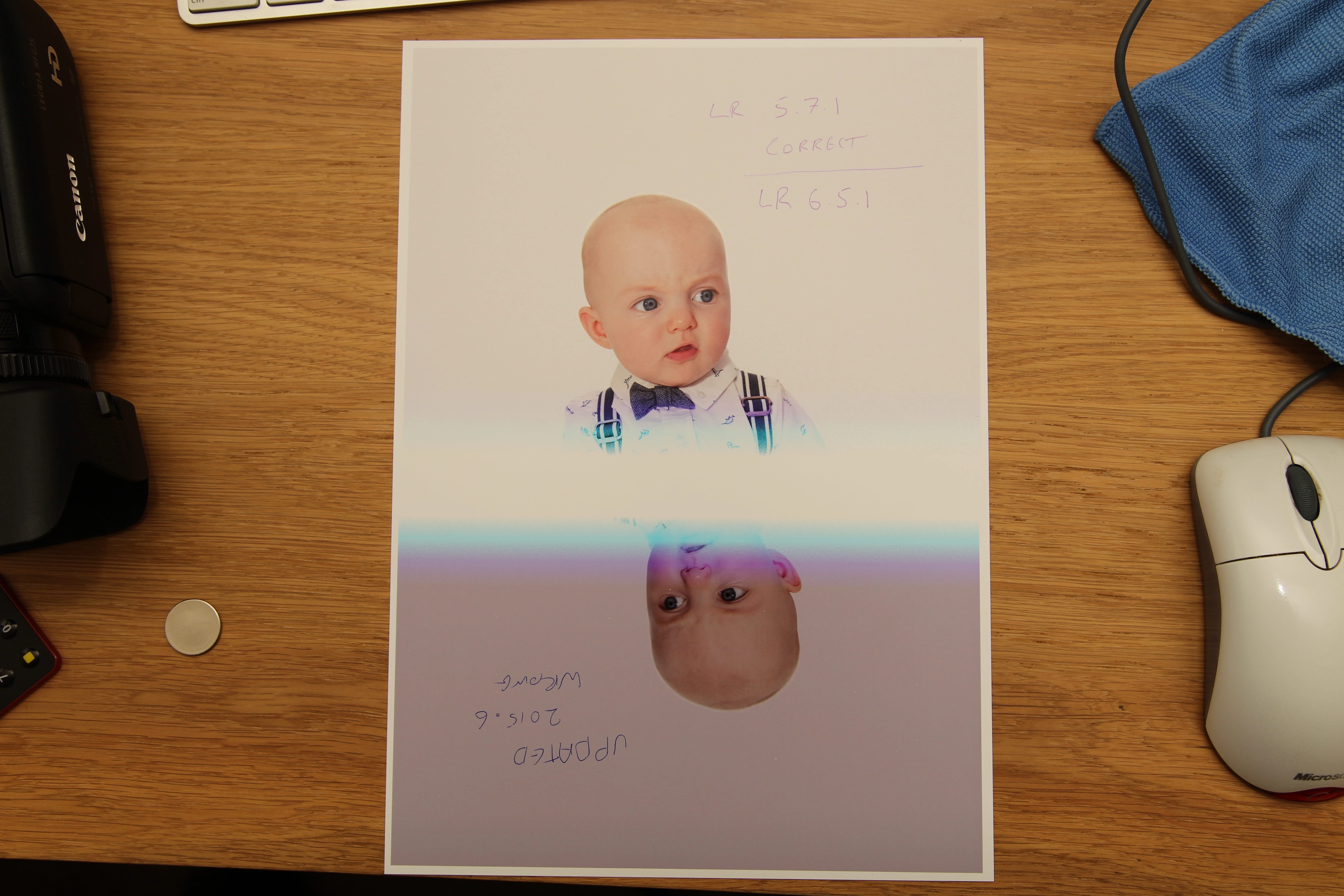

    This topic has been closed for replies.
    Correct answer Akash Sharma

    Hi All,

    This issue should be fixed in the CC 2015.6.1 update that went live today.Please update Lightroom to latest version.Refer the link Lightroom CC 2015.6.1 now available

    Regards,

    Akash

    19 replies

    Participating Frequently
    July 2, 2016

    For what it is worth, I'm running a P800.  Have the latest Epson driver installed and running MacOS 10.11.5

    Just to check I printed Andrew's test image on Ilford Gallerie Smooth Pear using a custom ICC profile through

    1.     LR CC2015.6

    2.     LR CC2015.5.1

    3.     Affinity Pro 1.4.2

    4.     QTR PrintTool

    LR 15.5.1, Affinity Pro, and QTR yield identical prints.  LR 2015.6  print comes out undersaturated and banded in the colour continuum.

    Can't see how the Epson driver, or the OS can be responsible.  Definitely something amiss in 2015.6

    Participating Frequently
    July 2, 2016

    Ha!  Should be Smooth Pearl.   Colours might be off on a smooth pear!

    Was DYP
    Inspiring
    July 2, 2016

    I am wondering has anyone created a new user and tried printing with LR2015.6 when logged in as the new user. This would eliminate preferences, templates, etc. as a potential cause of this issue.

    Adobe Employee
    July 1, 2016
    TheDigitalDog
    Inspiring
    July 1, 2016

    simonsaith wrote:

    There is a new Adobe help doc on this issue https://helpx.adobe.com/x-productkb/multi/unexpected-colors-when-printing-mac.html

    I did exactly what was recommended.

    Downloaded the 3880 driver again.

    I did an uninstall by removing the printer from Print/Fax. This is what I'd expect 90+% of your customers would do as there is no Epson uninstaller!

    Then I reinstalled the driver as you recommend.

    I printed my color reference image, on Exhibition Fiber. That paper isn't listed as being an issue from the URL. Doesn't matter however as you tell us that following your suggestions with the latest driver is a fix anyway.

    I printed with LRCC and LR 5. THEY DO NOT MATCH! Of course, if what was outlined in that URL above were accurate, they would.

    This didn't work! I wonder if anyone inside of Adobe actually tested this. Based on what I've just tested, it apepars no one did.

    Further this isn't an Epson 3880 only issue. Why the URL goes out of it's way to suggest it is, is kind of alarming.

    I suggest others follow the steps no matter the manufacturer; delete then reinstall the driver. Make a print in CC2015.6 and any older version. You can use this test reference image if you wish: http://www.digitaldog.net/files/2014PrinterTestFileFlat.tif.zip http://www.digitaldog.net/files/Gamut_Test_File_Flat.tif

    On my Epson, the blues are the worst offenders and obviously do not match. Examine the Granger Rainbow (the big synthetic just above the gray bar). Anyone seeing the two app's match?

    Author “Color Management for Photographers" & "Photoshop CC Color Management/pluralsight"
    Conrad_C
    Community Expert
    Community Expert
    July 1, 2016

    thedigitaldog wrote:

    I did an uninstall by removing the printer from Print/Fax. This is what I'd expect 90+% of your customers would do as there is no Epson uninstaller!...Further this isn't an Epson 3880 only issue. Why the URL goes out of it's way to suggest it is, is kind of alarming.

    I'm trying to find time to do a good test, but in the meantime I have some suggestions that might help those who do.

    • I wonder if removing just that one printer is enough. Some printer problems require going beyond simply deleting the printer, and doing a full reset of the Mac printing system (scroll down to the heading "If your Mac has some other issue with your printer or scanner." I don't know if that will be needed to "clear out cached information" as the tech doc says, but it's something to try.
    • While the tech doc has a section with info about the Epson driver, that section does say "Model Specific Information." The rest of the tech doc, including the title and the URL, is not Epson-specific.
    Adobe Employee
    July 1, 2016

    To revert to earlier version of Lr, uninstall, goto Install Photoshop Lightroom,  download and install Lr CC 2015/6.0,  then download and apply the CC 2015.5.1/6.5.1 patch.

    MarkDS
    Inspiring
    July 1, 2016

    What "patch" are you talking about? This is unclear. And what does one end-up with: the old printing implementation or the new defective one, or something else altogether?

    Also, when reverting to a previous version of LR, will the current catalog in the new version automatically port there? And what happens to edits made to photos with the new Transform tools? Do they simply get lost or does worse happen?

    TheDigitalDog
    Inspiring
    July 1, 2016

    The other question for Adobe is this: Can users downgrade a version to print and keep the current version installed for new features? I know I can run LR5 and LR6. Can one run say CC 2015.5 and CC 2015.6 on the same machine (not at the same time of course)?

    Author “Color Management for Photographers" & "Photoshop CC Color Management/pluralsight"
    Participating Frequently
    July 1, 2016

    We have reported the problem to Apple already.

    And are awaiting the response from them.

    MarkDS
    Inspiring
    July 1, 2016

    Please do keep us informed about exactly where this problem is lodged and as soon as you know it , what the solution path and timing will be. This bug is having real consequences for me (and undoubtedly many others) in terms of paper, ink and more valuable than both, wasted time.

    MarkDS
    Inspiring
    July 1, 2016

    I have conducted rigorous testing of the consistency between printed values and patch reference values with the latest update of Lightroom and I confirm that there are huge disconnects compared with the same tests done several months ago on the previous version of Lightroom. The dE errors are very large. Wherever this problem is, whether Adobe or Apple or both, the two of you need to confer and fix it ASAP.

    Participating Frequently
    June 28, 2016

    I'm getting something similar on the new Photoshop CC 2015.5 Same file prints differently than when using the previous version. Dark tones are deeper, and colors slightly different. The prints are acceptable, but I still prefer the rendering from the earlier version. I'm on a Mac, printing to an Epson 4900, with a custom profile I built with X-Rite ProfileMaker Pro software.

    Abambo
    Community Expert
    Community Expert
    June 27, 2016

    I can confirm this behaviour even on a non photo printer. When I however print to a file and print that file with windows I get what I would call correct colours.

    When selecting "Color Management ->sRGB... (check include Display Profiles) & Intend Perceptual" I get the same results as Print to a file.

    ABAMBO | Hard- and Software Engineer | Photographer
    BillBill
    Participant
    June 26, 2016

    Make sure your monitor is color calibrated / adjusted as noted above.  Use the soft proof feature of LR to match the image to the medium on which it will be printed.  Too bright a monitor is often not the best way to get color matching. 

    DibbyDoo
    DibbyDooAuthor
    Participating Frequently
    June 26, 2016

    Didn't you read what i put its nothing to do with my monitor

    TheDigitalDog
    Inspiring
    June 26, 2016

    Try printing out this color reference image:

    http://www.digitaldog.net/files/2014PrinterTestFileFlat.tif.zip

    Dark? 

    Author “Color Management for Photographers" & "Photoshop CC Color Management/pluralsight"
    Participant
    June 26, 2016

    I am experiencing a similar problems, although my prints are not coming out darker the flesh tones are skewed to the red side.

    Using Epson 3880 and Profiled NEC PA 272W calibrated monitor.  Did a lot of troubleshooting including switching over to my Mac Book Pro which still had LR 5 on it.  Found Kodak reference file was a match to my monitor and printed fine. In LR CC 2015.6 the prints are off a small amount to the red side in the flesh tones, enough so to be annoying. I had no printing problems in LR 5.  There is something they changed?

    DibbyDoo
    DibbyDooAuthor
    Participating Frequently
    June 26, 2016

    Im not sure if its something adobe as changed in the new update but i tried everything and prints out the same no matter what. i even turn up the exposure to really bright and tried printing it. still turns out the same really dark. not sure if its a bug in the new update with some printers. but it need sorting as we paying a subscription to have the latest updates thanks