
Participant
July 14, 2018
Question

Lightroom 5 will not let me sign in to my Adobe account

  • July 14, 2018
  • 2 replies
  • 1291 views

I have Lightroom 5.7.1 on my Windows 10 64bit desktop. I've been trying to sign into it via the "Get started with Lightroom mobile" drop down without any luck. After I enter my password, the popup screen just kinda grey's out. It does the same thing when I try to used my Google account.

Here's a screenshot:
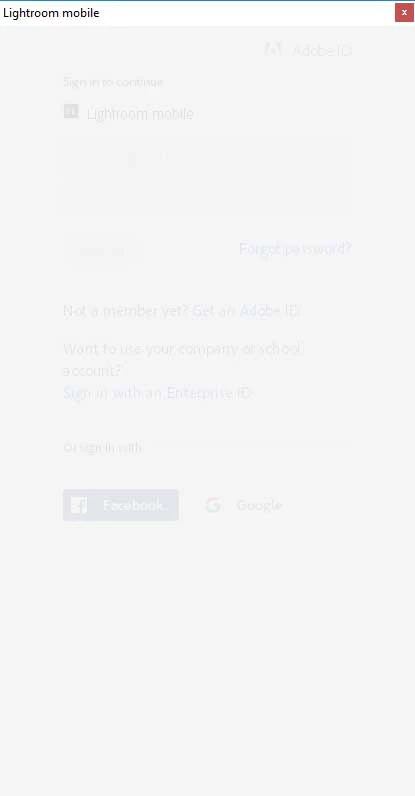
Since I'm able to post this using the same account as I'm trying to sign in with in LR, it's obviously not something to do with me messing up my password. I copy and paste from my password manager.

I have tried shutting down LR completely and trying again.

So, any suggestions?

Thanks!

This topic has been closed for replies.

2 replies

Just Shoot Me
Legend
July 15, 2018

Actually once Adobe came out with LR CC 2015, AKA LR V6 perpetual License, all support stopped for LR 5 including any Sync to the Web feature that went along with it. The Perpetual licensed version of LR CC 2015, LR 6, never had the sync feature enabled. To have that you had to have a subscription to LR CC 2015.  The same is true for LR CC 2015. Once Adobe came out with LR Classic CC, Version 7 (Desktop Centric version), all sync features of LR CC 2015 stopped working. If you have a subscription you should of upgraded to the newer version of LR and all support for the older version stopped.

If you want to test LR CC Mobile then do so on your phone and or pad and if you want to test it on the desktop then install the desktop version of LR CC Cloud Centric on your desktop/notebook computer.

Participant
July 25, 2022

Hello, I have LR CC2015 and a CC subscription and have the exact same log in problem when using the "get started with lightroom mobile" dropdown in LR CC2015. Asks and takes email, sends verification code to email, accepts it and moves on to ask for password, and then a blank grey box appears and stays for ever.

Any help appreciated.

Ani

Rob_Cullen
Community Expert
Community Expert
July 26, 2022

Post a screen-clip of the report from the Lightroom MENU: Help > System Info...


If you do have a subscription to the Photography Plan that includes Lightroom-Classic, why have you not upgraded to the latest version 11.4.1 (aka Lightroom-Classic)?


Lr CC2015 is now 7 years old?


Regards. My System: Windows-11, Lightroom-Classic 15.1.1, Photoshop 27.3.1, ACR 18.1.1, Lightroom 9.0, Lr-iOS 10.4.0, Bridge 16.0.2 .
dj_paige
Legend
July 14, 2018

Do you have a subscription to Lightroom, or did you purchase Lightrooom 5 without a subscription?

jerracAuthor
Participant
July 14, 2018

No subscription. I have a full, normal, license.

Um, how would that cause this error? If it requires a subscription, I'd expect a message to pop up explaining that when I log in. Not for it to just die.

dj_paige
Legend
July 14, 2018

Then you should NOT sign in. Why are you even trying?