
EdwardJohnAllen
Inspiring
December 12, 2017
Answered

Lightroom 6.13 Shuts down when I go to "Deleted" images

  • December 12, 2017
  • 1 reply
  • 728 views

Never had this issue before but Lightroom 6.13 (Perpetual License) gets the following error message whenever I go to my "deleted" images. It does not seem to matter how I get there, I still get the same fatal error message, and I have to restart the program to continue.
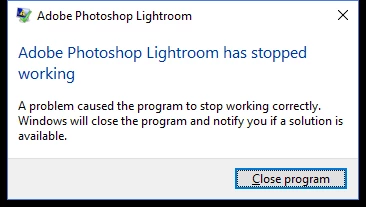
do I need to reinstall the software to fix this glitch? and if so, whats the best way to proceed please?

Thanks in advance. !

This topic has been closed for replies.
Correct answer EdwardJohnAllen

Thanks Axel

I disabled the GPU support and that allowed me to delete the images. I've never had this issue previously (although the GPU support has been ON for as long as I can remember) so can it now be turned back on again?

1 reply

AxelMatt
Community Expert
Community Expert
December 12, 2017

Try to deactivate the GPU support

Adobe Lightroom GPU Troubleshooting and FAQ

Reset the Lightroom preferences

How to set Lightroom Classic CC preferences

Please check the Windows application log and Windows system log if there are appropriate entries to identify what's the problem that LR crashed.

My System: Intel i7-8700K - 64GB RAM - NVidia Geforce RTX 3060 - Windows 11 Pro 25H2 -- LR-Classic 15 - Photoshop 27 - Nik Collection 8 - PureRAW 6 - Topaz Photo AI
EdwardJohnAllen
EdwardJohnAllenAuthorCorrect answer
Inspiring
December 12, 2017

Thanks Axel

I disabled the GPU support and that allowed me to delete the images. I've never had this issue previously (although the GPU support has been ON for as long as I can remember) so can it now be turned back on again?

AxelMatt
Community Expert
Community Expert
December 13, 2017

EdwardJohnAllen  schrieb

I've never had this issue previously (although the GPU support has been ON for as long as I can remember) so can it now be turned back on again?

If you don't work with high resolution monitor (4k/5k) you don't get a significant increase of performance when you activate the GPU support. I'll think it's better to leave this option unchecked.

Axel

My System: Intel i7-8700K - 64GB RAM - NVidia Geforce RTX 3060 - Windows 11 Pro 25H2 -- LR-Classic 15 - Photoshop 27 - Nik Collection 8 - PureRAW 6 - Topaz Photo AI