Participant
July 6, 2022
Answered

Lightroom 6.8 on Windows Übertragung Stichwortverzeichnis to Lightroom Classic on MacBook

  • July 6, 2022
  • 2 replies
  • 309 views

Hallo Community,


wie kann ich mein Stichwortverzeichnis von Lightroom 6.8 in das akutelle Lightroom Classic übertragen. Ich habe viel Arbeit in das Verzeichnis gesteckt und es wäre eine Katastrophe, wenn man die Daten nicht übertragen könnte. Wichtig zu wissen ist, dass das Stichwortverzeichnis von Lightroom 6.8 auf meinem Windows-Laptop in das neue Stichwortverzeichnis von dem aktuellen Lighroom Classic auf meinem MacBook übertragen werden soll.

Vielen Dank schon einmal für die Rückmeldungen!

LG

JP


{Thread title updated by moderator}
This topic has been closed for replies.
Correct answer Sameer K

Hi JP, 


Thanks for reaching out. I'd love to help you figure this out.


Lightroom Classic offers you compatibility with early versions of Lightroom & you can upgrade a catalog with Lightroom Classic.

You would first want to move your presets & the catalog.lrcat, catalog.lrcat-data, Previews.lrdata, and (if present) Smart Previews.lrdata files from the Windows machine to your new MacBook.


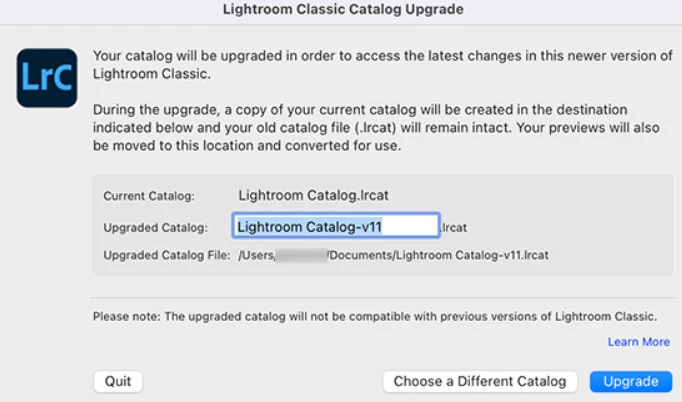
Once the catalog is on the MacBook, you can double-click it to open with Lightroom Classic. This should prompt Lightroom Classic's upgrade pop-up screen as follows.


Check this article for help with moving the catalog to a new computer and upgrading an old catalog to work on a more recent version of Lightroom Classic: https://helpx.adobe.com/lightroom-classic/help/create-catalogs.html


We hope it helps,

Thanks!
Sameer K

2 replies

Victoria Bampton LR Queen
Community Expert
Community Expert
July 7, 2022

Thread moved from Lightroom Ecosystem to Lightroom Classic forum.

Victoria - The Lightroom Queen
Sameer K
Community Manager
Sameer KCommunity ManagerCorrect answer
Community Manager
July 6, 2022

Hi JP, 


Thanks for reaching out. I'd love to help you figure this out.


Lightroom Classic offers you compatibility with early versions of Lightroom & you can upgrade a catalog with Lightroom Classic.

You would first want to move your presets & the catalog.lrcat, catalog.lrcat-data, Previews.lrdata, and (if present) Smart Previews.lrdata files from the Windows machine to your new MacBook.


Once the catalog is on the MacBook, you can double-click it to open with Lightroom Classic. This should prompt Lightroom Classic's upgrade pop-up screen as follows.


Check this article for help with moving the catalog to a new computer and upgrading an old catalog to work on a more recent version of Lightroom Classic: https://helpx.adobe.com/lightroom-classic/help/create-catalogs.html


We hope it helps,

Thanks!
Sameer K

JP94Author
Participant
July 6, 2022

Hey Sameer,


it's finally working! Thank a lot for your fast support!


Many greetings!

JP

Sameer K
Community Manager
Community Manager
July 6, 2022

Thanks for confirming this.

We are here to help.


Thanks!
Sameer K