
Inspiring
October 12, 2021
Answered

Lightroom 6 instalation

  • October 12, 2021
  • 5 replies
  • 4101 views

Hi All,

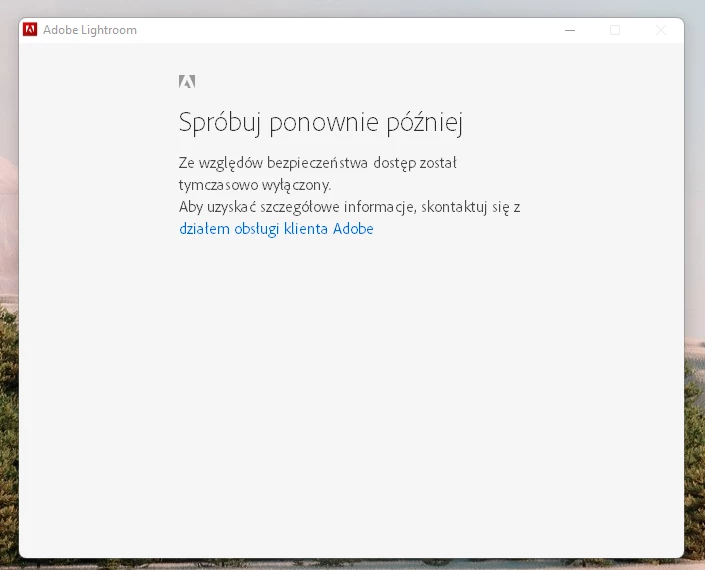
I am trying to install my Lightroom 6 on Windows 11. Everytime I start I get following error - it says: Try again later. from the Security reasons your access was temporarly turned off. Please contact with Adobe Support. And now when I contact with Support they say: either I should install LR CC to not have such problem (I bought stand alone version to not pay for Sub. if I do not need to), either to download the instalation file again and they provide the link (this solution does not work). Funny fact is that I can login to web account without any problem. Can you advice?
This topic has been closed for replies.
Correct answer defaulth3ng3bs05gsj

Thank you all for your support. Without you I would not solve it - to be honest Adobe support did not done it anyway. 

so my story has a Happy End! I made it. The solution was with 2-factor indentification. As soon as I have disabled 2fi on my account the installer went through the inatallation process. Looks like in my case LR installer stuck on logging due to the 2fi. Sad part of the story is that Adobe Support was unable to find it out based on error code i gived them. Anyway i am happy as I can use it still. And it worka fine on W11 :).

5 replies

DdeGannes
Community Expert
Community Expert
October 13, 2021

See the following info on Lightroom compatibility with Win 11.

The reference you see to Lightroom 4, is the new Cloud Based version, so as I indicated earlier Lightroom 6.14 may not be compatible with Win 11.

https://www.lightroomqueen.com/lightroom-and-windows-11-compatibility/


Regards, Denis: iMac 27” mid-2015, macOS 11.7.10 Big Sur; 2TB SSD, 24 GB Ram, GPU 2 GB; LrC 12.5,; Lr 6.5, PS 24.7,; ACR 15.5,; (also Laptop Win 11, ver 24H2, LrC 15.0.1, PS 27.0; ) Camera Oly OM-D E-M1.
defaulth3ng3bs05gsjAuthorCorrect answer
Inspiring
February 9, 2022

Thank you all for your support. Without you I would not solve it - to be honest Adobe support did not done it anyway. 

so my story has a Happy End! I made it. The solution was with 2-factor indentification. As soon as I have disabled 2fi on my account the installer went through the inatallation process. Looks like in my case LR installer stuck on logging due to the 2fi. Sad part of the story is that Adobe Support was unable to find it out based on error code i gived them. Anyway i am happy as I can use it still. And it worka fine on W11 :).

DdeGannes
Community Expert
Community Expert
October 12, 2021

Try the following link and search the site for the Win version Lightroom 6 .14. You may have to go back several pages at the link.

https://prodesigntools.com/adobe-cc-2015-direct-download-links.html#download-instructions

Adobe does not have downloads on their site available for download.

Careeeesa, can also help getting it activated on you Adobe a/c.

Regards, Denis: iMac 27” mid-2015, macOS 11.7.10 Big Sur; 2TB SSD, 24 GB Ram, GPU 2 GB; LrC 12.5,; Lr 6.5, PS 24.7,; ACR 15.5,; (also Laptop Win 11, ver 24H2, LrC 15.0.1, PS 27.0; ) Camera Oly OM-D E-M1.
Inspiring
October 12, 2021

Will contact with her for sure. Adobe gived me a link to download 6.14. Did it and same error msg. appeared. I also have had a working install win version which i was using for a lasy few years without any problem. 

John Waller
Community Expert
Community Expert
October 12, 2021
quote

I am trying to install my Lightroom 6 on Windows 11.


Although Windows 11 will never be officially supported by Lightroom 6, it's usually possible to install Windows software on most versions.


How far have you got through the installation process?


Is that screenshot from installing or during first launch after installing?

Inspiring
October 12, 2021

It happens just after i press .exe file and installer unpacs.

DdeGannes
Community Expert
Community Expert
October 12, 2021

Is it possible to translate the error message to English, the best you can.

Regards, Denis: iMac 27” mid-2015, macOS 11.7.10 Big Sur; 2TB SSD, 24 GB Ram, GPU 2 GB; LrC 12.5,; Lr 6.5, PS 24.7,; ACR 15.5,; (also Laptop Win 11, ver 24H2, LrC 15.0.1, PS 27.0; ) Camera Oly OM-D E-M1.
DdeGannes
Community Expert
Community Expert
October 12, 2021

You can also make contact with an Adobe staff member named @CMass using the private message option in this forum. 

Send a message to her for assistance, she may request info on your Adobe account. The message link is available by clicking in the top right corner of the forum.


Regards, Denis: iMac 27” mid-2015, macOS 11.7.10 Big Sur; 2TB SSD, 24 GB Ram, GPU 2 GB; LrC 12.5,; Lr 6.5, PS 24.7,; ACR 15.5,; (also Laptop Win 11, ver 24H2, LrC 15.0.1, PS 27.0; ) Camera Oly OM-D E-M1.
Inspiring
October 12, 2021

Thx. I will try to contact with her.

DdeGannes
Community Expert
Community Expert
October 12, 2021

Just some thoughts.

The last version of Lr 6 was released in Dec 2017 as version 6.14 and support ceased around the end of 2018.

I am not sure if Lr 6 will install on Win 11 which is a completely new version released in the last couple of weeks.

Your license key only allows you two activated installations at any time.

Lr 6 installation was unique it could be installed with the license key version which you have or as a subscription version Lr CC 2015. It just depends how you activate the application.

If you need to deactivate one of your previous installations you will have to make contact with Adobe staff.

Please provide us with more info.

Regards, Denis: iMac 27” mid-2015, macOS 11.7.10 Big Sur; 2TB SSD, 24 GB Ram, GPU 2 GB; LrC 12.5,; Lr 6.5, PS 24.7,; ACR 15.5,; (also Laptop Win 11, ver 24H2, LrC 15.0.1, PS 27.0; ) Camera Oly OM-D E-M1.
Inspiring
October 12, 2021

Always been using it only on PC + Laptop. And never had a problem with reinstall so far on any of them. Issue exists even when i use original DVD so it is not the software i use to install issue. But fair point with 2 devices. just realized that few days ago i have installed Lr on mobile and logged with same credentials. So maybe that is the reason. I will test in te morning.