Inspiring
December 13, 2016
Answered

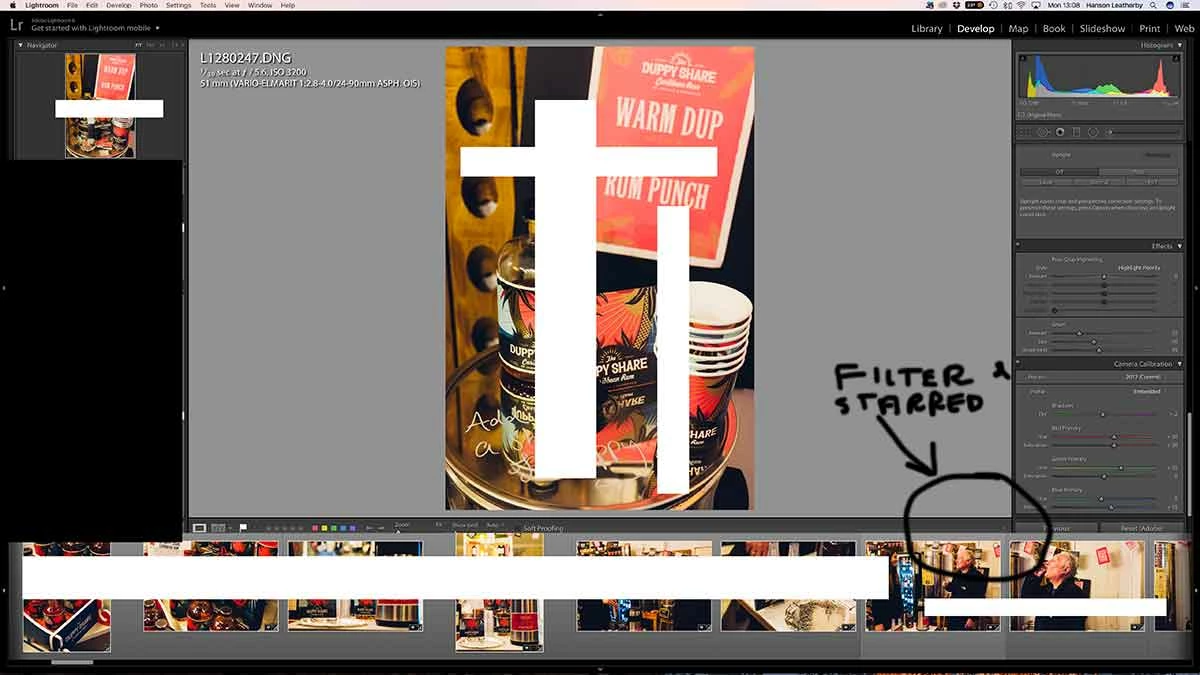
Lightroom 6 mac, my filter dropdown to activate flagged files and starred files and coloured files, has disappeared in Develop mode. Can anyone tell me how to make it return?

  • December 13, 2016
  • 3 replies
  • 997 views

In Lightroom 6 on a mac, my filter dropdown to activate flagged files and starred files and coloured files, has disappeared in Develop mode. Can anyone tell me how to make it return? My cat walked over my keyboard and pressed a short key. Also the lower bar for the images seems different and larger and the images are a little cropped. Can anyone help?!
    This topic has been closed for replies.
    Correct answer hansonl28200515

    I worked it out by backing up the Lightroom catalogue and then restarting the application whilst holding down the shift and option key (mac) which allows you to select reset lightroom preferences. This fixed it

    3 replies

    Todd Shaner
    Legend
    December 13, 2016

    hansonl28200515 wrote:

    In Lightroom 6 on a mac, my filter dropdown to activate flagged files and starred files and coloured files, has disappeared in Develop mode.

    See if it's related to the problem at the below link. The solution for now is to go to menu Window> and uncheck 'Show Tab bar.' It's only available and happening on OS X systems.

    Filmstrip is covering / overlapping filter- and breadcrumb bar | Photoshop Family Customer Community

    Michael J. Hoffman
    Community Expert
    Community Expert
    December 13, 2016

    Hi Hanson,

    Can you try toggling the flimstrip off and back on, either with F6 or via Window > Panels > Show Filmstrip

    You can also try pressing Shift-F a couple of times to toggle your screen view, and see if you can fix it by resizing the window.

    Mike

    Inspiring
    December 13, 2016

    Hi Thanks but that doesn't work. The filmstrip images are really big and seem to have cropped the filmstrip toolbar away and the ability to shrink or enlarge the filmstrip with the double arrows, as hovering over the top of the filmstrip does not make the double arrow appear!

    hansonl28200515AuthorCorrect answer
    Inspiring
    December 13, 2016

    I worked it out by backing up the Lightroom catalogue and then restarting the application whilst holding down the shift and option key (mac) which allows you to select reset lightroom preferences. This fixed it

    Inspiring
    December 13, 2016

    This is missing in library and develop mode and the images on the bottom seem larger than they should be. Can anyone help?!

    Inspiring
    December 13, 2016

    My filmstrip images have somehow enlarged and are cropped and as a result the toolbar above the filmstrip is missing, not showing the filter on the right side. I also cannot hover over the top of the film strip to get the double arrow to enlarge or shrink the film strip. Please can anyone help Im totally stuck!!