
Participant
June 12, 2020
Answered

Lightroom 6 unable to open DNG files

  • June 12, 2020
  • 3 replies
  • 3322 views

Hi, I´m using Lightroom 6. Shooting the last mont with a Nikon  D850. Because of NEF files, i downloaded Adobe DNG Convertor. After first Convert, I was able to open and edit the DNG´s in Lightroom. After second session of shooting, after I convert the new files to DNG and trying to open them in Lightroom, the Lr was starting but desapers after 20 seconds.  I tried it diffrent times also to change directores etc, but Lr was unable to run the DNG´s.


I aslo didn´t get a error massage. In the starting process, Lr just desapare.  But without trying to run the DNG´s, Lr was running perfectly. Also the first imported DNG was no issue to edit, save or whatever..


I thought, it´s a Lr issue, so I uninstalled it a installed it new. But with same negative result. To make the story short, I reinstalled the whole windows, than installed Lr. again. Than Adobes DNG converter and again. First Convert and Import was with no issue and than after that, exactly the same problem with the new DNG´s. The first Import was still there and no problem to work with. 


I don´t wan´t to upgrade to the new Lr cause it´s sadly not in my budget to pay monthly. Thats why i buyed the last CD version. And till know i was totally happy with it. I don´t know if its important, but Im using  Win10 prof. and by Lightroom is telling by checking the updateds, that theres no updated available.


Please had someone the same problem and now´s the solution for it? (PS, sorry for my english)

Thanks to every one who can help. 


J.T.
    This topic has been closed for replies.
    Correct answer DdeGannes

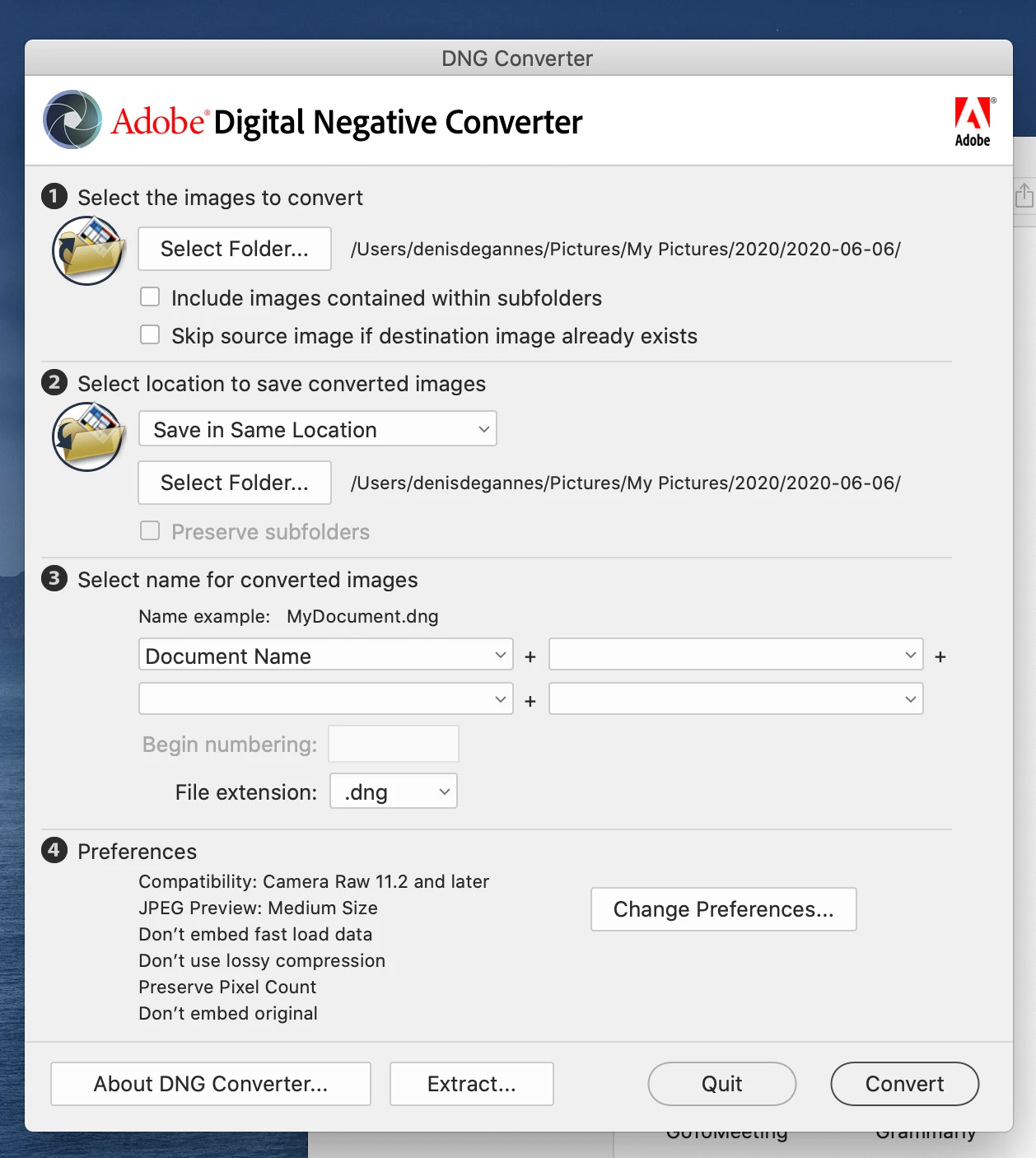
    Just a hint to check on when you are using the Adobe DNG Converter, in the popup dialog the option at the bottom "preferences" there is an option to select the Adobe Camera Raw compatibility. Lightroom 6 is compatible with Adobe Camera Raw 9. ; so you need to select an option that will allow LR 6 to read the DNG conversion.

    Converting your original raw files to DNG format is not some sort of magic solution. Please get informed before you choose this option, too often I see users advise "just convert to DNG and you will be fine".

    See the screen capture, it shows the current default. Choose your preferences wisely.


    3 replies

    Participant
    July 30, 2020

    hi ,aivng the same issues ,sort of and cant get an adobe tech suport .i installed the latest version of dng converter ,i have rwa file from my nikon,NEF 

    .my ituation is that no matter what i do the select folder wont accept the files,ive tried drag and drop ,ive tried TIFF ,Ive tried downloading directly from camera.No luck what so ever . I have a fuji camera as well with out ant luck on those raw files ,where do i start ?i am stuck with kodak capture nx-d and thats not light room....

    DdeGannes
    Community Expert
    DdeGannesCommunity ExpertCorrect answer
    Community Expert
    June 13, 2020

    Just a hint to check on when you are using the Adobe DNG Converter, in the popup dialog the option at the bottom "preferences" there is an option to select the Adobe Camera Raw compatibility. Lightroom 6 is compatible with Adobe Camera Raw 9. ; so you need to select an option that will allow LR 6 to read the DNG conversion.

    Converting your original raw files to DNG format is not some sort of magic solution. Please get informed before you choose this option, too often I see users advise "just convert to DNG and you will be fine".

    See the screen capture, it shows the current default. Choose your preferences wisely.


    Regards, Denis: iMac 27” mid-2015, macOS 11.7.10 Big Sur; 2TB SSD, 24 GB Ram, GPU 2 GB; LrC 12.5,; Lr 6.5, PS 24.7,; ACR 15.5,; (also Laptop Win 11, ver 24H2, LrC 15.0.1, PS 27.0; ) Camera Oly OM-D E-M1.
    J.T.SKAuthor
    Participant
    June 13, 2020

    Thank you very much. It seems to working. You saved my day. Thank you!

    GoldingD
    Legend
    June 13, 2020

    For clarity. Just launching Lightroom Classic, not trying to import, not doing anything other than starting Lightroom Classic.


    Does it start? Or does it try to start then disappears?


    J.T.SKAuthor
    Participant
    June 13, 2020

    Hi,


    Yeah, if Lr is starting normaly without DNG. Edting, evrything possible, no issues