
Inspiring
November 12, 2019
Answered

Lightroom 9.0 suggests keywords which are not in the keyword list

  • November 12, 2019
  • 5 replies
  • 708 views

Hello Community,


since the update to Version 9.0 LR keeps on suggesting Keywords which were entered once but removed from the list afterwards.

As I am no native speaker I added the screenshot below to make clear what I mean. I simulated that I tagged a photo of my friend Sabine errously with "Sabiene". After recognizing my "fault" I removed the keyword from that photo and hit "Purge Unused Keywords". That succesfully removed the keyword from the keyword list but not from the suggestions. At the time the screenshot below was made "Sabiene" wasn't in the keyword list anymore.
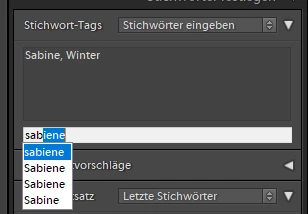
Deactivating "Offer suggestions from recently entered values" and "Clear all suggestions lists" don't have any influence on the behaviour. Also this problem seems to affect all of my catalogues. No matter if they  were updated from previous version or newly created ones. The only workaround I found until now is to delete the helper.db of the catalogue.

Any suggestions how to solve this issue?


BR

Chris

This topic has been closed for replies.
Correct answer Chris280

Thank you for your answers.


I wasn't aware of of the official feedback forum. However someone else posted the same issue a few hours ago there and it was confirmed as an known issue.

https://feedback.photoshop.com/photoshop_family/topics/deleting-a-keyword-from-the-keyword-list-doesnt-remove-it-from-auto-complete 


BR

Chris


5 replies

Chris280Author
Inspiring
November 13, 2019

I just did. Thank you for guiding me through this.


BR

Chris

johnrellis
Legend
November 13, 2019

Please add your constructive opinion to the bug report, and be sure to click Me Too and Follow in the upper-right corner. That will make it a little more likely that Adobe will prioritize a fix, and you'll be notified when the bug's status changes.

Chris280AuthorCorrect answer
Inspiring
November 13, 2019

Thank you for your answers.


I wasn't aware of of the official feedback forum. However someone else posted the same issue a few hours ago there and it was confirmed as an known issue.

https://feedback.photoshop.com/photoshop_family/topics/deleting-a-keyword-from-the-keyword-list-doesnt-remove-it-from-auto-complete 


BR

Chris


johnrellis
Legend
November 13, 2019

I don't have any other suggestions except to post a bug report in the official Adobe feedback forum, where Adobe wants all bug reports and feature suggestions: 

https://feedback.photoshop.com/photoshop_family/categories/photoshop_family_photoshop_lightroom .

Be sure to include the first ten lines of the menu command Help > System Info.  Provide all the details, rather than linking back to this thread -- experience shows that Adobe developers tend not follow the links.


[Use the reply button under the first post to ensure replies sort properly.]

cmgap
Community Expert
Community Expert
November 13, 2019

Have  you  tied to edit the mis-spelled keyword tag by right clicking on it? When you rename a keyword, it will be automatically updated on all of the photos it has been used on. This is under Keyword List