
allanh74012973
Participant
February 12, 2017
Question

Lightroom and Photoshop issue with Raw files from my D500

  • February 12, 2017
  • 2 replies
  • 2506 views

Since I bought my Nikon D500 earlier this year I have had an issue where about 5% of the files ended up looking like the screenshot below. A couple of months ago the exported jpegs had the issue. When I exported this raw file the jpeg was fine. The problem is apparrent on Lightroom and Photoshop CC 2017 on Windows and on my Mac . When I open the file. In Windows 10 "photos" app the problem is not shown, but in Apple's preview it is shown. The memory card is a Lexar XQD 2933x card. The D500 saves the raw files as 14 bit raw compressed lossless.
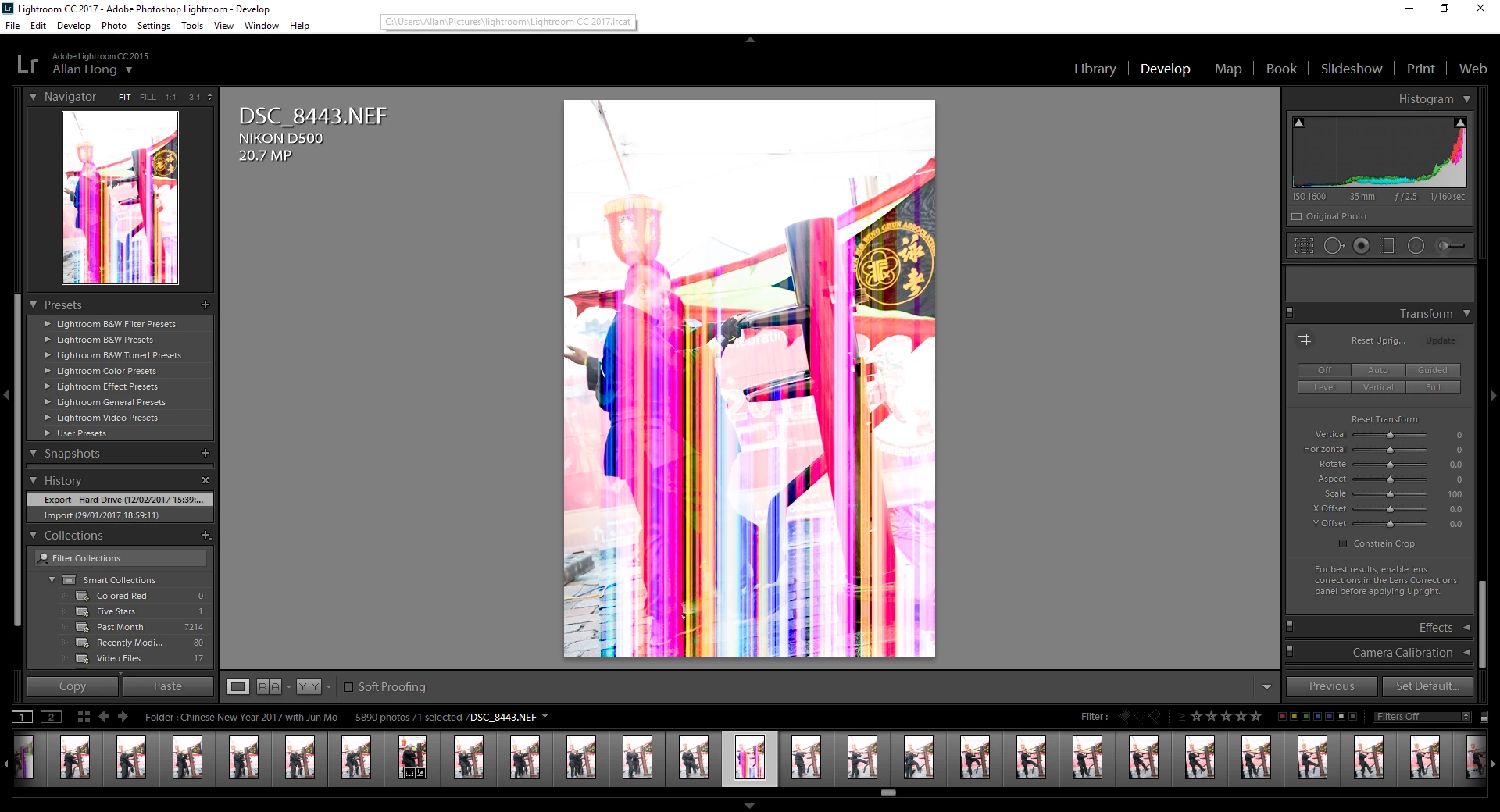
exported jpeg:

    This topic has been closed for replies.

    2 replies

    Community Expert
    February 12, 2017

    Apparently there was an issue with certain Lexar cards and the Nikon D500: Official Lexar Response on D500 | DSLRBodies | Thom Hogan . Make sure you have updated your camera's firmware. Might help: Nikon | Download center | D500 Firmware

    allanh74012973
    Participant
    February 12, 2017

    I saw that before but it relates to SD cards not XQD.

    update:

    I have updated the firmware to 1.11, the images direct from the memory card look fine.

    Community Expert
    February 12, 2017

    If the images look fine in camera from the memory card, it does not mean the raw file is fine. When you look at a raw image in camera (or in Nikon View), it show you the embedded jpeg file that every raw file has. It does not show you the actual raw data. When you open in Lightroom or in apps like Apple preview, it actually reads the raw data and renders that. So when the image looks corrupted in Apple preview, Lightroom or photoshop, but not in Nikon view or on camera it means the raw data got corrupted somewhere along the chain. This means the camera itself, the card, the USB cable (if used), or the card reader has a problem. Eliminating which one it is is then the problem. Test using a different card, a different USB cable and a different card reader. If none of those help, it is probably a problem with the camera.

    Lastly, make sure you NEVER use Nikon's software to transfer raw files. It is well known to corrupt Nef files if you are not using the very latest version. It turns files unreadable in anything but Nikon software.

    Just Shoot Me
    Legend
    February 12, 2017

    That is a corrupted file. It could be the camera, memory card, card reader you are using or even the cable connecting the card reader to the computer or cable if you connect the camera directrly to the computer that is causing the corruption. Try a different memory card first. Card reader second. New cable third or if you are connecting the camera directly to the computer try a card reader.

    If none of the above fixes the issue then the camera is at fault and will need to be fixed by the manufacturer.