Your external SSD will appear in Windows File Explorer with a drive letter- D, E, etc.
When you Import photos from your camera SD card, you set the Import option to [COPY] from the camera card, and in the Destination panel of the Import dialog you set the Destination of the files to be the external SSD.
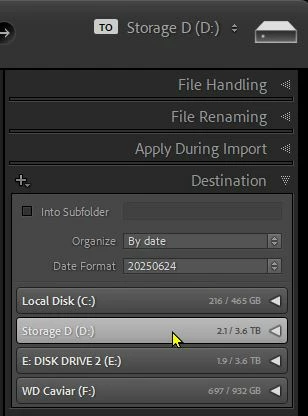
This is only about storing and referencing your photo files on the external SSD. The Catalog can remain on the internal drive.
With the external SSD plugged in you will have access to all photos in the library. If un-plugged you will see 'missing' photos. Some people work around this by creating Smart Previews with the internal catalog. (Smart Preview also occupy storage, but not as much as the original files.)
Be aware that windows allocates a drive letter in the order that externals are plugged in, so if you have multiple external devices you may also see 'Missing' photos. The way to prevent this is to name the SSD drive with a letter further along the alphabet eg. P or S.
Adobe Help Page- DRIVE RENAME
Microsoft Help page- DRIVE LETTER CHANGE RENAME | Microsoft Docs
Regards. My System: Windows-11, Lightroom-Classic 15.6, Photoshop 27.8, ACR 18.7, Lightroom 9.4, Lr-iOS 10.4.0, Bridge 16.0.3 .




 AdChoices