October 1, 2019
Question

Lightroom Camera Profile Matching for Canon RP

  • October 1, 2019
  • 11 replies
  • 10086 views

I have upgraded to lighroom 8.3.1 but I still found the Camera Profile (Portrait, Landscape, Standard) are showing missing.
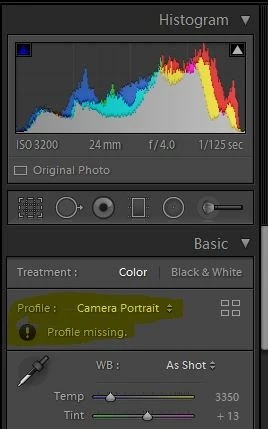
 

May I know this is my problem of version or this is adobe's issue?

This topic has been closed for replies.

11 replies

Todd Shaner
Legend
November 3, 2019

"is there any official mailbox to file the case to adobe?"
A request has already been entered at the Photoshop Family website at the link I provided. The more 'Me To' votes added there themore likely Adobe will provide camera matching profiles for the Canon EOS RP.

https://feedback.photoshop.com/photoshop_family/topics/lightroom-classic-camera-matching-profiles-canon-eos-rp

Todd Shaner
Legend
November 3, 2019

The Canon EOS RP uses the same sensor as the EOS 6D MKII. Someone has already converted the 6D MKII camera matching profiles at the below link so they can be used with the EOS RP. The results should be very similar to the Adobe created camera matching profiles, which remian to be created.....if ever?
https://www.dpreview.com/forums/thread/4418030

GoldingD
Legend
November 3, 2019

.

is there any official mailbox to file the case to adobe?

You can post your feature request over at:

https://feedback.photoshop.com/photoshop_family/categories/photoshop_family_photoshop_lightroom?topic-list[settings][type]=idea


November 3, 2019

is there any official mailbox to file the case to adobe?

Todd Shaner
Legend
November 3, 2019

Adobe apparently hasn't created the camera matching profiles for the Canon EOS RP. See this post:
https://community.adobe.com/t5/Lightroom-Classic/Is-Canon-EOS-RP-camera-matching-profile-coming/m-p/10504583#M148887

You can add your 'Me To' vote and comments at the below post:
https://feedback.photoshop.com/photoshop_family/topics/lightroom-classic-camera-matching-profiles-canon-eos-rp

November 3, 2019

so sad that the issue has been 9 months without hearing any update......

Just Shoot Me
Legend
November 3, 2019

For whatever reason LR Classic's RAW engine and the ACR system, which is what is used in LR Classic, does not have Camera Matching Profiles for the Canon RP camera. They are there for the Canon R camera but not for the RP which is newer. Maybe the next version of LR will included them, not sure, don't know.

GoldingD
Legend
October 30, 2019

Well, dirty word.


Went and downloaded a Canon RP RAW file. Brought it into my copy of Lightroom Classic. Thought I would provide some step by step examples with screenshots. But dang, no Camera Matching Profiles.


CLICK on the current Profile


Clcik on Browse


Thewn scroll down to Camera Matching. Opps, no Camera Matching


And looking for the profiles, on my PC, no joy.

Windows:  C;/ProgramData/Adobe/CameraRaw/CameraProfiles/Camera/


November 3, 2019


I have a canon rp raw file, but the path you mentioned is for importing a .dcp file. Where can I get a canon RP .dcp? 

GoldingD
Legend
October 30, 2019

See: https://loadedlandscapes.com/how-to-use-profiles-in-lightroom/


And are you refering to Camera Matching Profiles, discussed in the link, Item 2?


or  some third  party ones  you got off the internet?


October 30, 2019

yes, point 2, I am looking for the camera matching profile. i dont mind to input manually.

GoldingD
Legend
October 29, 2019

You do not import camera matching profiles. Camera matching profiles come with lightroom classic. Now you can import third party profiles that mimic in camera film simulations. Your screenshot looks like you are looking at the later. You should be able to browse and find a section called camera matching.


You can see some confusion. Camera Matching or third party?


October 30, 2019

i m already on 8.4.1 but is still the same, where can i download the official camera matching profile?

Just Shoot Me
Legend
October 29, 2019

Also update to 8.4.1.

GoldingD
Legend
October 1, 2019

Odd, would think that version would support that camera. This shows that it should:

https://helpx.adobe.com/camera-raw/kb/camera-raw-plug-supported-cameras.html


When you click on the misbehaving profile, and then select Browse, and navigate to Camera Matching, what do you see?


Not at a computer, stuck in a waiting room for auto service, so, I cannot share with you the folder path to inspect and/or diagnose, where the profiles are kept.


October 29, 2019

the 4 profiles are what I imported. But you can see the profile is missing

Just Shoot Me
Legend
October 29, 2019

What do you mean the Profile is missing. Are you saying the Camera Matching profiles are missing?