


Participating Frequently
April 9, 2025
Answered

Lightroom Catalog Backups

  • April 9, 2025
  • 5 replies
  • 1288 views

My catalog will not backup when I close out of Lightroom Classic. Below is te catalog settings and I have never seen the backup path as being marked *offline before.
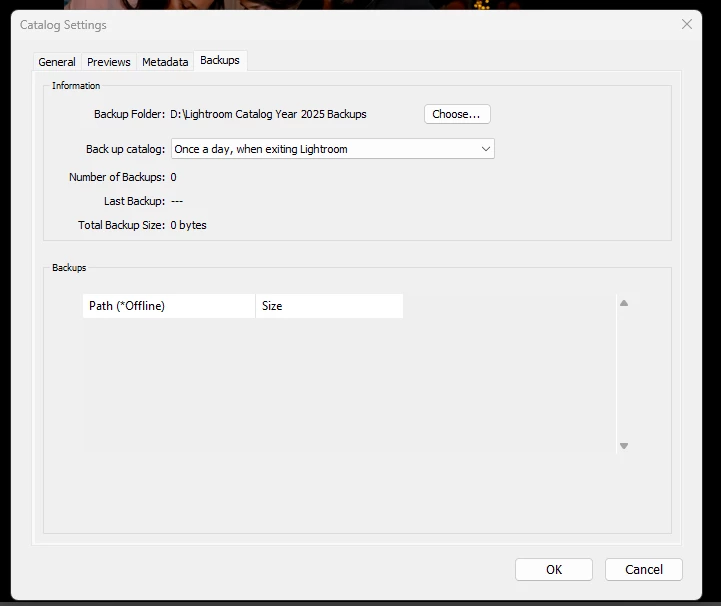
I originally had an alert at the bottom of the window stating that my backup path was on the same volume as my catalog. When I Googled and looked at some troubleshooting, all the solutions were telling me to direct my catalog backups to a different location storage location from where my actual catalog was being stored (e.g. instead of storing the backups on my C: Drive, I moved the location to my 😧 Drive). 

I do not get any sort of dialogue box that pops up when I close LRC, so I can't tick any boxes with regards to optimizing the catalog or testing the integrity of the catalog. 

I am using Version 14.2 on Windows 11. 

Correct answer jamesm25846476

OK. This is what happened.  After creating a new catalog and successfully able to back it up, I opened my LR catalog.  I checked the path and it was still correct.  Then I closed LR to restore its preferences, but upon closing the correct backup screen appeared.  The catalog was verified and saved.  It think opening a new catalog might have restored preferences.   In any case that is worked for me.  Hope it might help someone else having the same problem.

5 replies

jamesm25846476
jamesm25846476Correct answer
Participant
April 16, 2025

OK. This is what happened.  After creating a new catalog and successfully able to back it up, I opened my LR catalog.  I checked the path and it was still correct.  Then I closed LR to restore its preferences, but upon closing the correct backup screen appeared.  The catalog was verified and saved.  It think opening a new catalog might have restored preferences.   In any case that is worked for me.  Hope it might help someone else having the same problem.

Participating Frequently
August 6, 2025

I am having this issue. Just got a new computer and thought maybe it would go away, but it didn't.  My catalog and my images are both pointed to my Synology NAS.  I have not seen that back up screen for 6-9 months and I have reset preferences, made new catalogs, and nothing seems to fix this.  

jamesm25846476
Participant
April 16, 2025

I have the same problem.  I recently migrated from PC to MAC.  The catalog cannot be backed up.  I tried opening a new catalog and backed that up.  It did work.  So it seems this is a catalog problem.  


Should I just open a new catalog and transfer all info to that one?


Thanks.


jim

JohanElzenga
Community Expert
Community Expert
April 10, 2025

Your backup path isn't offline, that's not what this means. That header is a bit confusing. If you have created a number of backups, they'll be listed there. If the backups drive is offline, the list will show an asterisk behind the paths (image from https://www.lightroomqueen.com/whats-new-in-lightroom-2025-02/). That is what this header says. It has nothing to do with your problem, because your problem is that you cannot create backups. Try resetting the preferences, as @CMass suggests.


-- Johan W. Elzenga
CMass
Community Manager
Community Manager
April 9, 2025

Hey @Vincintron

Did this happen in any previous versions? Have you tried resenting preferences or moving the location back to your C: Drive to see if you get the prompt? 

How to reset preferences: https://adobe.ly/3RFOha6


^CM

Participating Frequently
April 14, 2025

Just reset my preferences and it didn't fix the issue. I've tried to change the backup folder a few different times and that didn't work either. I never had this issue until this version. 

JohanElzenga
Community Expert
Community Expert
April 14, 2025

Try if this is a catalog issue. Create a brand new catalog and see if Lightroom Classic will backup it. That will establish if this is a catalog issue or an application issue.


-- Johan W. Elzenga
Rob_Cullen
Community Expert
Community Expert
April 9, 2025

Is the D Drive connected and available to save the backup?


Regards. My System: Windows-11, Lightroom-Classic 15.1.1, Photoshop 27.3.1, ACR 18.1.1, Lightroom 9.0, Lr-iOS 10.4.0, Bridge 16.0.2 .