
Known Participant
April 3, 2025
Question

Lightroom Catalog Completely Broken After Moving to New Drive – No Folder Tree, No “Missing” ? Mark
  • April 3, 2025
  • 2 replies
  • 521 views


Hi everyone,
I really need help here. I recently moved all my files from my external 5TB drive (E:) to a new 8TB internal SSD (C:) that I just installed to replace the original 1TB drive in my laptop.

At first, when I opened Adobe Lightroom, things seemed fine. Some folders showed the "?" icon, but I was able to repoint them to the new location on the C: drive, and they appeared to work normally.

But then I made a huge mistake: I moved the folders that contained all of my Lightroom catalog files (including the .lrcat files) to the C: drive as well. After that, everything disappeared. When I open any of my catalog files now:

  • There’s no folder tree on the left panel.

  • No thumbnails or previews.

  • No “?” icons, so I can’t even repoint missing files.

  • It’s like the catalog is completely empty, even though the .lrcat files still have size and aren’t corrupted (as far as I can tell).

I even tried copying the catalog folders back to the E: drive where they originally were, but the same issue persists.

I’ve scoured the internet and haven’t found anyone with this exact problem. I’m considering reinstalling Lightroom (13.3.1), but I doubt that would solve it.

Any ideas or suggestions would be greatly appreciated. This is years of work and organization at stake.

Thank you so much.

2 replies

dj_paige
Legend
April 3, 2025

But then I made a huge mistake: I moved the folders that contained all of my Lightroom catalog files (including the .lrcat files) to the C: drive as well. After that, everything disappeared. When I open any of my catalog files now:

  • There’s no folder tree on the left panel.

  • No thumbnails or previews.

  • No “?” icons, so I can’t even repoint missing files.

  • It’s like the catalog is completely empty, even though the .lrcat files still have size and aren’t corrupted (as far as I can tell).


Moving the folders that catalogs are stored in should not cause this to happen. 


How do you open catalogs after this move? Please be specific and detailed.


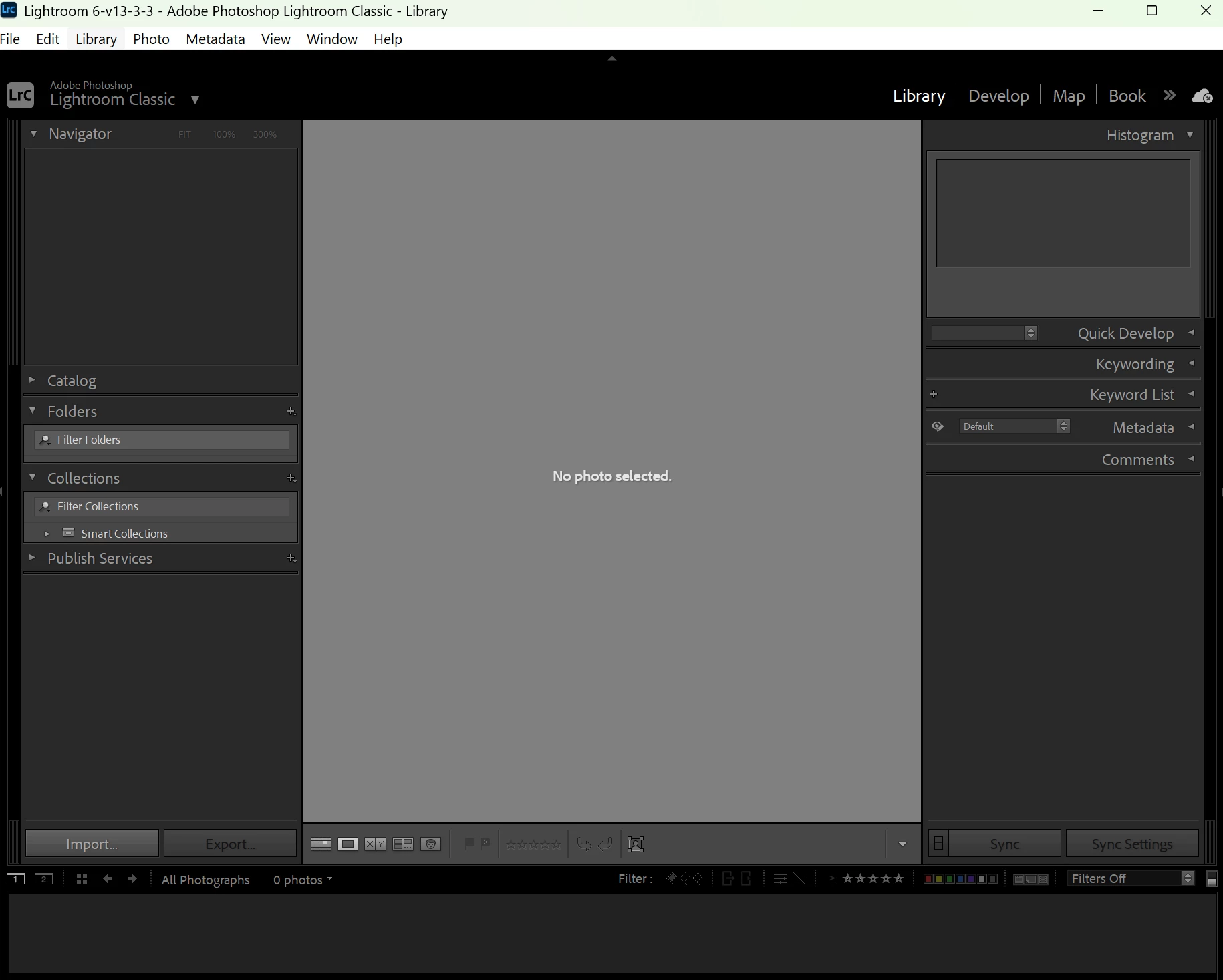
Show us a screen capture of the entire Library module screen that displays this problem. Please use the "Insert Photos" icon; do NOT attach files.

Known Participant
April 3, 2025

Lightroom 6 is my most recent catalogue. I had 6 versions over 20 years or so.
I think what I happened was that I lost the edited catalogue Lightroom 6-v13 as you can see from the screenshot, all the files are 1.6-1.7mb, which is too small from catalogue files, I believe.
I am running disk drill, its 1% done but at first glance, I don't see a Lightroom 6 LRCAT file that is big enough.


To answer your question, I captured the library module..
Don't see insert photo but you can see on the left, its not recognizing that it is missing photos, which makes me think that I am on the wrong catalogue files and I have no idea where else it'd be. It should be in this catalogue 6 folder.


Sameer K
Community Manager
Community Manager
April 3, 2025

Hey, @Sunny_visionary0730. Welcome to the Lightroom Classic Community. I'll help you figure this out, and it might be simpler than you'd expect. 


The screenshot shows a catalog that is just empty and in reality, Lightroom may have lost track of the specific catalog you were working on.


First, move the catalog to where you want it to be and then to the C drive. Once you've moved the catalog, double-click on the .lrcat file directly to launch Lightroom instead of any other icon or launcher on your computer.


You can list all the catalogs on your computer using Windows search. Type in .lrcat and arrange the results by modified date to find the recent catalog you worked on and differentiate between your primary catalog. 


Let me know if this helps.

Sameer K

(Type '@' and type my name to mention me when you reply)

Known Participant
April 3, 2025

Thank you Sameer.
I have an update: I actually was open the other .lrcat files from years ago now. 
However, the most recent one cannot be opened. I think it might be lost??
If you look at these .lrcat files, I think they were all generated this morning but they are just copies/updated catalogues of an empty one right? (the empty one is one that's only 1.6mb big and I should expect the real .lrcat files to be much larger)
The real one is much larger right?

The backfolder opened.. I am suspecting that there the real one got deleted. Now performing windows search.