
Participant
February 12, 2025
Question

Lightroom catalog not working?
  • February 12, 2025
  • 1 reply
  • 191 views


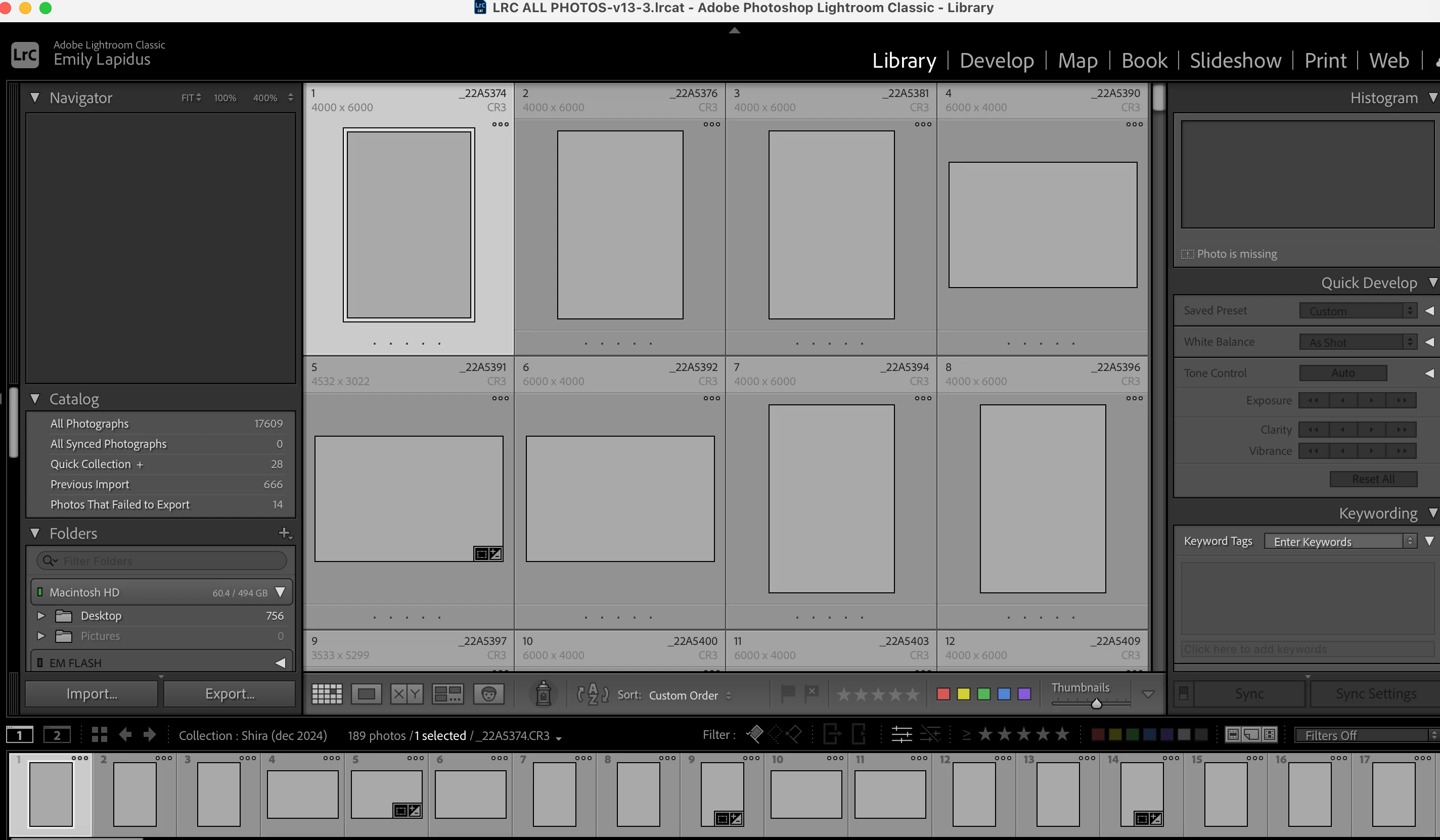
My Lightroom Classic updated to the new 14.1.1 (on a Mac), and when I just opened it it asked to upgrade my catalog to match the update I assume. Now my Lightroom is not working correctly (refer to photo). I have reopened this a bunch of times and nothing has changed. When I hover over photos, it seems to have the camera data such as aperture the photo was shot at, so there should be all the data in there, just none of the previews or actual photos are loading. I cannot edit, access, or see any of my photos. It also would not let me import any new photos. PLEASE HELP! 


[Moved from ‘Bugs’ to ‘Discussions’ by moderator, according to forum rules.]

1 reply

Sameer K
Community Manager
Community Manager
February 12, 2025

Hey, @EmilyLapPhoto. Welcome to the Lightroom Community. I'll need more information. Please share the system information from Lightroom Help > System info > Copy and paste into a text document > Upload and attach here.


As you've updated Lightroom Classic from an older catalog, it may be pointing at the missing images. Please head here to learn more if the images are, indeed, missing: https://adobe.ly/4dHklng


Let me know how it goes.
Thanks!

Sameer K

(Type '@' and type my name to mention me when you reply)

Participant
February 12, 2025

Hi! I tried going to a bakcup of my catalog to open that and have it re-upgrade it and it still has blank files. It seems to have the data of them, but no previews or images to edit. 


Here is my system info:

Lightroom Classic version: 14.1.1 [ 202412150940-551fb044 ]
License: Creative Cloud
Language setting: en-US
Operating system: Mac OS 15
Version: 15.1.0 [24B83]
Application architecture: arm64
Logical processor count: 8
Processor speed: NA
SqLite Version: 3.36.0
Power Source: Plugged In, 88%, Charging
Built-in memory: 16,384.0 MB
Dedicated GPU memory used by Lightroom: 127.4MB / 10,922.6MB (1%)
Real memory available to Lightroom: 16,384.0 MB
Real memory used by Lightroom: 635.5 MB (3.8%)
Virtual memory used by Lightroom: 405,396.4 MB
Memory cache size: 0.0MB
Internal Camera Raw version: 17.1 [ 2098 ]
Maximum thread count used by Camera Raw: 5
Camera Raw SIMD optimization: SSE2
Camera Raw virtual memory: 0MB / 8191MB (0%)
Camera Raw real memory: 2MB / 16384MB (0%)

Cache1:
NT- RAM:0.0MB, VRAM:0.0MB, Combined:0.0MB

Cache2:
m:0.0MB, n:0.0MB

U-main: 104.0MB

Standard Preview Size: 2940 pixels
Displays: 1) 2940x1912

Graphics Processor Info:
Metal: Apple M2
Init State: GPU for Display supported by default
User Preference: Auto
Enable HDR in Library: OFF

Application folder: /Applications/Adobe Lightroom Classic
Library Path: /Users/emilylapidus/Desktop/LRC ALL PHOTOS/Backups/2025-01-16 2038/LRC ALL PHOTOS-v13-3/LRC ALL PHOTOS-v13-3.lrcat
Settings Folder: /Users/emilylapidus/Library/Application Support/Adobe/Lightroom

Installed Plugins:
1) AdobeStock
2) Aperture/iPhoto Importer Plug-in
3) Flickr

Config.lua flags:


Participant
February 12, 2025