

crusnak
Participant
May 20, 2026
Question

Lightroom catalogs can't be accessed

  • May 20, 2026
  • 2 replies
  • 44 views

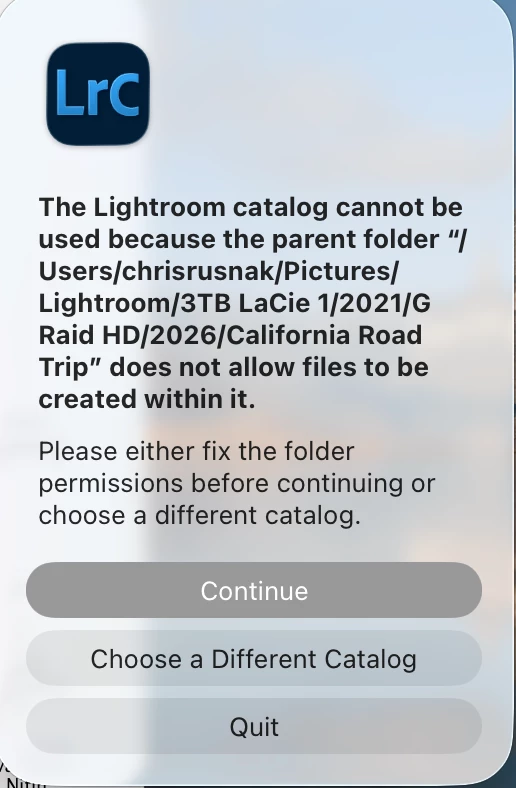
 I am having trouble accessing about five years worth of digital catalog photographs through Adobe Lightroom. My problem started I think when either my macOS system software updated or adobe Lightroom updated its software.  Originally, I couldn’t find these photos anywhere on my hard drive so I had to retrieve them through Time Machine on my Mac. Once I located these catalogues I copied them over from Time Machine. I am unable to open them through Lightroom. I keep getting this warning.  Can you help me with the ability to open my Lightroom photo catalogs again?    And what does it mean when the LrC warning says “does not allow files to be created within it.”?


    2 replies

    dj_paige
    Legend
    May 21, 2026

    Additional thought: does this folder mentioned in the error message actually exist? It would be odd (at least in my opinion) to have a folder under /Users actually have 3TB Lacie 1 and G Raid HD in the folder name.

    crusnak
    crusnakAuthor
    Participant
    May 21, 2026

    I know this is an odd path to have but it was by mistake. But it has been working in the past and I was planning on reorganizing all these folders.

    Chris Rusnak
    dj_paige
    Legend
    May 21, 2026

    Did you check the permissions on that folder? What did you find? You must have write permission to create files inside that folder.


    Can you try moving the catalog file to somewhere else to see if it will open?

    crusnak
    crusnakAuthor
    Participant
    May 21, 2026

    Yes, it exists and I’ve copied to new places and moved and the main folder of catalogues or any of the individual folders within it it as well. I still get the same results.

    When I found the 215G folder on Time machine I copied to my harddrive and move it back to where I had it before.

    Good questions BTW.

    Chris Rusnak
    dj_paige
    Legend
    May 21, 2026

    Yes, it exists and I’ve copied to new places and moved and the main folder of catalogues or any of the individual folders within it it as well. I still get the same results.


    But did you check the permissions on that folder or the moved folder? What were they?