
Participant
January 5, 2020
Answered

Lightroom CC classic: how to change Keywords ? ( in selected pix module Library)

  • January 5, 2020
  • 2 replies
  • 637 views

Having moved my entier catalog from LR 6.14 to LR CC classic, I tried to change and adapt keywords in selected pictures.

I have found no possibility to change the keyword as it was in LR 6.14.

Normally I was able to do this in teh Metadata window where the Keword was shown. Now I do not find the Keywork entry on the screen:
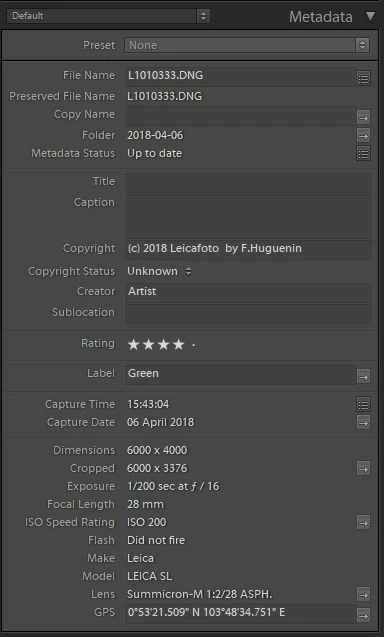
 

Do anyone know how to change the Keyword of the pictures. I tried hard looking into infos in the help function but was not able to find anay answer.

Your help is very much appreciated.

This topic has been closed for replies.
Correct answer dj_paige

There's both a Keywording panel and a Keyword List panel that you should be using, just as there was in all previous versions of Lightroom. If you don't see them, go the the menu command Window->Panel and select them from there.

2 replies

dj_paige
dj_paigeCorrect answer
Legend
January 5, 2020

There's both a Keywording panel and a Keyword List panel that you should be using, just as there was in all previous versions of Lightroom. If you don't see them, go the the menu command Window->Panel and select them from there.

john beardsworth
Community Expert
Community Expert
January 5, 2020

It's exactly the same as it's always been.

How exactly are you trying to apply keywords? In the Keywording panel, maybe it's set to Will Export? Or maybe you have hidden the two keywording panels - right click the top of the Metadata panel and see if they are unticked.