Participating Frequently
April 6, 2017
Answered

Lightroom cc & GPS

  • April 6, 2017
  • 2 replies
  • 1435 views

I use a Canon EOS 6D which has a built-in GPS and as of about a month ago none of my pictures are importing with the GPS coordinates into LR cc. I have tested my camera it appears fine, I can see the GPS info with the image in my camera but when I import them they are not coming into LR. I am using LR cc and PS cc and it is kept current. I have checked my import presets and they do show that the GPS is checked in the metadata for imports. I must have inadvertently turned something off.  Can you help?

Dave
Twin Falls, ID
This topic has been closed for replies.
Correct answer johnrellis

I have checked my import presets and they do show that the GPS is checked in the metadata for imports. I must have inadvertently turned something off. 

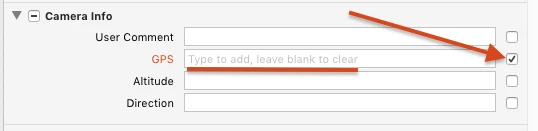
That sounds like the problem.  If any field (including the GPS field) in an import preset is checked, that means the value in the preset replaces the value coming from the camera.  E.g. if your preset looks like:

then the GPS field will get cleared in imported photos.

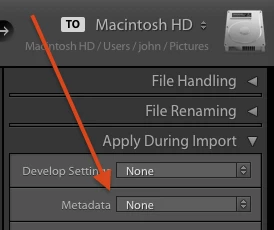
The quickest way to troubleshoot this is to set Apply During Import > Metadata to none and do a test import of a fresh pic:

2 replies

johnrellis
johnrellisCorrect answer
Legend
April 6, 2017

I have checked my import presets and they do show that the GPS is checked in the metadata for imports. I must have inadvertently turned something off. 

That sounds like the problem.  If any field (including the GPS field) in an import preset is checked, that means the value in the preset replaces the value coming from the camera.  E.g. if your preset looks like:

then the GPS field will get cleared in imported photos.

The quickest way to troubleshoot this is to set Apply During Import > Metadata to none and do a test import of a fresh pic:

d.jewellAuthor
Participating Frequently
April 6, 2017

Thanks, don't know why i changed it and also just learned how the check marks work. I've never even thought about that part of LR and tended to busy myself with Photo editing and general work flow. Thanks again.

kglad
Community Expert
Community Expert
April 6, 2017
d.jewellAuthor
Participating Frequently
April 6, 2017

What are you telling me? How does switching to another App solve the problem. I would think someone at Lightroom cc should know there's a problem or at least show me what I am doing wrong. I lived without GPS prior to Lightroom cc so I guess I'll  wait to see other answers.

Thanks