
Participant
January 4, 2017
Answered

Lightroom CC importing very slow

  • January 4, 2017
  • 1 reply
  • 1137 views

I just switched from Lightroom 5 to CC, and importing photos is going very slow. One major issue I am having is my PC shuts down after importing 100 or so photos.

I am using a USB 3.0 card reader, and I have 3 SSD's in my PC, no spinning disks, I have an AMD 8 core CPU, running 64 bit Windows 10, and 16GB ram.

During my investigation, I found that I have unusually high network traffic while Lightroom is importing photos.  As you can see from the image below the traffic peaks for every image imported.  Does Lightroom send everyone of my photos to the cloud as it imports it???  Is this a default?  Because I haven't changed any settings.  As you can also see, disk 2 (H:) is where I am importing the photos to, and the traffic there is almost zero!
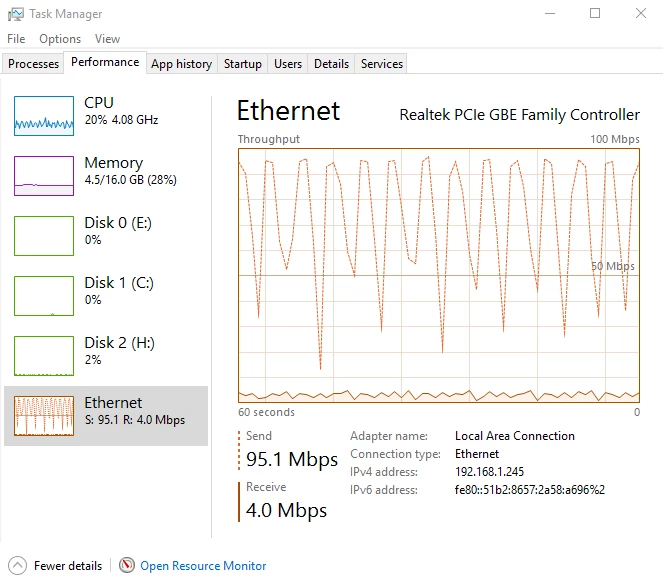
While typing this, it finished the rest of the imports, minus the 4K videos I chose not to import at this time due to the painful speed.  I have searched and can't find any reason for this constant upload happening.  Thanks for any help.

    This topic has been closed for replies.
    Correct answer dj_paige

    One major issue I am having is my PC shuts down after importing 100 or so photos.

    This is a hardware malfunction or bad/corrupt video driver causing the computer to shut down. Since you are performing CPU intensive actions during import (generating previews for many files), one likely cause is that a fan in your computer has malfunctioned causing the computer to overheat and shut itself down (but of course there could be other hardware causes). Also re-install the latest version of your GPU's video driver.

    1 reply

    Mohit Goyal
    Community Manager
    Community Manager
    January 4, 2017

    Hi skydivewags,

    Lightroom only import the previews for the images you choose to import and there's no cloud involve in this function.

    You can turn off the graphics process from the Lightroom and preferences and check if that helps.

    Open Lightroom > Edit > Preferences > Performance > Uncheck the GPU > Restart.

    Regards,

    Mohit

    Participant
    January 6, 2017

    I am importing from my CF card, so.....  it must be importing the full image, at least copying it to my HD, and my...... oh, that's the network traffic, my networked server where the backup goes.  I'm a dummy!

    I was thinking the network traffic was going to the internet, not so.

    It still seems slow, and I don't get why it would shut my system down.  I'll try what you suggested, but wouldn't that slow things down?

    Thanks,

    Mark

    dj_paige
    dj_paigeCorrect answer
    Legend
    January 6, 2017

    One major issue I am having is my PC shuts down after importing 100 or so photos.

    This is a hardware malfunction or bad/corrupt video driver causing the computer to shut down. Since you are performing CPU intensive actions during import (generating previews for many files), one likely cause is that a fan in your computer has malfunctioned causing the computer to overheat and shut itself down (but of course there could be other hardware causes). Also re-install the latest version of your GPU's video driver.