
Participating Frequently
January 14, 2017
Answered

Lightroom CC message "no photos match filter"

  • January 14, 2017
  • 3 replies
  • 4351 views

Currently have an issue with my 2016 catalog. I am running Lightroom CC on my MacBook Pro. Here are a few pieces of information to provide my current situation:

1.  Last week my 2016 catalog worked fine and was able to see all photos.

2.  Yesterday my 2016 catalog can only see one of my many folders.

3.  When I choose any of the other folders the message "no photos match this filter" message.

4.  All the photos are still in the proper locations and can be seen as the gray-out file if you want to try import. I mention this only so that I confirmed that Lightroom does see the photos.

5.  My Lightroom catalogs are set up by year.

6.  All other catalogs are working fine with no issues.

7.  I did go through all the filter selections to be sure all of them were turned off.

8.  I was in the process of finishing some client photos from late 2016 and now I have this issue which is not allowing me to get access to the folders I need.

I would greatly appreciate any prompt feedback. As a photographer, I have certain time which I can work in Lightroom when I am not shooting. So this is a very critical issue that I need some help on. I noticed that Adobe does not have support service on the weekends.

Kind Regards,

Noah
    This topic has been closed for replies.
    Correct answer Just Shoot Me

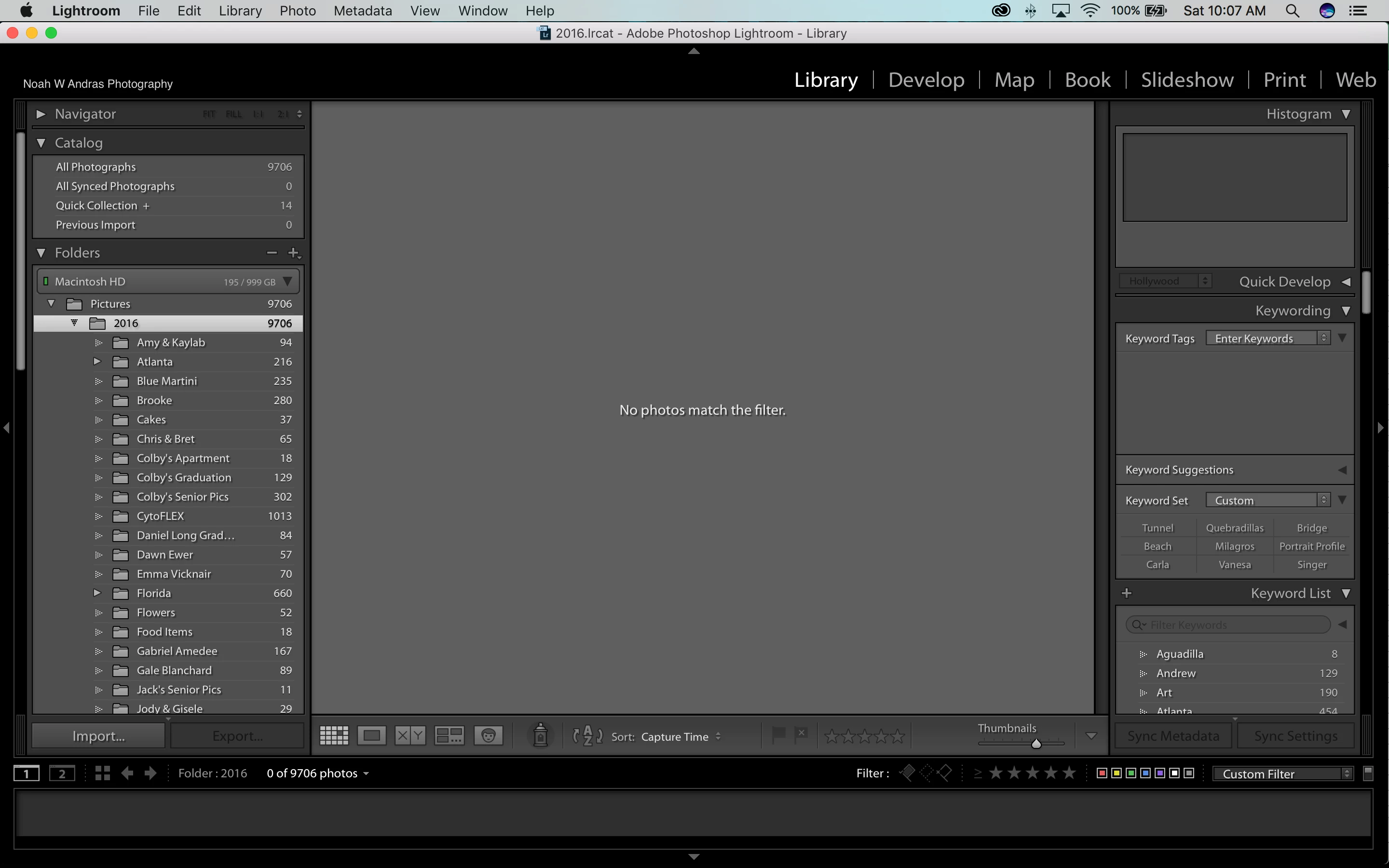
    As requested...here is a screen shot

    Noah


    In the Tool Bar, bottom right you have Custom Filter enabled. Turn it OFF.


    3 replies

    Participant
    June 29, 2022

    Thank you. I just open lightroom and couldn't see my pictures. this solved it and saved some extreme stress. 


    Just Shoot Me
    Legend
    January 14, 2017

    As stated above you have a Filter set that doesn't show all your images. Turn off that filter.

    Participating Frequently
    January 14, 2017

    Thanks for your response Just Shoot Me....however there are no filters tagged...ALL filters are off. The strange thing is that all my other catalogs are working fine with the filters off.

    Noah

    Just Shoot Me
    Legend
    January 14, 2017

    Are you in a collection?

    Please post a screen shot of the LR program showing the full interface.

    dj_paige
    Legend
    January 14, 2017

    Turn off Filters using Ctrl-L

    Participating Frequently
    January 14, 2017

    Thanks for your quick response dj_paige....however after confirming there are no filters...there is still no photos to be viewed...I still get the same message.

    Noah