
AndyEllen
Inspiring
January 31, 2018
Answered

Lightroom CC not filtering on some keywords

  • January 31, 2018
  • 1 reply
  • 1239 views

My problem...I select a keyword in Lightroom CC, and although there are 152 people keywords assigned, the view shows me none.

All photos were selected, no additional filters show.  Clicking on other keywords in the list shows proper results.  I am on Release 7.0.1, Windows 7.  I have attached an image which shows my problem.  "Maryanne" is clearly selected, All Photographs are selected, and no other filters are in place
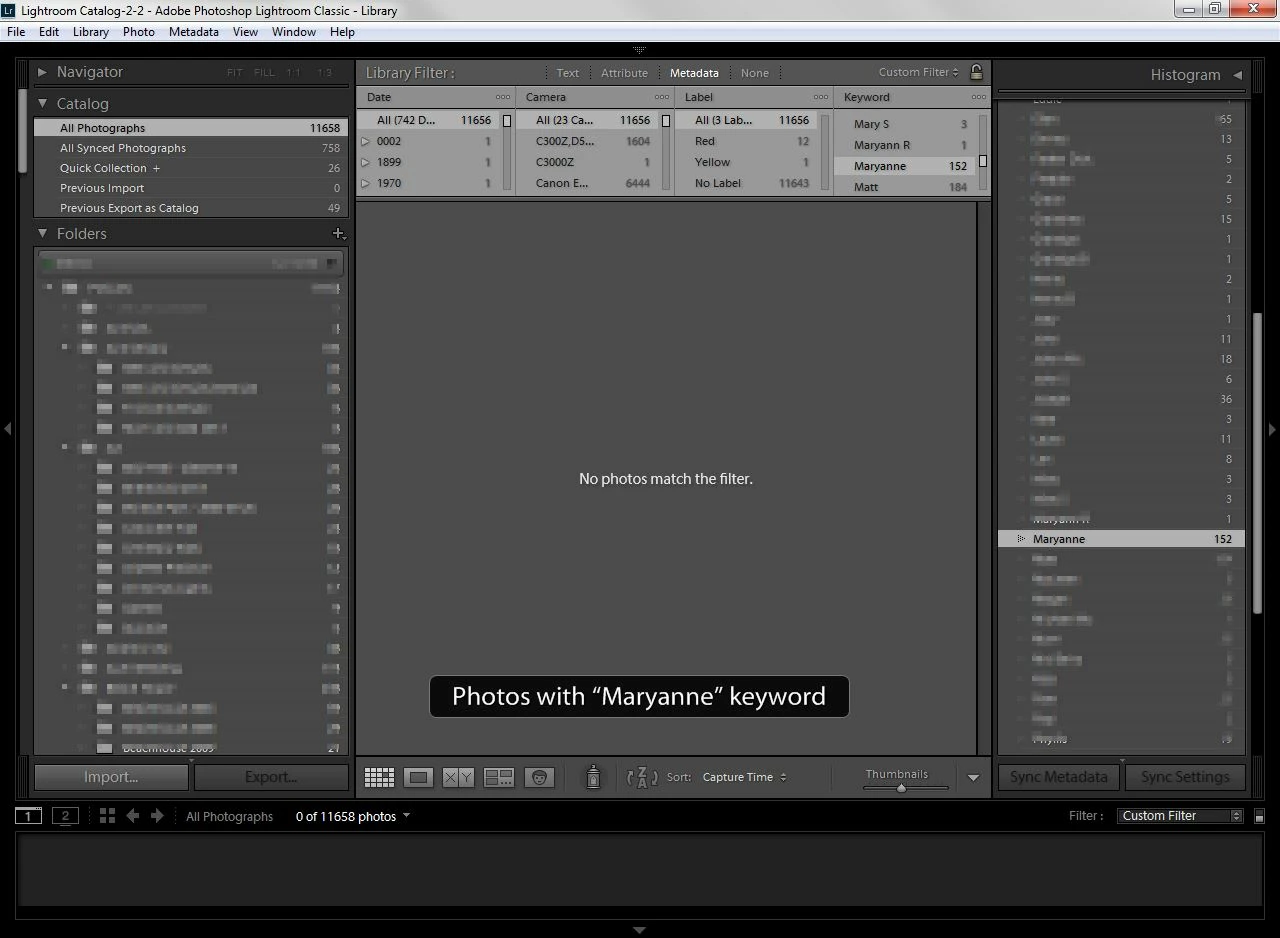
I appreciate any help.

Thanks, Andy

This topic has been closed for replies.
Correct answer AndyEllen

Hi again, John.  I started thinking of what could be unique about those who did not show.  I came up with the fact that I manually added a People keyword without drawing a box around a face.  I thought if the face was incomprehensible, I did not want to mess up Adobe's face AI. 

I reviewed Maryanne, and removed the non-face delineated people keywords.

Not exactly sure if that was the cause, but it seemed to work.  Thanks for the advice.

Andy

1 reply

johnrellis
Legend
January 31, 2018

I've observed the Metadata browser getting confused a few times over the years. I think you LR Metadata browser may be slightly wedged:

Those three dots initially appear when you open the Metadata browser, but they should immediately be replaced with this:

Try these steps in this order:

- Reboot your computer. That can often fix weirdness in the LR user interface.

- Reset LR's preferences and then reboot: https://www.lightroomqueen.com/articles-page/how-do-i-reset-lightrooms-preferences/ . Unfortunately, this too often fixes things when LR goes wonky.

- Click on Custom Filter in the upper-right corner and select Restore Default Presets. This will restore the definition of the built-in presets (without affecting any custom presets you've defined).  Even though you're not using a built-in preset apparently, my experience is that this can cure strange behavior.

- Try deleting all the columns except the Keyword column. Click on that three-line menu in the upper-right of the column (see above) and then click Remote This Column.

AndyEllen
AndyEllenAuthor
Inspiring
January 31, 2018

I appreciate the nicely detailed answer, John.  Unfortunately I still have the issue after trying:

  1. Simple reboot
  2. Reset Preferences (alt-shift-open Lightroom)
  3. Restore Default Presets
  4. Deleting all columns (first, leaving just keyword, then deleting all but a "none" column, and then adding Keyword and deleting "none"

I can get to the pictures using Text filtering, but I also get others that have Maryanne in a different form.  Is there something else I can try?

Thanks, Andy

AndyEllen
AndyEllenAuthorCorrect answer
Inspiring
January 31, 2018

Hi again, John.  I started thinking of what could be unique about those who did not show.  I came up with the fact that I manually added a People keyword without drawing a box around a face.  I thought if the face was incomprehensible, I did not want to mess up Adobe's face AI. 

I reviewed Maryanne, and removed the non-face delineated people keywords.

Not exactly sure if that was the cause, but it seemed to work.  Thanks for the advice.

Andy